Vertrauenswürdige Software

Outbyte Driver Updater
- 1.000.000+ Treiber
- Herunterladen: 1,143,473 times
- Windows 11 / 10 / 8 / 7




 Herunterladen
EMU20k1 Sound Blaster X-Fi Series
Herunterladen
EMU20k1 Sound Blaster X-Fi Series
Herunterladen
EMU20k1 Sound Blaster X-Fi Series

Systeminformationen
Ihr PC läuft derzeit mit:
Driver details
Driver Name:
EMU20k1 Sound Blaster X-Fi Series
Provider:
Creative
Version:
5.12.8.1201
Release Date:
6/18/2007
Architecture:
AMD64 , X86
File Size:
10.9 MB
Driver ID:
pci\ven_1102&dev_0005&subsys_00231102
Supported OS:
Windows XP
WHQL:
Signed
Sonderangebot
Herunterladen
Alle Links wurden mit einem Antivirenprogramm gescannt.
Manual download (.cab, 10.9 MB) from Microsoft servers
— install via Device Manager.
Compatible hardware
- EMU20k1 [Sound Blaster X-Fi Series] (Creative Labs)
Supported Hardware IDs
pci\ven_1102&dev_0005&subsys_00201102
pci\ven_1102&dev_0005&subsys_00211102
pci\ven_1102&dev_0005&subsys_00221102
pci\ven_1102&dev_0005&subsys_00231102
pci\ven_1102&dev_0005&subsys_00241102
pci\ven_1102&dev_0005&subsys_00251102
pci\ven_1102&dev_0005&subsys_00261102
pci\ven_1102&dev_0005&subsys_00271102
pci\ven_1102&dev_0005&subsys_00281102
pci\ven_1102&dev_0005&subsys_00291102
Show all 20 hardware IDs
pci\ven_1102&dev_0005&subsys_002a1102
pci\ven_1102&dev_0005&subsys_002c1102
pci\ven_1102&dev_0005&subsys_002d1102
pci\ven_1102&dev_0005&subsys_002e1102
pci\ven_1102&dev_0005&subsys_002f1102
pci\ven_1102&dev_0005&subsys_00311102
pci\ven_1102&dev_0005&subsys_00321102
pci\ven_1102&dev_0005&subsys_00331102
pci\ven_1102&dev_0005&subsys_10031102
pci\ven_1102&dev_0005&subsys_60021102
Match against Device Manager → Details → Hardware Ids to confirm this driver fits your device.
File details
File name:
20060955_7371869ff22311261a1710b5c00f267e1edb6fe8.cab
File size:
11392691 bytes (10.8 MB)
Signed / DriverVer:
06/18/2007, 5.12.08.1201
Provider (INF):
Creative
SHA-256:
84ffaf26a9bb93ae8024c5a5509c28d3a6aae61f85f320196630bcb3d760bf0f
To verify: open PowerShell and run Get-FileHash <filename.cab>
What's inside the package (183 files)
ctzapxx.ini 54 B
instwdm.ini 63.6 KB
wdma_emu.inf 33.1 KB
wdmemu32.cat 48.3 KB
wdmemu64.cat 59.5 KB
SBXFi.ico 766 B
XFi.bmp 3.0 KB
ctbas2w.dat 146.3 KB
ctbasicw.dat 112.2 KB
ctdaught.dat 52.6 KB
ctdlang.dat 318.1 KB
ctdnlstr.dat 45.1 KB
ctsbas2w.dat 268.1 KB
ctsbasw.dat 234.9 KB
ctstatic.dat 305.8 KB
CtCoInst.dll 84.0 KB
CtDvInst.dll 159.5 KB
PfModNT.sys 15.8 KB
ctac32k.sys 499.3 KB
ctaud2k.sys 502.5 KB
ctoss2k.sys 125.3 KB
ctprxy2k.sys 14.3 KB
ctsfm2k.sys 153.3 KB
emupia2k.sys 88.8 KB
ha20x2k.sys 1.1 MB
ctd20x.dat 27.2 KB
ctp0460w.dat 257.8 KB
ctp0462w.dat 257.8 KB
ctp0463w.dat 258.1 KB
ctp0464w.dat 257.8 KB
ctp0465w.dat 257.8 KB
ctp0466w.dat 257.8 KB
ctp0468w.dat 257.8 KB
ctp0469w.dat 257.8 KB
ctp046Aw.dat 257.8 KB
ctp046Bw.dat 257.8 KB
ctp046Cw.dat 257.8 KB
ctp0550w.dat 258.1 KB
ctp055Aw.dat 258.1 KB
ctp0678w.dat 337.9 KB
ctp0679w.dat 337.9 KB
ctp0730w.dat 259.4 KB
ctp073Aw.dat 259.4 KB
ctp0760w.dat 257.6 KB
ctp0773w.dat 257.2 KB
ctp0930w.dat 257.2 KB
cts20x.dat 2.0 KB
ctxficbm.rfx 7.1 KB
ctxficm.rfx 40.6 KB
ctxfiem.rfx 40.8 KB
ctxfigm.rfx 40.3 KB
CtCoInst.dll 72.0 KB
CtDvInst.dll 189.5 KB
PfModNT.sys 16.3 KB
ctac32k.sys 567.3 KB
ctaud2k.sys 833.7 KB
ctoss2k.sys 212.8 KB
ctprxy2k.sys 16.8 KB
ctsfm2k.sys 283.3 KB
emupia2k.sys 141.3 KB
ha20x2k.sys 1.9 MB
CtxfiRes.dll 3.0 KB
ctdcres.dll 10.0 KB
ctpres.dll 9.0 KB
inres.dll 11.5 KB
CtxfiRes.dll 3.5 KB
ctdcres.dll 10.0 KB
ctpres.dll 9.5 KB
inres.dll 12.0 KB
CT1MGM.ROM 1.0 MB
CT2MGM.SF2 2.0 MB
CTDV10K1.CDF 3.2 MB
CTDV10K2.CDF 3.5 MB
CTDVAUDY.CDF 4.7 MB
XFi_CRCF.ini 666 B
ctdaught.dat 52.6 KB
ctdlang.dat 318.1 KB
ctdnlstr.dat 45.1 KB
ctstatic.dat 305.8 KB
default.sfm 59 B
default4.sfm 59 B
default8.sfm 59 B
kill.ini 269 B
A3D.dll 34.0 KB
CT20XUT.dll 163.8 KB
CTBurst.DLL 42.5 KB
CTEMUPIA.dll 107.5 KB
CTEXFIFX.dll 1.2 MB
CTHWIUT.dll 67.8 KB
CTpcmcia.dll 54.0 KB
CTxfiBtn.dll 41.5 KB
CTxfiReg.exe 43.0 KB
CTxfiSpi.exe 822.5 KB
CiSetup.dll 54.5 KB
CtCtlPan.cpl 17.0 KB
CtHelper.exe 19.0 KB
CtPanel.exe 149.5 KB
CtxfiSpk.dll 49.0 KB
Ctxfihlp.exe 20.0 KB
Ctxfispi.dll 56.0 KB
EAXAC3.DLL 76.0 KB
OALInst.exe 764.0 KB
ReadReg.exe 37.5 KB
ac3api.dll 27.0 KB
commonfx.dll 93.3 KB
crlds3d.dll 748.0 KB
ct_oal.dll 200.0 KB
ctagent.dll 8.5 KB
ctasio.dll 78.0 KB
ctaudfx.dll 533.8 KB
ctdc0000.dll 223.0 KB
ctdc0001.dll 324.0 KB
ctdcifce.dll 128.0 KB
ctdproxy.dll 75.0 KB
cteapsfx.dll 164.8 KB
ctedasio.dll 49.0 KB
ctedspfx.dll 271.8 KB
ctedspio.dll 129.8 KB
ctedspsy.dll 318.3 KB
ctmmep.dll 12.5 KB
ctosuser.dll 134.0 KB
ctsblfx.dll 544.8 KB
ctscal.dll 76.5 KB
ctspkhlp.dll 51.0 KB
ctthxcal.dll 68.0 KB
devreg.dll 47.5 KB
enlocstr.exe 5.0 KB
killapps.exe 10.0 KB
mididef.exe 28.0 KB
piaproxy.dll 80.0 KB
psconv.exe 37.0 KB
regplib.exe 34.5 KB
sfman32.dll 22.0 KB
sfms32.dll 127.0 KB
ctasio.dll 79.0 KB
ctdproxy.dll 81.0 KB
piaproxy.dll 89.0 KB
sfms32.dll 130.0 KB
CT20XUT.dll 245.8 KB
CTBurst.DLL 70.0 KB
CTEMUPIA.dll 111.5 KB
CTEXFIFX.dll 1.5 MB
CTHWIUT.dll 119.8 KB
CTpcmcia.dll 77.0 KB
CTxfiBtn.dll 65.0 KB
CTxfiReg.exe 49.5 KB
CTxfiSpi.exe 1.4 MB
CiSetup.dll 72.0 KB
CtCtlPan.cpl 20.5 KB
CtHelper.exe 28.0 KB
CtPanel.exe 204.5 KB
CtxfiSpk.dll 66.5 KB
Ctxfihlp.exe 26.5 KB
Ctxfispi.dll 80.5 KB
ReadReg.exe 55.0 KB
commonfx.dll 153.8 KB
ct_oal.dll 284.5 KB
ctagent.dll 11.0 KB
ctasio.dll 101.5 KB
ctaudfx.dll 683.8 KB
ctdc0000.dll 319.0 KB
ctdc0001.dll 481.0 KB
ctdcifce.dll 170.5 KB
ctdproxy.dll 108.5 KB
cteapsfx.dll 213.8 KB
ctedasio.dll 66.5 KB
ctedspfx.dll 314.3 KB
ctedspio.dll 185.8 KB
ctedspsy.dll 354.8 KB
ctmmep.dll 17.0 KB
ctosuser.dll 201.0 KB
ctsblfx.dll 664.8 KB
ctscal.dll 109.0 KB
ctspkhlp.dll 72.0 KB
ctthxcal.dll 93.5 KB
devreg.dll 65.0 KB
enlocstr.exe 6.5 KB
killapps.exe 13.0 KB
mididef.exe 38.0 KB
piaproxy.dll 116.5 KB
regplib.exe 53.5 KB
sfman32.dll 24.5 KB
sfms32.dll 193.5 KB
All versions of this driver
| Version | Release Date | Architecture | OS | |
|---|---|---|---|---|
| 6.0.230.12 | 4/17/2019 | AMD64 , X86 | Windows 10 | 6.0.230.12 |
| 6.0.1.1376 | 5/5/2010 | AMD64 , X86 | Windows 8.1, Windows 8, Windows 7 | 6.0.1.1376 |
| 6.0.1.1374 | 6/3/2009 | AMD64 , X86 | Windows 8.1, Windows 8, Windows 7, Windows XP | 6.0.1.1374 |
| 6.0.1.1369 | 12/30/2008 | AMD64 , X86 | Windows XP | 6.0.1.1369 |
| 6.0.1.1283 | 2/21/2008 | AMD64 , X86 | Windows 8, Windows 7 | 6.0.1.1283 |
| 5.12.8.1201 | 6/18/2007 | AMD64 , X86 | Windows XP | (this page) |
| 6.0.1.1281 | 6/18/2007 | AMD64 , X86 | Windows 8, Windows 7 | 6.0.1.1281 |
| 6.0.1.1281 | 4/27/2007 | X86 , AMD64 | Windows 8, Windows 7 | 6.0.1.1281 |
| 1.0.0.0 | 1/29/2003 | AMD64 , X86 | Windows XP | 1.0.0.0 |
Related drivers
- EMU20k2 Sound Blaster X-Fi Titanium Series (v6.0.1.1327)
- EMU20k2 Sound Blaster X-Fi Titanium Series (v6.0.1.1348)
- EMU20k1 Sound Blaster X-Fi Series (v6.0.1.1376)
- EMU20k2 Sound Blaster X-Fi Titanium Series (v6.0.1.1325)
- CA0106 CA0111 SB Live! Audigy X-Fi Series (v5.12.1.519)
- SB Live! Game Port (v1.0.0.0)
- Live! Cam Chat HD VF0700 VF0790 (v2.1.2.0)
- Creative Technology Ltd. - Audio, Other hardware, Streaming Media and Broadcast - Live! Cam Connect HD 1080 VF0760 (v1.0.4.0)
- Live! Cam Sync HD VF0770 (v1.0.2.0)
- Live! Cam Sync VF0520 (v0.0.0.0)
Treiber: Die Grundlage für eine stabile Geräteleistung
Warum sind Treiber so wichtig?
Treiber spielen eine entscheidende Rolle bei der Systemstabilität. Veraltete oder beschädigte Treiber können zu folgenden Problemen führen:
Es wird empfohlen, Treiber alle 3–6 Monate zu aktualisieren. Dies ist besonders wichtig vor der Installation eines neuen Betriebssystems, da aktualisierte Treiber für die Kompatibilität erforderlich sein können.
Wie halten Sie Ihre Treiber auf dem neuesten Stand?
Automatische Methode zum Aktualisieren und Herunterladen von Treibern (Empfohlen):
Wenn Sie den richtigen Treiber nicht manuell suchen möchten, gibt es Tools, die Ihr Gerätemodell automatisch erkennen und einen kompatiblen Treiber finden. Dies verringert das Fehlerrisiko und spart Zeit.
Sonderangebot
Herunterladen

Limitations: trial version offers an unlimited number of scans, free driver backup and rollback. Registration for the full version starts from USD 29.95. See more information about Outbyte and uninstall instructions. Please review Outbyte EULA and Privacy Policy
Alle Links wurden mit einem Antivirenprogramm gescannt.
Manuelle Treiberinstallation
Hinweis: Die Installation einer falschen Treiberversion kann zu Systemproblemen führen. Wenn Sie sich nicht sicher sind, welchen Treiber Sie wählen sollen, empfehlen wir die automatische Methode.
Laden Sie den Treiber über den Geräte-Manager herunter. So öffnen Sie den Geräte-Manager:
So installieren Sie Treiber mithilfe des Geräte-Managers:
How to Update a Driver for Free Using Outbyte Driver Updater
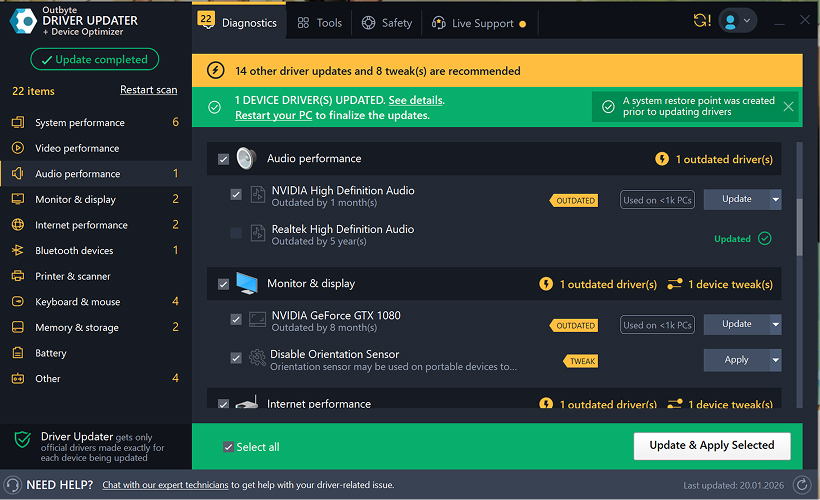
Die Aktualisierung Ihrer Gerätetreiber trägt dazu bei, eine stabile Windows-Leistung und einen ordnungsgemäßen Hardwarebetrieb sicherzustellen. Im Folgenden finden Sie eine Schritt-für-Schritt-Anleitung, die erklärt, wie Sie einen einzelnen Treiber kostenlos mit Outbyte Driver Updater aktualisieren können. Diese Anleitung beschreibt eine Methode zur Aktualisierung eines ausgewählten Treibers ohne Aktivierung einer Lizenz und ohne Angabe persönlicher Informationen oder Zahlungsdetails.
Können Sie einen Treiber kostenlos ohne Registrierung aktualisieren?
Ja.
Outbyte Driver Updater ermöglicht Ihnen:
- Ihren Computer kostenlos nach veralteten Treibern zu scannen;
- eine Liste der erkannten Treiber anzuzeigen;
- einen ausgewählten Treiber kostenlos zu aktualisieren;
- die Eingabe einer E-Mail-Adresse, eines Namens, einer Kreditkartennummer oder anderer persönlicher Daten zu vermeiden.
Der kostenlose Aktualisierungsprozess erfordert nur das installierte Programm und die standardmäßigen Scan- und Aktualisierungsschritte.
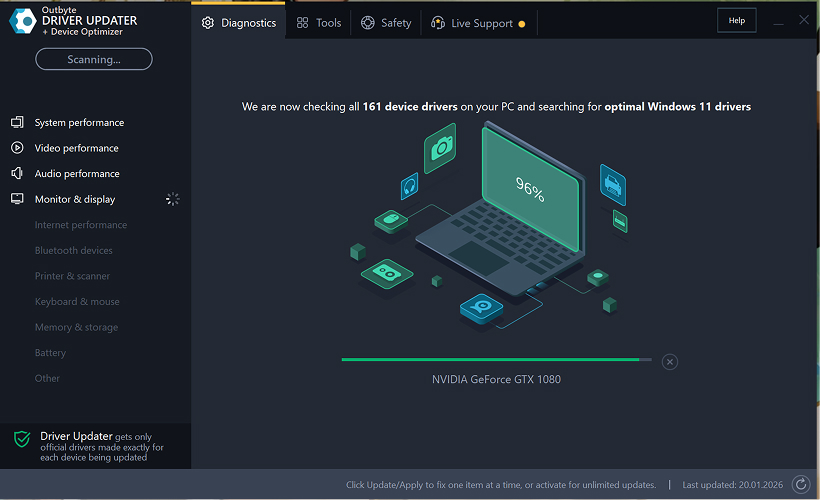
Schritt 1: Starten Sie das Programm und scannen Sie Ihren Computer
Laden Sie Outbyte Driver Updater herunter und installieren Sie es auf Ihrem Windows-PC.
Nach dem Start des Programms beginnt es automatisch mit dem Scannen Ihres Systems und der Überprüfung installierter Treiber.
Schritt 2: Schließen Sie das Aktivierungsfenster
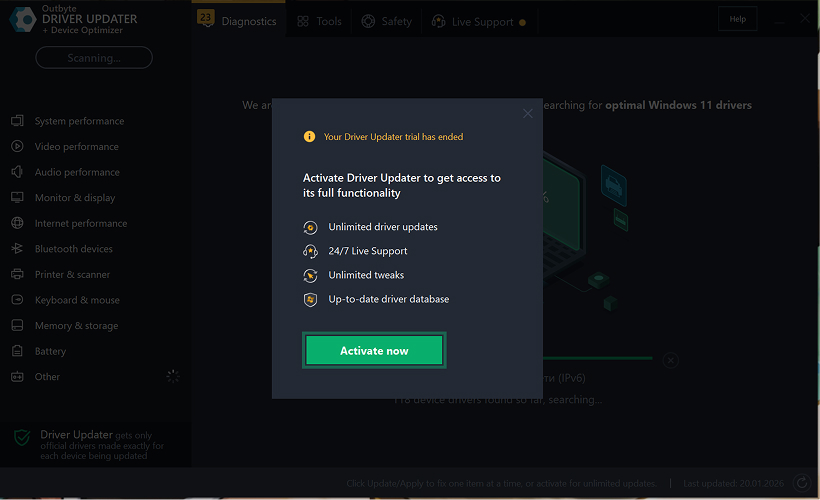
Nach dem Scan kann ein Fenster „Jetzt aktivieren" erscheinen.
Um kostenlos fortzufahren:
- Klicken Sie auf die Schaltfläche „Schließen" (X) in der oberen rechten Ecke des Fensters.
Es müssen keine Informationen eingegeben werden
Schritt 3: Wählen Sie die Treiberkategorie aus
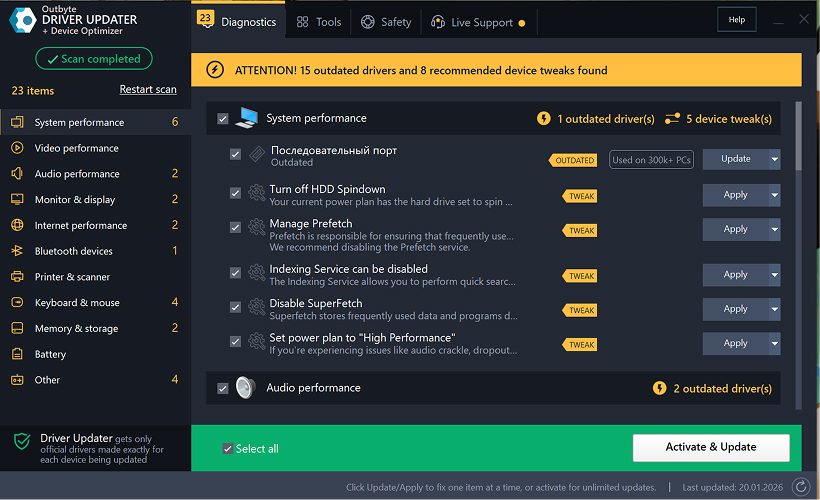
Wählen Sie im Menü auf der linken Seite die Gerätekategorie aus, die Sie aktualisieren möchten, z. B.:
- Audiotreiber;
- Video- und Grafiktreiber;
- Netzwerk- und WLAN-Treiber;
- Bluetooth-Treiber;
- Drucker- und Scannertreiber.
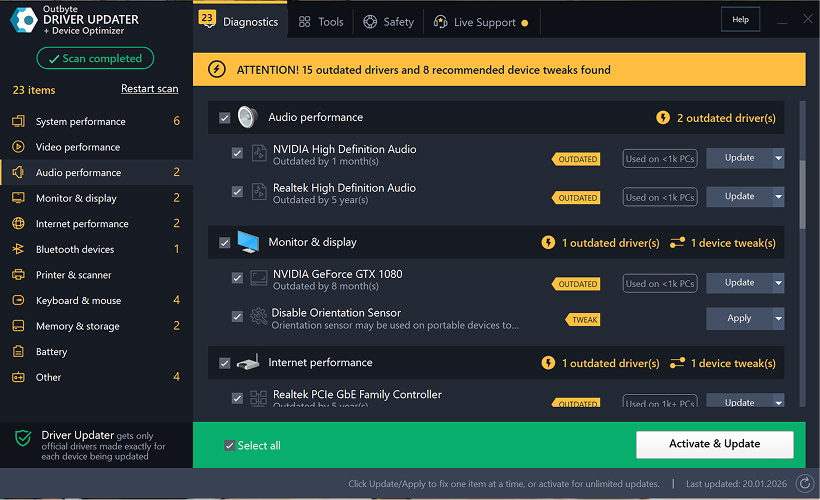
Schritt 4: Klicken Sie neben dem ausgewählten Treiber auf „Aktualisieren"
Suchen Sie in der Treiberliste den Treiber, den Sie aktualisieren möchten, und klicken Sie neben ihm auf die Schaltfläche „Aktualisieren".
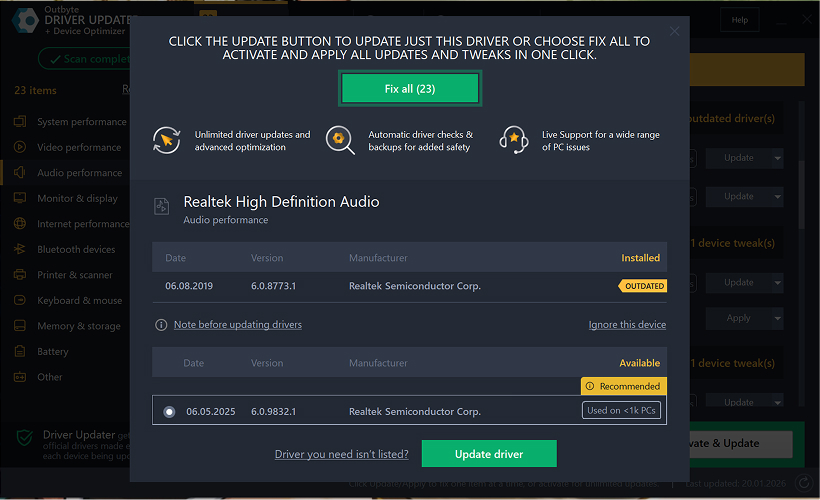
Schritt 5: Bestätigen Sie die Treiberaktualisierung
Klicken Sie im Popup-Fenster auf „Treiber aktualisieren".
In diesem Stadium sind keine persönlichen Daten oder Zahlungsdetails erforderlich.
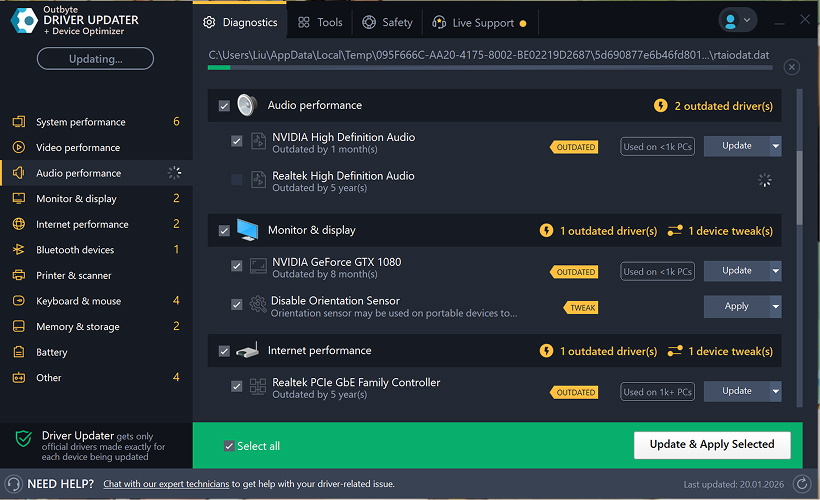
Schritt 6: Warten Sie, bis der Aktualisierungsvorgang abgeschlossen ist
Das Programm beginnt mit dem Herunterladen und Installieren des ausgewählten Treibers.
Bitte warten Sie, bis der Vorgang abgeschlossen ist.
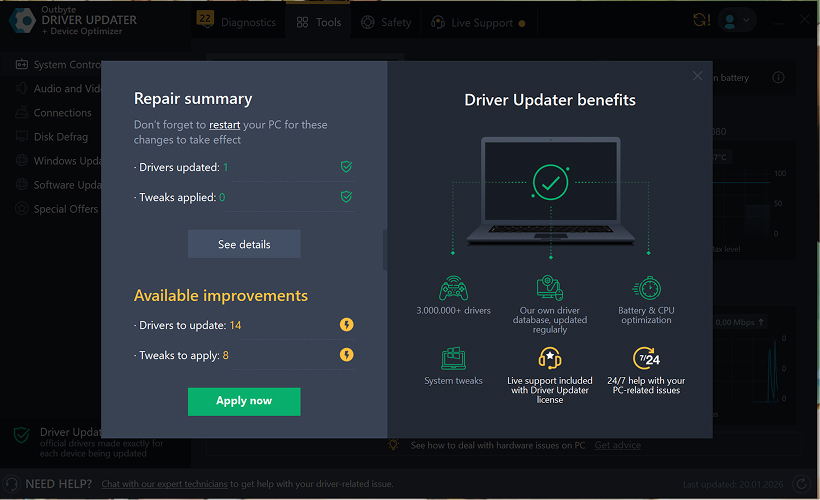
Schritt 7: Änderungen anwenden und Computer neu starten
Klicken Sie nach Abschluss der Installation auf „Jetzt anwenden", um die Änderungen zu übernehmen.
Um sicherzustellen, dass der aktualisierte Treiber ordnungsgemäß funktioniert, starten Sie Ihren Computer neu.
Wichtige Hinweise
- Kostenlose Updates sind jeweils für einen Treiber verfügbar.
- Für die kostenlose Aktualisierung ist keine Registrierung erforderlich.
- Es werden keine Kreditkarten- oder Zahlungsinformationen angefordert.
- Alle Aktionen werden lokal innerhalb des Programms nach dem Scannen Ihres Systems durchgeführt.
- Die Verfügbarkeit kostenloser Updates kann vom Treibertyp und der Systemkonfiguration abhängen.
Learn to pair your wireless mouse with a different USB receiver in simple steps. Check compatibility (e.g., Logitech Unifying receivers), install required software/drivers, and use pairing modes to sync devices. Troubleshoot connection issues and optimize performance for seamless use.
Simplify your workspace with Logitech Unifying Software, enabling effortless connection of up to six compatible devices through a single receiver. Enjoy quick setup, clutter-free connectivity, and enhanced productivity as your keyboard, mouse, and other peripherals work in perfect harmony.
Learn how to set up your Epson L3250 printer with this step-by-step guide. Unbox, install ink, connect to power, and download drivers via Epson’s website or included CD. Configure Wi-Fi settings for wireless printing and run a test page to ensure proper installation. Simplify your setup process and start printing effortlessly.
Transform your smartphone into an HD webcam with DroidCam. Enjoy wireless connectivity and seamless video streaming for crystal-clear video calls, live streams, or online meetings. Works with PC/Mac.
Learn how to enable Bluetooth on your PC in a few simple steps. Check compatibility, activate Bluetooth via Windows Settings or the system tray, pair your device, and troubleshoot common issues. This guide ensures seamless wireless connections for headphones, speakers, or peripherals.
Learn how to set up your Epson L3250 printer quickly and efficiently. This guide covers unboxing, installing ink cartridges, connecting to power, and configuring Wi-Fi for seamless wireless printing. Follow step-by-step instructions to install drivers, align the printer head, and troubleshoot common issues. Perfect for home or office use, the Epson L3250 ensures hassle-free installation and high-quality printing, scanning, and copying.
Download the latest Epson L3250 printer drivers and software to ensure seamless connectivity and optimal performance. Compatible with Windows and macOS, these tools enable easy setup, wireless printing, and advanced features. Visit the official Epson support page for secure, up-to-date downloads tailored to your operating system. Simplify installation and maximize your printer’s capabilities with reliable drivers and utilities.
Discover innovative strategies to amplify your message and connect deeply with audiences – no microphone needed. Harness the power of body language, visual storytelling, and creative platforms to make your voice heard in any setting.
The Valeton GP 100 Wah is a professional-grade guitar pedal designed for musicians seeking dynamic sound control and expressive tonal shaping. Featuring a responsive wah circuit, it delivers smooth, vintage-inspired sweeps and modern versatility for rock, funk, blues, and beyond. Built with durable components and an intuitive design, the GP 100 ensures reliable performance on stage or in the studio. Adjustable parameters and a true bypass switch provide seamless integration into any pedalboard setup, while its compact size maximizes space efficiency. Elevate your playing with rich, articulate wah effects tailored to your musical style.
Virtual CloneDrive offers effortless disc image mounting and virtual drive cloning, enabling you to access ISO, BIN, IMG, and other formats without physical media. Streamline workflows, run software, or backup data with a lightweight, user-friendly tool that integrates seamlessly into your system. Simplify disc management and enhance productivity—no hardware required.