Pålitelig Programvare

Outbyte Driver Updater
- 1.000.000+ drivere
- Nedlastet: 1,143,473 ganger
- Windows 11 / 10 / 8 / 7





 Last Ned
Elan - Keyboard - Samsung USB Port Input Device
Last Ned
Elan - Keyboard - Samsung USB Port Input Device
Last Ned
Elan - Keyboard - Samsung USB Port Input Device

Systemoplysninger
Din PC kører i øjeblikket følgende system:
Driver details
Driver Name:
Elan - Keyboard - Samsung USB Port Input Device
Provider:
Elan
Version:
11.7.0.437
Release Date:
6/26/2015
Architecture:
X86
File Size:
56.8 MB
Driver ID:
usb\vid_04f3&pid_0740
Supported OS:
Windows 10
WHQL:
Signed
Særtilbud
Last Ned
Alle links er blevet scannet af antivirusprogram.
Manual download (.cab, 56.8 MB) from Microsoft servers
— install via Device Manager.
Supported Hardware IDs
usb\vid_04f3&pid_0740
Match against Device Manager → Details → Hardware Ids to confirm this driver fits your device.
File details
File name:
20747226_55c59ca18b4db650d09944b977f06d0bd346ae4f.cab
File size:
59566058 bytes (56.8 MB)
Signed / DriverVer:
06/26/2015, 11.7.0.437
Provider (INF):
ELAN
Catalog file:
ETD.cat
SHA-256:
72576d5c4976d978002acf291752e385533eacfe1dafbc6d763423ae624815c0
To verify: open PowerShell and run Get-FileHash <filename.cab>
What's inside the package (174 files)
3F-tap_cortana_win10.avi 83.0 KB
4F-tap_notification-center_win10.avi 121.0 KB
Button_ClickPad.avi 195.4 KB
Button_SmartPad.avi 197.8 KB
Clicking_1F.avi 96.7 KB
Clicking_2F.avi 84.8 KB
Continuous_EdgeScroll_H.avi 1.3 MB
Continuous_EdgeScroll_Reverse-H.avi 1.3 MB
Continuous_EdgeScroll_Reverse-V.avi 1.3 MB
Continuous_EdgeScroll_V.avi 1.3 MB
Continuous_Scroll_H.avi 1.3 MB
Continuous_Scroll_H_2F.avi 1.2 MB
Continuous_Scroll_Reverse-H.avi 1.3 MB
Continuous_Scroll_Reverse-H_2F.avi 1.2 MB
Continuous_Scroll_Reverse-V.avi 1.3 MB
Continuous_Scroll_Reverse-V_2F.avi 1.3 MB
Continuous_Scroll_V.avi 1.3 MB
Continuous_Scroll_V_2F.avi 1.3 MB
CornerTap.avi 316.2 KB
CursorMove_Inertia.avi 172.2 KB
DnD01.avi 242.6 KB
DnD02.avi 284.0 KB
DnD03.avi 254.7 KB
ELANLogo.ico 12.2 KB
ELANTP.bmp 6.8 KB
ETD.inf 8.6 KB
ETD.sys 139.5 KB
ETDAniConf.exe 7.3 MB
ETDApi.dll 1.9 MB
ETDApix.dll 2.0 MB
ETDCmds.dll 1.7 MB
ETDCoInstaller.dll 61.0 KB
ETDCtrl.exe 2.1 MB
ETDCtrlHelper.exe 1.5 MB
ETDDeviceInformation.exe 1.6 MB
ETDFavorite.dll 1.6 MB
ETDFingerPositioner.exe 1.5 MB
ETDHValueMonitor.exe 2.1 MB
ETDMcpl.dll 6.9 MB
ETDSetup.ini 243.9 KB
ETDSimpleUI.exe 1.7 MB
ETDUI.cpl 5.9 MB
ETDUn_inst.exe 1.7 MB
ETDUninst.dll 1.5 MB
EdgeSwipe_4F_Left_Win8.avi 1.0 MB
EdgeSwipe_4F_Right_Win8.avi 1.0 MB
EdgeSwipe_4F_Up_Win8.avi 243.6 KB
Edge_Auto.avi 1.4 MB
Edge_Auto_Reverse.avi 1.4 MB
Edge_Auto_Reverse_Only_V.avi 869.2 KB
Edge_Circular.avi 1.1 MB
Edge_Inertial.avi 863.5 KB
Edge_Inertial_Only_V.avi 503.7 KB
Edge_Inertial_Reverse.avi 825.7 KB
Edge_Inertial_Reverse_Only_V.avi 480.2 KB
Edge_Reverse_H.avi 380.0 KB
Edge_Reverse_V.avi 478.7 KB
Edge_Scroll.avi 1.3 MB
Edge_Scroll_Once.avi 786.8 KB
Edge_Scroll_Only_V.avi 732.5 KB
Eula0401ARA.txt 981 B
Eula0404CHT.txt 490 B
Eula0405CZE.txt 715 B
Eula0406DAN.txt 614 B
Eula0407GER.txt 682 B
Eula0408GRE.txt 1.3 KB
Eula0409ENU.txt 627 B
Eula040BFIN.txt 699 B
Eula040CFRA.txt 726 B
Eula040DHEB.txt 707 B
Eula040EHUN.txt 682 B
Eula0410ITA.txt 684 B
Eula0411JPN.txt 680 B
Eula0412KOR.txt 702 B
Eula0413HOL.txt 695 B
Eula0414NOR.txt 661 B
Eula0415POL.txt 776 B
Eula0416BRA.txt 708 B
Eula0418ROM.txt 740 B
Eula0419RUS.txt 1.2 KB
Eula041ACRO.txt 642 B
Eula041BSLK.txt 721 B
Eula041DSWE.txt 640 B
Eula041ETHA.txt 1.5 KB
Eula041FTUR.txt 709 B
Eula0424SLO.txt 689 B
Eula0804PRC.txt 510 B
Eula0816POR.txt 708 B
Eula0C04HK.txt 476 B
Eula0C0ASPN.txt 684 B
Fastkeys.avi 430.0 KB
Palmtracking.avi 433.5 KB
Press_3F.avi 191.8 KB
Rotation_Circular.avi 382.3 KB
Rotation_Twist.avi 317.2 KB
Scroll_Auto.avi 1.2 MB
Scroll_Auto_Only_V.avi 728.0 KB
Scroll_Auto_Reverse.avi 1.4 MB
Scroll_Auto_Reverse_Only_V.avi 1.0 MB
Scroll_Inertial.avi 865.8 KB
Scroll_Inertial_Only_V.avi 496.0 KB
Scroll_Inertial_Reverse.avi 850.8 KB
Scroll_Inertial_Reverse_Only_V.avi 471.4 KB
Scroll_No_FreeScroll.avi 713.8 KB
Scroll_Only_V.avi 638.4 KB
Scroll_Reverse_H.avi 398.8 KB
Scroll_Reverse_V.avi 484.9 KB
Sensitivity.avi 240.3 KB
Setup.exe 1.7 MB
Setup.ini 54 B
SlowMotion.avi 288.9 KB
SmartArea.avi 298.4 KB
SmartMotion.avi 92.5 KB
Swipe_2F_LR_PageUpDown.avi 498.4 KB
Swipe_3F_Down_Desktop.avi 217.8 KB
Swipe_3F_Down_SwitchWnd.avi 276.3 KB
Swipe_3F_LR_PageupDown.avi 508.1 KB
Swipe_3F_UpDown_SlideShow.avi 812.5 KB
Swipe_3F_Up_Computer.avi 198.8 KB
Swipe_3F_Up_SwitchWindow_1F.avi 691.6 KB
Swipe_3F_Up_SwitchWindow_3F.avi 1.1 MB
Swipe_3F_Up_TabWindows_1F.avi 220.9 KB
Swipe_3F_Up_TabWindows_3F.avi 487.3 KB
Swipe_4F_Down_Desktop.avi 238.4 KB
Swipe_4F_Down_SwitchWnd.avi 1.0 MB
Swipe_4F_Up_Desktop.avi 216.2 KB
Swipe_4F_Up_SwitchWnd.avi 692.8 KB
Swipe_4F_Up_TabWindows.avi 319.1 KB
Tapping_1F.avi 108.9 KB
Tapping_2F_Middle_Button.avi 282.5 KB
Tapping_2F_Popup.avi 222.8 KB
Win8EdgeSwipe_Left.avi 703.5 KB
Win8EdgeSwipe_Right.avi 144.3 KB
Win8EdgeSwipe_Top.avi 261.3 KB
Zooming.avi 638.7 KB
dpinst.exe 908.9 KB
dpinst.xml 28.4 KB
etd.cat 14.7 KB
ETDSimpleUI.resources.dll 289.0 KB
ETDSimpleUI.resources.dll 282.5 KB
ETDSimpleUI.resources.dll 301.5 KB
ETDSimpleUI.resources.dll 303.5 KB
ETDSimpleUI.resources.dll 304.5 KB
ETDSimpleUI.resources.dll 12.5 KB
ETDSimpleUI.resources.dll 281.5 KB
ETDSimpleUI.resources.dll 16.5 KB
ETDSimpleUI.resources.dll 330.0 KB
ETDSimpleUI.resources.dll 335.0 KB
ETDSimpleUI.resources.dll 358.0 KB
ETDSimpleUI.resources.dll 350.0 KB
ETDSimpleUI.resources.dll 348.5 KB
ETDSimpleUI.resources.dll 383.5 KB
ETDSimpleUI.resources.dll 331.5 KB
ETDSimpleUI.resources.dll 364.5 KB
ETDSimpleUI.resources.dll 107.0 KB
ETDSimpleUI.resources.dll 358.0 KB
ETDSimpleUI.resources.dll 349.0 KB
ETDSimpleUI.resources.dll 397.5 KB
ETDSimpleUI.resources.dll 334.5 KB
ETDSimpleUI.resources.dll 343.0 KB
ETDSimpleUI.resources.dll 350.0 KB
ETDSimpleUI.resources.dll 14.0 KB
ETDSimpleUI.resources.dll 354.5 KB
ETDSimpleUI.resources.dll 327.0 KB
ETDSimpleUI.resources.dll 361.5 KB
ETDSimpleUI.resources.dll 346.5 KB
ETDSimpleUI.resources.dll 329.0 KB
ETDSimpleUI.resources.dll 372.5 KB
ETDSimpleUI.resources.dll 344.0 KB
ETDSimpleUI.resources.dll 368.0 KB
ETDSimpleUI.resources.dll 360.5 KB
ETDSimpleUI.resources.dll 285.0 KB
ETDSimpleUI.resources.dll 325.0 KB
ETDSimpleUI.resources.dll 369.0 KB
All versions of this driver
| Version | Release Date | Architecture | OS | |
|---|---|---|---|---|
| 11.7.0.437 | 6/26/2015 | X86 | Windows 10 | (this page) |
| 11.7.0.436 | 6/10/2015 | X86 | Windows 10 | 11.7.0.436 |
Related drivers
- ELAN - USB - 11 30 2015 12:00:00 AM - 11.7.10.22 (v11.7.10.22)
- ELAN - USB - 10 8 2015 12:00:00 AM - 11.7.10.21 (v11.7.10.21)
- ELAN - USB - 7 23 2015 12:00:00 AM - 11.7.10.20 (v11.7.10.20)
- ELAN - SoftwareComponent - 3.0.0.1 (v3.0.0.1)
- ELAN - Biometric - 6 21 2016 12:00:00 AM - 1.5.0.12 (v1.5.0.12)
- ELAN - HIDClass - 12 25 2015 12:00:00 AM - 12.8.5.9 (v12.8.5.9)
- ELAN driver update for NX PAD (v12.8.5.9)
- ELAN driver update for NX PAD (v12.8.5.8)
- ELAN - HIDClass - 11 19 2015 12:00:00 AM - 12.8.5.8 (v12.8.5.8)
- ELAN driver update for ELAN Input Device (v12.8.2.11)
Drivere: Grundlaget for Stabil Enhedsydelse
Hvorfor er Drivere Så Vigtige?
Drivere spiller en afgørende rolle for systemets stabilitet. Forældede eller beskadigede drivere kan føre til følgende problemer:
Det anbefales at opdatere drivere hver 3-6 måned. Dette er især vigtigt før installation af et nyt operativsystem, da opdaterede drivere kan være nødvendige for at sikre kompatibilitet.
Sådan Holder du dine Drivere Opdaterede
Automatisk metode til opdatering og download af drivere (Anbefalet):
Hvis du ikke vil lede manuelt efter den rigtige driver, findes der værktøjer, der automatisk registrerer din enhedsmodel og finder en kompatibel driver. Det minimerer fejl og sparer tid.
Særtilbud
Last Ned

Limitations: trial version offers an unlimited number of scans, free driver backup and rollback. Registration for the full version starts from USD 29.95. See more information about Outbyte and uninstall instructions. Please review Outbyte EULA and Privacy Policy
Alle links er blevet scannet af antivirusprogram.
Manuel driverinstallation
Bemærk: Installation af en forkert driver kan forårsage systemproblemer. Hvis du er i tvivl, anbefaler vi den automatiske metode.
Download driveren via Enhedshåndtering. Sådan åbner du Enhedshåndtering:
Sådan installeres drivere ved hjælp af Enhedshåndtering:
How to Update a Driver for Free Using Outbyte Driver Updater
At holde dine enhedsdrivere opdaterede hjælper med at sikre stabil Windows-ydeevne og korrekt hardwarefunktion. Nedenfor er en trinvis vejledning, der forklarer, hvordan du opdaterer en enkelt driver gratis ved hjælp af Outbyte Driver Updater. Denne vejledning beskriver en metode til at opdatere én valgt driver uden at aktivere en licens og uden at angive personlige oplysninger eller betalingsoplysninger.
Kan du opdatere en driver gratis uden registrering?
Ja.
Outbyte Driver Updater giver dig mulighed for at:
- scanne din computer for forældede drivere uden omkostninger;
- se en liste over registrerede drivere;
- opdatere én valgt driver gratis;
- undgå at indtaste e-mailadresse, navn, kreditkortnummer eller andre personlige data.
Den gratis opdateringsproces kræver kun det installerede program og de almindelige scan- og opdateringstrin.
Trin 1: Start programmet og scan din computer
Download og installer Outbyte Driver Updater på din Windows-pc.
Efter start af programmet vil det automatisk begynde at scanne dit system og kontrollere installerede drivere.
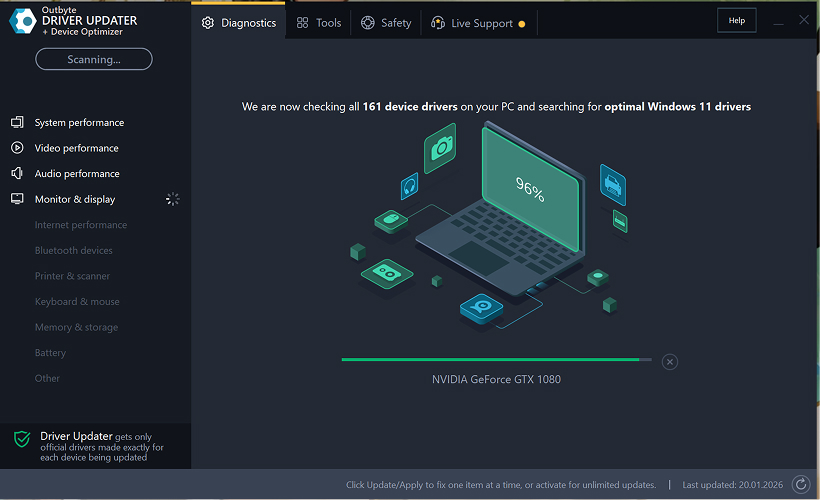
Trin 2: Luk aktiveringsvinduet
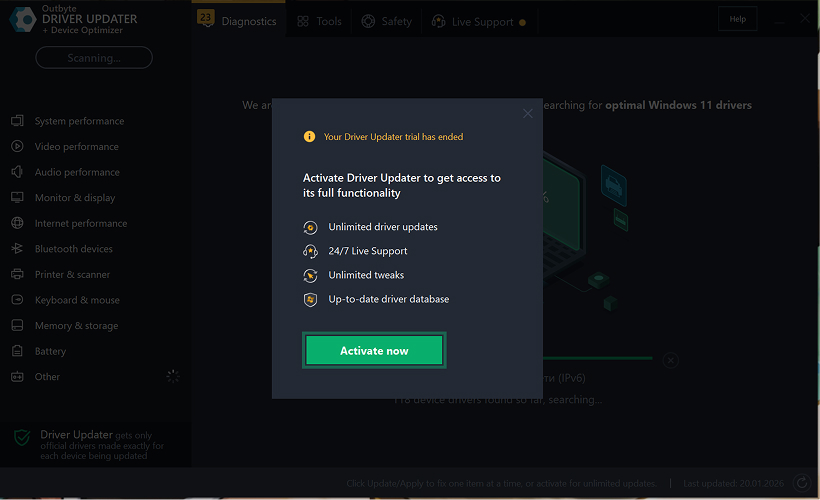
Efter scanningen kan et "Aktiver nu"-vindue vises.
For at fortsætte gratis:
- klik på luk (X) knappen i øverste højre hjørne af vinduet.
Der skal ikke indtastes nogen oplysninger
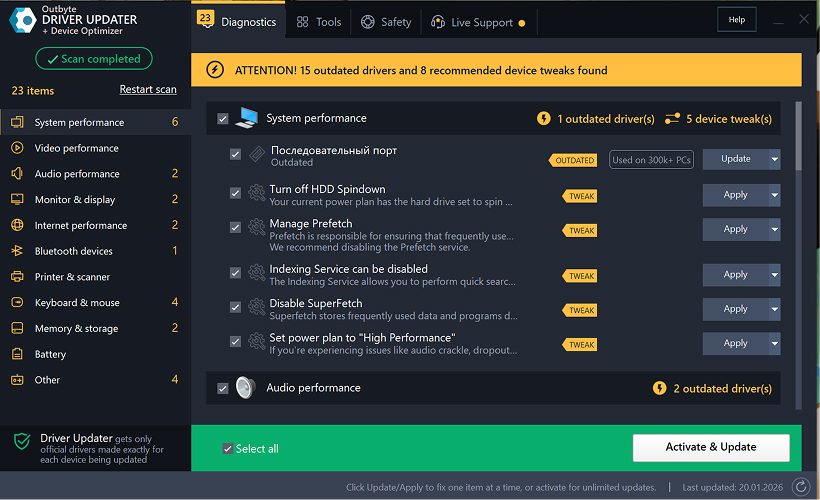
Trin 3: Vælg driverkategori
Vælg fra menuen til venstre den enhedskategori, du vil opdatere, såsom:
- lyddrivere;
- video- og grafikdrivere;
- netværks- og Wi-Fi-drivere;
- Bluetooth-drivere;
- printer- og scannerdrivere.
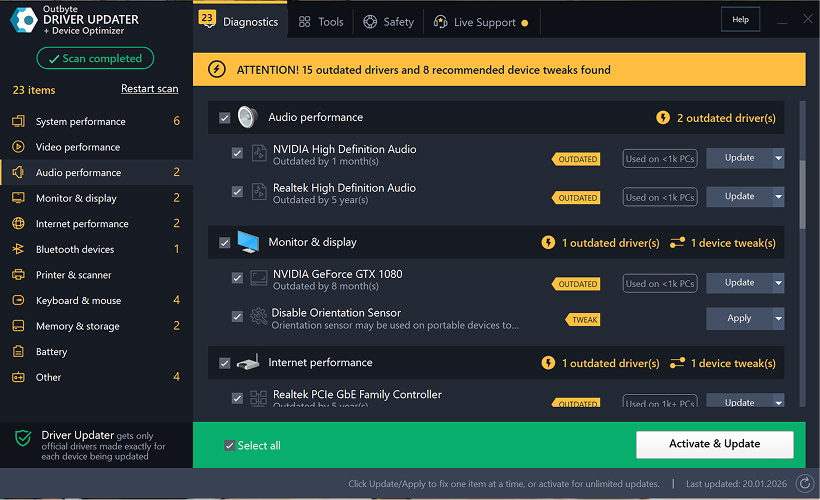
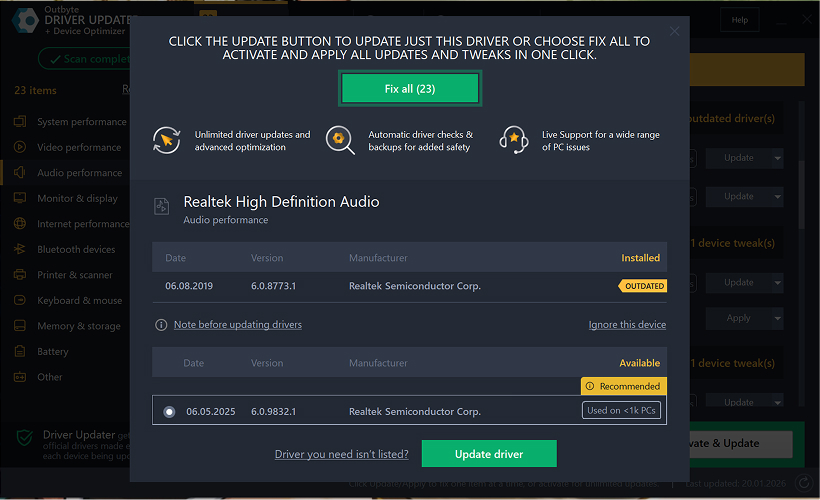
Trin 4: Klik på "Opdater" ved siden af den valgte driver
Find i driverlisten den driver, du vil opdatere, og klik på Opdater-knappen ved siden af den.
Trin 5: Bekræft driveropdateringen
I pop-up-vinduet skal du klikke på Opdater driver.
På dette trin kræves ingen personlige data eller betalingsoplysninger.
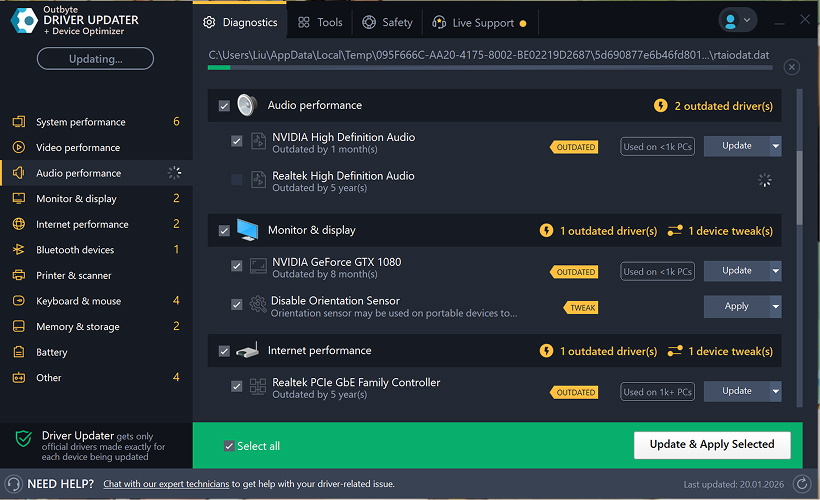
Trin 6: Vent på, at opdateringsprocessen er færdig
Programmet vil begynde at downloade og installere den valgte driver.
Vent venligst, indtil processen er fuldført.
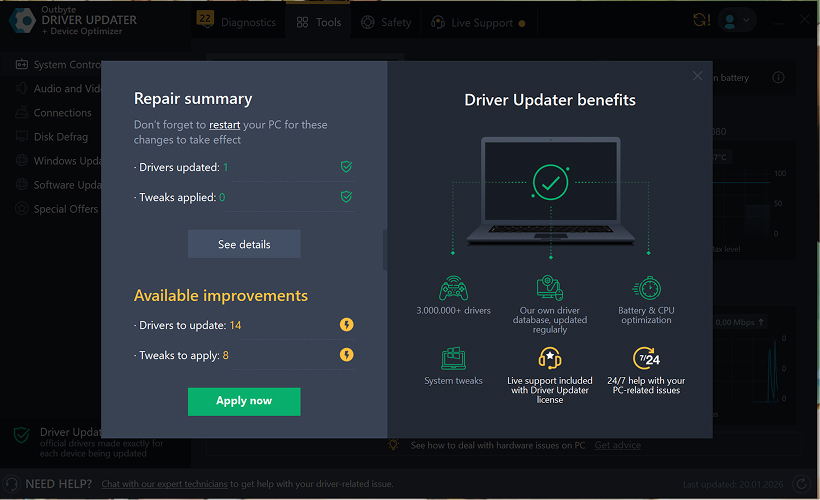
Trin 7: Anvend ændringer og genstart din computer
Når installationen er færdig, skal du klikke på Anvend nu for at anvende ændringerne.
For at sikre, at den opdaterede driver fungerer korrekt, skal du genstarte din computer.
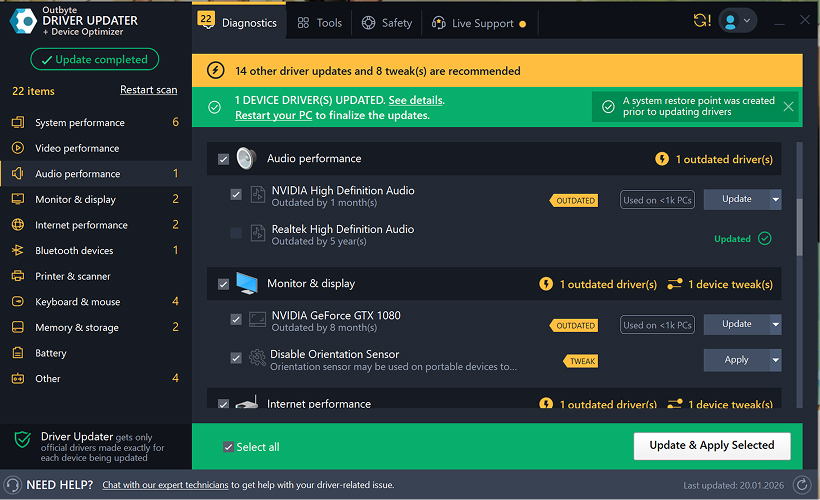
Vigtige bemærkninger
- Gratis opdateringer er tilgængelige én driver ad gangen.
- Der kræves ingen registrering for den gratis opdatering.
- Der anmodes ikke om kreditkort- eller betalingsoplysninger.
- Alle handlinger udføres lokalt i programmet efter scanning af dit system.
- Tilgængeligheden af gratis opdatering kan afhænge af drivertypen og systemkonfigurationen.
Learn to pair your wireless mouse with a different USB receiver in simple steps. Check compatibility (e.g., Logitech Unifying receivers), install required software/drivers, and use pairing modes to sync devices. Troubleshoot connection issues and optimize performance for seamless use.
Simplify your workspace with Logitech Unifying Software, enabling effortless connection of up to six compatible devices through a single receiver. Enjoy quick setup, clutter-free connectivity, and enhanced productivity as your keyboard, mouse, and other peripherals work in perfect harmony.
Learn how to set up your Epson L3250 printer with this step-by-step guide. Unbox, install ink, connect to power, and download drivers via Epson’s website or included CD. Configure Wi-Fi settings for wireless printing and run a test page to ensure proper installation. Simplify your setup process and start printing effortlessly.
Transform your smartphone into an HD webcam with DroidCam. Enjoy wireless connectivity and seamless video streaming for crystal-clear video calls, live streams, or online meetings. Works with PC/Mac.
Learn how to enable Bluetooth on your PC in a few simple steps. Check compatibility, activate Bluetooth via Windows Settings or the system tray, pair your device, and troubleshoot common issues. This guide ensures seamless wireless connections for headphones, speakers, or peripherals.
Learn how to set up your Epson L3250 printer quickly and efficiently. This guide covers unboxing, installing ink cartridges, connecting to power, and configuring Wi-Fi for seamless wireless printing. Follow step-by-step instructions to install drivers, align the printer head, and troubleshoot common issues. Perfect for home or office use, the Epson L3250 ensures hassle-free installation and high-quality printing, scanning, and copying.
Download the latest Epson L3250 printer drivers and software to ensure seamless connectivity and optimal performance. Compatible with Windows and macOS, these tools enable easy setup, wireless printing, and advanced features. Visit the official Epson support page for secure, up-to-date downloads tailored to your operating system. Simplify installation and maximize your printer’s capabilities with reliable drivers and utilities.
Discover innovative strategies to amplify your message and connect deeply with audiences – no microphone needed. Harness the power of body language, visual storytelling, and creative platforms to make your voice heard in any setting.
The Valeton GP 100 Wah is a professional-grade guitar pedal designed for musicians seeking dynamic sound control and expressive tonal shaping. Featuring a responsive wah circuit, it delivers smooth, vintage-inspired sweeps and modern versatility for rock, funk, blues, and beyond. Built with durable components and an intuitive design, the GP 100 ensures reliable performance on stage or in the studio. Adjustable parameters and a true bypass switch provide seamless integration into any pedalboard setup, while its compact size maximizes space efficiency. Elevate your playing with rich, articulate wah effects tailored to your musical style.
Virtual CloneDrive offers effortless disc image mounting and virtual drive cloning, enabling you to access ISO, BIN, IMG, and other formats without physical media. Streamline workflows, run software, or backup data with a lightweight, user-friendly tool that integrates seamlessly into your system. Simplify disc management and enhance productivity—no hardware required.