Trusted Software
Trustpilot
Outbyte Driver Updater
  • 1,000,000+ drivers
  • 1,143,473 downloads
  • Windows 11 / 10 / 8 / 7
Rating
Windows 2007 Windows 2008 Windows 2010 Windows 2011

Download Rembrandt Radeon 680M

System Information
Your PC is currently running:
Driver details
Driver Name: Rembrandt Radeon 680M
Provider: Advanced Micro Devices, Inc.
Version: 31.0.12044.54000
Release Date: 3/30/2023
Architecture: AMD64
File Size: 501.4 MB
Driver ID: pci\ven_1002&dev_1681&subsys_3afe17aa&rev_c7
Supported OS: Windows 11
WHQL: Signed
Special offer
Download
All links have been scanned by antivirus program.
Compatible hardware
  • Rembrandt [Radeon 680M] (Advanced Micro Devices, Inc. [AMD/ATI])
Supported Hardware IDs
pci\ven_1002&dev_1681&subsys_3afe17aa&rev_c7
pci\ven_1002&dev_1681&subsys_3afe17aa&rev_c8
pci\ven_1002&dev_1681&subsys_3afe17aa&rev_c9
pci\ven_1002&dev_1681&subsys_3aff17aa&rev_c7
pci\ven_1002&dev_1681&subsys_3aff17aa&rev_c8
pci\ven_1002&dev_1681&subsys_3aff17aa&rev_c9
pci\ven_1002&dev_1681&subsys_3b0017aa&rev_c7
pci\ven_1002&dev_1681&subsys_3b0017aa&rev_c8
pci\ven_1002&dev_1681&subsys_3b0017aa&rev_c9
pci\ven_1002&dev_1681&subsys_3b0117aa&rev_c7
Show all 337 hardware IDs
pci\ven_1002&dev_1681&subsys_3b0117aa&rev_c8
pci\ven_1002&dev_1681&subsys_3b0117aa&rev_c9
pci\ven_1002&dev_1681&subsys_3b0217aa&rev_c7
pci\ven_1002&dev_1681&subsys_3b0217aa&rev_c8
pci\ven_1002&dev_1681&subsys_3b0217aa&rev_c9
pci\ven_1002&dev_1681&subsys_3b0317aa&rev_c7
pci\ven_1002&dev_1681&subsys_3b0317aa&rev_c8
pci\ven_1002&dev_1681&subsys_3b0317aa&rev_c9
pci\ven_1002&dev_1681&subsys_3b0417aa&rev_c7
pci\ven_1002&dev_1681&subsys_3b0417aa&rev_c8
pci\ven_1002&dev_1681&subsys_3b0417aa&rev_c9
pci\ven_1002&dev_1681&subsys_3b0517aa&rev_c7
pci\ven_1002&dev_1681&subsys_3b0517aa&rev_c8
pci\ven_1002&dev_1681&subsys_3b0517aa&rev_c9
pci\ven_1002&dev_1681&subsys_3b0617aa&rev_c7
pci\ven_1002&dev_1681&subsys_3b0617aa&rev_c8
pci\ven_1002&dev_1681&subsys_3b0617aa&rev_c9
pci\ven_1002&dev_1681&subsys_3b0717aa&rev_c7
pci\ven_1002&dev_1681&subsys_3b0717aa&rev_c8
pci\ven_1002&dev_1681&subsys_3b0717aa&rev_c9
pci\ven_1002&dev_1681&subsys_3b0817aa&rev_c7
pci\ven_1002&dev_1681&subsys_3b0817aa&rev_c8
pci\ven_1002&dev_1681&subsys_3b0817aa&rev_c9
pci\ven_1002&dev_1681&subsys_3b0917aa&rev_c7
pci\ven_1002&dev_1681&subsys_3b0917aa&rev_c8
pci\ven_1002&dev_1681&subsys_3b0917aa&rev_c9
pci\ven_1002&dev_1681&subsys_3b0a17aa&rev_c7
pci\ven_1002&dev_1681&subsys_3b0a17aa&rev_c8
pci\ven_1002&dev_1681&subsys_3b0a17aa&rev_c9
pci\ven_1002&dev_1681&subsys_3b0b17aa&rev_c7
pci\ven_1002&dev_1681&subsys_3b0b17aa&rev_c8
pci\ven_1002&dev_1681&subsys_3b0b17aa&rev_c9
pci\ven_1002&dev_1681&subsys_3b0c17aa&rev_c7
pci\ven_1002&dev_1681&subsys_3b0c17aa&rev_c8
pci\ven_1002&dev_1681&subsys_3b0c17aa&rev_c9
pci\ven_1002&dev_1681&subsys_3b0d17aa&rev_c7
pci\ven_1002&dev_1681&subsys_3b0d17aa&rev_c8
pci\ven_1002&dev_1681&subsys_3b0d17aa&rev_c9
pci\ven_1002&dev_1681&subsys_3b0e17aa&rev_c7
pci\ven_1002&dev_1681&subsys_3b0e17aa&rev_c8
pci\ven_1002&dev_1681&subsys_3b0e17aa&rev_c9
pci\ven_1002&dev_1681&subsys_3b0f17aa&rev_c7
pci\ven_1002&dev_1681&subsys_3b0f17aa&rev_c8
pci\ven_1002&dev_1681&subsys_3b0f17aa&rev_c9
pci\ven_1002&dev_1681&subsys_3b1017aa&rev_c7
pci\ven_1002&dev_1681&subsys_3b1017aa&rev_c8
pci\ven_1002&dev_1681&subsys_3b1017aa&rev_c9
pci\ven_1002&dev_1681&subsys_3b1117aa&rev_c7
pci\ven_1002&dev_1681&subsys_3b1117aa&rev_c8
pci\ven_1002&dev_1681&subsys_3b1117aa&rev_c9
pci\ven_1002&dev_1681&subsys_3b1f17aa&rev_c7
pci\ven_1002&dev_1681&subsys_3b1f17aa&rev_c8
pci\ven_1002&dev_1681&subsys_3b1f17aa&rev_c9
pci\ven_1002&dev_1681&subsys_3b2317aa&rev_c7
pci\ven_1002&dev_1681&subsys_3b2317aa&rev_c8
pci\ven_1002&dev_1681&subsys_3b2317aa&rev_c9
pci\ven_1002&dev_1681&subsys_3b2417aa&rev_c7
pci\ven_1002&dev_1681&subsys_3b2417aa&rev_c8
pci\ven_1002&dev_1681&subsys_3b2417aa&rev_c9
pci\ven_1002&dev_1681&subsys_3b2517aa&rev_c7
pci\ven_1002&dev_1681&subsys_3b2517aa&rev_c8
pci\ven_1002&dev_1681&subsys_3b2517aa&rev_c9
pci\ven_1002&dev_1681&subsys_3b2617aa&rev_c7
pci\ven_1002&dev_1681&subsys_3b2617aa&rev_c8
pci\ven_1002&dev_1681&subsys_3b2617aa&rev_c9
pci\ven_1002&dev_1681&subsys_3b2a17aa&rev_c7
pci\ven_1002&dev_1681&subsys_3b2a17aa&rev_c8
pci\ven_1002&dev_1681&subsys_3b2a17aa&rev_c9
pci\ven_1002&dev_1681&subsys_3b2b17aa&rev_c7
pci\ven_1002&dev_1681&subsys_3b2b17aa&rev_c8
pci\ven_1002&dev_1681&subsys_3b2b17aa&rev_c9
pci\ven_1002&dev_1681&subsys_3b2c17aa&rev_c7
pci\ven_1002&dev_1681&subsys_3b2c17aa&rev_c8
pci\ven_1002&dev_1681&subsys_3b2c17aa&rev_c9
pci\ven_1002&dev_1681&subsys_3b2d17aa&rev_c7
pci\ven_1002&dev_1681&subsys_3b2d17aa&rev_c8
pci\ven_1002&dev_1681&subsys_3b2d17aa&rev_c9
pci\ven_1002&dev_6700
pci\ven_1002&dev_6701
pci\ven_1002&dev_6702
pci\ven_1002&dev_6703
pci\ven_1002&dev_6704
pci\ven_1002&dev_6705
pci\ven_1002&dev_6706
pci\ven_1002&dev_6707
pci\ven_1002&dev_6708
pci\ven_1002&dev_6709
pci\ven_1002&dev_6718
pci\ven_1002&dev_6719
pci\ven_1002&dev_671c
pci\ven_1002&dev_671d
pci\ven_1002&dev_671f
pci\ven_1002&dev_6720
pci\ven_1002&dev_6721
pci\ven_1002&dev_6722
pci\ven_1002&dev_6723
pci\ven_1002&dev_6724
pci\ven_1002&dev_6725
pci\ven_1002&dev_6726
pci\ven_1002&dev_6727
pci\ven_1002&dev_6728
pci\ven_1002&dev_6729
pci\ven_1002&dev_6738
pci\ven_1002&dev_6739
pci\ven_1002&dev_673e
pci\ven_1002&dev_6740
pci\ven_1002&dev_6741
pci\ven_1002&dev_6742
pci\ven_1002&dev_6743
pci\ven_1002&dev_6744
pci\ven_1002&dev_6746
pci\ven_1002&dev_6747
pci\ven_1002&dev_6748
pci\ven_1002&dev_6749
pci\ven_1002&dev_674a
pci\ven_1002&dev_6750
pci\ven_1002&dev_6751
pci\ven_1002&dev_6758
pci\ven_1002&dev_6759
pci\ven_1002&dev_675b
pci\ven_1002&dev_675d
pci\ven_1002&dev_675f
pci\ven_1002&dev_6760
pci\ven_1002&dev_6761
pci\ven_1002&dev_6762
pci\ven_1002&dev_6763
pci\ven_1002&dev_6764
pci\ven_1002&dev_6765
pci\ven_1002&dev_6766
pci\ven_1002&dev_6767
pci\ven_1002&dev_6768
pci\ven_1002&dev_6770
pci\ven_1002&dev_6771
pci\ven_1002&dev_6772
pci\ven_1002&dev_6778
pci\ven_1002&dev_6779
pci\ven_1002&dev_677b
pci\ven_1002&dev_6840
pci\ven_1002&dev_6841
pci\ven_1002&dev_6842
pci\ven_1002&dev_6843
pci\ven_1002&dev_6849
pci\ven_1002&dev_684c
pci\ven_1002&dev_6850
pci\ven_1002&dev_6858
pci\ven_1002&dev_6859
pci\ven_1002&dev_6880
pci\ven_1002&dev_6888
pci\ven_1002&dev_6889
pci\ven_1002&dev_688a
pci\ven_1002&dev_688c
pci\ven_1002&dev_688d
pci\ven_1002&dev_6898
pci\ven_1002&dev_6899
pci\ven_1002&dev_689b
pci\ven_1002&dev_689c
pci\ven_1002&dev_689d
pci\ven_1002&dev_689e
pci\ven_1002&dev_68a0
pci\ven_1002&dev_68a1
pci\ven_1002&dev_68a8
pci\ven_1002&dev_68a9
pci\ven_1002&dev_68b0
pci\ven_1002&dev_68b8
pci\ven_1002&dev_68b9
pci\ven_1002&dev_68ba
pci\ven_1002&dev_68be
pci\ven_1002&dev_68bf
pci\ven_1002&dev_68c0
pci\ven_1002&dev_68c1
pci\ven_1002&dev_68c7
pci\ven_1002&dev_68c8
pci\ven_1002&dev_68c9
pci\ven_1002&dev_68d8
pci\ven_1002&dev_68d9
pci\ven_1002&dev_68da
pci\ven_1002&dev_68de
pci\ven_1002&dev_68e0
pci\ven_1002&dev_68e1
pci\ven_1002&dev_68e4
pci\ven_1002&dev_68e5
pci\ven_1002&dev_68e8
pci\ven_1002&dev_68e9
pci\ven_1002&dev_68f1
pci\ven_1002&dev_68f2
pci\ven_1002&dev_68f8
pci\ven_1002&dev_68f9
pci\ven_1002&dev_68fa
pci\ven_1002&dev_68fe
pci\ven_1002&dev_9400
pci\ven_1002&dev_9403
pci\ven_1002&dev_9405
pci\ven_1002&dev_940a
pci\ven_1002&dev_940b
pci\ven_1002&dev_940f
pci\ven_1002&dev_9440
pci\ven_1002&dev_9441
pci\ven_1002&dev_9442
pci\ven_1002&dev_9443
pci\ven_1002&dev_9444
pci\ven_1002&dev_944a
pci\ven_1002&dev_944c
pci\ven_1002&dev_944e
pci\ven_1002&dev_9450
pci\ven_1002&dev_9452
pci\ven_1002&dev_9456
pci\ven_1002&dev_945a
pci\ven_1002&dev_9460
pci\ven_1002&dev_9462
pci\ven_1002&dev_9480
pci\ven_1002&dev_9488
pci\ven_1002&dev_9490
pci\ven_1002&dev_9491
pci\ven_1002&dev_9495
pci\ven_1002&dev_9498
pci\ven_1002&dev_949c
pci\ven_1002&dev_949e
pci\ven_1002&dev_949f
pci\ven_1002&dev_94a0
pci\ven_1002&dev_94a1
pci\ven_1002&dev_94a3
pci\ven_1002&dev_94b3
pci\ven_1002&dev_94b4
pci\ven_1002&dev_94b5
pci\ven_1002&dev_94c1
pci\ven_1002&dev_94c3
pci\ven_1002&dev_94c4
pci\ven_1002&dev_94c6
pci\ven_1002&dev_94c7
pci\ven_1002&dev_94c8
pci\ven_1002&dev_94c9
pci\ven_1002&dev_94cb
pci\ven_1002&dev_94cc
pci\ven_1002&dev_9501
pci\ven_1002&dev_9504
pci\ven_1002&dev_9505
pci\ven_1002&dev_9506
pci\ven_1002&dev_9507
pci\ven_1002&dev_9508
pci\ven_1002&dev_9509
pci\ven_1002&dev_950f
pci\ven_1002&dev_9511
pci\ven_1002&dev_9513
pci\ven_1002&dev_9515
pci\ven_1002&dev_9519
pci\ven_1002&dev_9540
pci\ven_1002&dev_954f
pci\ven_1002&dev_9552
pci\ven_1002&dev_9553
pci\ven_1002&dev_9555
pci\ven_1002&dev_9557
pci\ven_1002&dev_955f
pci\ven_1002&dev_9581
pci\ven_1002&dev_9583
pci\ven_1002&dev_9586
pci\ven_1002&dev_9587
pci\ven_1002&dev_9588
pci\ven_1002&dev_9589
pci\ven_1002&dev_958a
pci\ven_1002&dev_958b
pci\ven_1002&dev_958c
pci\ven_1002&dev_958d
pci\ven_1002&dev_9591
pci\ven_1002&dev_9593
pci\ven_1002&dev_9596
pci\ven_1002&dev_9598
pci\ven_1002&dev_95c0
pci\ven_1002&dev_95c2
pci\ven_1002&dev_95c4
pci\ven_1002&dev_95c5
pci\ven_1002&dev_95c6
pci\ven_1002&dev_95c9
pci\ven_1002&dev_95cc
pci\ven_1002&dev_95cd
pci\ven_1002&dev_95ce
pci\ven_1002&dev_95cf
pci\ven_1002&dev_9610
pci\ven_1002&dev_9611
pci\ven_1002&dev_9612
pci\ven_1002&dev_9613
pci\ven_1002&dev_9614
pci\ven_1002&dev_9615
pci\ven_1002&dev_9616
pci\ven_1002&dev_964e
pci\ven_1002&dev_964f
pci\ven_1002&dev_9710
pci\ven_1002&dev_9712
pci\ven_1002&dev_9713
pci\ven_1002&dev_9714
pci\ven_1002&dev_9715
pci\ven_1002&dev_9900
pci\ven_1002&dev_9901
pci\ven_1002&dev_9903
pci\ven_1002&dev_9904
pci\ven_1002&dev_9905
pci\ven_1002&dev_9906
pci\ven_1002&dev_9907
pci\ven_1002&dev_9908
pci\ven_1002&dev_9909
pci\ven_1002&dev_990a
pci\ven_1002&dev_990b
pci\ven_1002&dev_990c
pci\ven_1002&dev_990d
pci\ven_1002&dev_990e
pci\ven_1002&dev_990f
pci\ven_1002&dev_9910
pci\ven_1002&dev_9913
pci\ven_1002&dev_9917
pci\ven_1002&dev_9918
pci\ven_1002&dev_9919
pci\ven_1002&dev_9990
pci\ven_1002&dev_9991
pci\ven_1002&dev_9992
pci\ven_1002&dev_9993
pci\ven_1002&dev_9994
pci\ven_1002&dev_9995
pci\ven_1002&dev_9996
pci\ven_1002&dev_9997
pci\ven_1002&dev_9998
pci\ven_1002&dev_9999
pci\ven_1002&dev_999a
pci\ven_1002&dev_999b
pci\ven_1002&dev_999c
pci\ven_1002&dev_999d
pci\ven_1002&dev_99a0
pci\ven_1002&dev_99a2
pci\ven_1002&dev_99a4
Match against Device Manager → Details → Hardware Ids to confirm this driver fits your device.
File details
File name: ec11dcc4-da82-4cc1-ac95-9e412dce3198_c6a313bc2dfaf45b3ac92a54ffb4432e53ed28f0.cab
File size: 525773164 bytes (501.4 MB)
Signed / DriverVer: 03/30/2023, 31.0.12044.54000
Provider (INF): Advanced Micro Devices, Inc.
Catalog file: U0390556.CAT
SHA-256:
ab4657974027ef714524d9f558cfe8ff74d0bb8f8c0a7339efafdb4fda186a4d
To verify: open PowerShell and run Get-FileHash <filename.cab>
What's inside the package (167 files)
U0390447.inf 111.7 KB
U0390556.inf 111.7 KB
u0390447.cat 2.6 MB
u0390556.cat 2.6 MB
amd-vulkan32.json 703 B
amd-vulkan64.json 703 B
amd_comgr.dll 87.2 MB
amd_comgr32.dll 71.6 MB
amd_opencl32.dll 368.9 KB
amd_opencl64.dll 500.3 KB
amdave32.dll 147.5 KB
amdave64.dll 172.7 KB
amde31a.dat 155.3 KB
amde34a.dat 170.9 KB
amde34b.dat 170.9 KB
amde40a.dat 169.4 KB
amdefctb.dat 503.1 KB
amdenc32.dll 866.5 KB
amdenc64.dll 981.1 KB
amdfendr.ctz 11.6 KB
amdfendr.itz 2.7 KB
amdfendr.stz 190.4 KB
amdfendrmgr.stz 53.4 KB
amdfendrsr.etz 608.4 KB
amdgfxinfo32.dll 421.8 KB
amdgfxinfo64.dll 554.8 KB
amdh264enc32.dll 1.9 MB
amdh264enc64.dll 2.0 MB
amdh265enc32.dll 1.2 MB
amdh265enc64.dll 1.5 MB
amdhdl32.dll 401.8 KB
amdhdl64.dll 523.7 KB
amdhip64.dll 10.0 MB
amdhsail32.dll 52.5 MB
amdhsail64.dll 63.6 MB
amdhwdecoder_32.dll 245.8 KB
amdhwdecoder_64.dll 297.8 KB
amdicdxx.dat 1.3 MB
amdihk32.dll 182.5 KB
amdihk64.dll 226.3 KB
amdkernelevents.mc 74.4 KB
amdkmdag.sys 90.2 MB
amdkmpfd.ctz 10.8 KB
amdkmpfd.itz 1.9 KB
amdkmpfd.stz 112.3 KB
amdlogum.exe 459.9 KB
amdlvr32.dll 752.9 KB
amdlvr64.dll 920.8 KB
amdmantle32.dll 24.7 MB
amdmantle64.dll 29.2 MB
amdmiracast.dll 554.4 KB
amdmmcl.dll 141.9 KB
amdmmcl6.dll 172.4 KB
amdocl32.dll 7.8 MB
amdocl64.dll 8.2 MB
amdpcom32.dll 133.2 KB
amdpcom64.dll 163.0 KB
amdsmi.exe 6.6 MB
amduve32.dll 170.0 KB
amduve64.dll 203.9 KB
amdverag.dll 99.3 KB
amdvlk32.dll 36.6 MB
amdvlk64.dll 41.1 MB
amdxc32.dll 45.9 MB
amdxc64.dll 51.7 MB
amdxc64.so 76.8 MB
amdxcstub32.dll 110.9 KB
amdxcstub64.dll 134.8 KB
amdxn32.dll 26.0 MB
amdxn64.dll 29.6 MB
amdxx32.dll 32.9 MB
amdxx64.dll 37.3 MB
amf-mft-mjpeg-decoder32.dll 1.3 MB
amf-mft-mjpeg-decoder64.dll 1.6 MB
amfrt32.dll 115.3 KB
amfrt64.dll 138.9 KB
amfrtdrv32.dll 7.1 MB
amfrtdrv64.dll 7.4 MB
ati2erec.dll 72.9 KB
atiadlxx.dll 1.8 MB
atiadlxy.dll 1.4 MB
atiapfxx.blb 567.8 KB
aticfx32.dll 1.4 MB
aticfx64.dll 1.7 MB
aticfxstub32.dll 168.9 KB
aticfxstub64.dll 205.1 KB
atidemgy.dll 461.8 KB
atidxx32.dll 26.9 MB
atidxx64.dll 31.6 MB
atidxxstub32.dll 115.4 KB
atidxxstub64.dll 140.9 KB
atieah32.exe 394.8 KB
atieah64.exe 522.8 KB
atieclxx.exe 918.3 KB
atiesrxx.exe 627.3 KB
atig6pxx.dll 186.8 KB
atig6txx.dll 259.8 KB
atigktxx.dll 221.3 KB
atiglpxx.dll 156.8 KB
atiicdxx.dat 720.1 KB
atimpc32.dll 133.2 KB
atimpc64.dll 163.1 KB
atimuixx.dll 166.8 KB
atio6axx.dll 60.1 MB
atioglxx.dll 52.2 MB
atisamu32.dll 143.3 KB
atisamu64.dll 179.3 KB
atiu9p64.dll 234.6 KB
atiu9pag.dll 194.1 KB
atiumd64.dll 13.4 MB
atiumd6a.cap 3.2 MB
atiumd6a.dll 15.0 MB
atiumdag.dll 10.9 MB
atiumdva.cap 3.3 MB
atiumdva.dll 14.1 MB
atiuxp64.dll 251.5 KB
atiuxpag.dll 213.5 KB
ativce02.dat 98.4 KB
ativce03.dat 157.0 KB
ativvaxy_cik.dat 229.1 KB
ativvaxy_cik_nd.dat 228.9 KB
ativvaxy_cz_nd.dat 266.5 KB
ativvaxy_el_nd.dat 367.4 KB
ativvaxy_fj.dat 261.9 KB
ativvaxy_fj_nd.dat 261.7 KB
ativvaxy_gl_nd.dat 371.2 KB
ativvaxy_nv.dat 392.0 KB
ativvaxy_rv.dat 356.7 KB
ativvaxy_stn_nd.dat 271.9 KB
ativvaxy_vcn3.dat 560.9 KB
ativvaxy_vcn3_1.dat 553.6 KB
ativvaxy_vcn4.dat 381.6 KB
ativvaxy_vg20.dat 370.3 KB
ativvaxy_vg20_nd.dat 373.9 KB
ativvaxy_vi.dat 317.5 KB
ativvaxy_vi_nd.dat 317.3 KB
ativvsnl.dat 20.3 KB
ativvsny.dat 25 B
ativvsva.dat 153.4 KB
ativvsvl.dat 200.1 KB
ccc2_install.exe 206.5 MB
clinfo.exe 352.3 KB
detoured32.dll 42.7 KB
detoured64.dll 42.7 KB
dgtrayicon.exe 529.3 KB
eeurestart.exe 490.3 KB
featuresync.dll 943.3 KB
gamemanager32.dll 448.8 KB
gamemanager64.dll 591.8 KB
kapp_ci.sbin 125.0 KB
kapp_si.sbin 118.3 KB
libsmi_guest.dll 533.8 KB
libsmi_host.dll 508.8 KB
mantle32.dll 159.3 KB
mantle64.dll 201.3 KB
mantleaxl32.dll 143.8 KB
mantleaxl64.dll 181.3 KB
rapidfire.dll 662.3 KB
rapidfire64.dll 782.3 KB
rapidfireserver.dll 46.8 KB
rapidfireserver64.dll 49.8 KB
samu_krnl_ci.sbin 150.7 KB
samu_krnl_isv_ci.sbin 135.5 KB
vulkan32.dll 1.1 MB
vulkan64.dll 1.3 MB
vulkaninfo32.exe 1.4 MB
vulkaninfo64.exe 1.8 MB
All versions of this driver
Version Release Date Architecture OS
32.0.21030.17002 1/7/2026 AMD64 Windows 11 32.0.21030.17002
32.0.21032.4002 12/18/2025 AMD64 Windows 11 32.0.21032.4002
31.0.21024.2004 8/23/2023 AMD64 Windows 11 31.0.21024.2004
31.0.12046.13002 7/10/2023 AMD64 Windows 11 31.0.12046.13002
31.0.12044.54000 3/30/2023 AMD64 Windows 11 (this page)
31.0.12014.7000 11/4/2022 AMD64 Windows 11, Windows 10 31.0.12014.7000
31.0.12028.9001 11/1/2022 AMD64 Windows 11 31.0.12028.9001
31.0.12024.2005 9/6/2022 AMD64 Windows 11 31.0.12024.2005
31.0.12024.2005 9/6/2022 AMD64 Windows 11, Windows 10 31.0.12024.2005
31.0.12014.3005 8/31/2022 AMD64 Windows 11 31.0.12014.3005
31.0.12028.2 8/30/2022 AMD64 Windows 11, Windows 10 31.0.12028.2
30.0.14064.16001 8/24/2022 AMD64 Windows 11, Windows 10 30.0.14064.16001
30.0.14060.10 5/10/2022 AMD64 Windows 10 30.0.14060.10
30.0.14018.19001 4/11/2022 AMD64 Windows 11, Windows 10 30.0.14018.19001
30.0.14028.9002 3/24/2022 AMD64 Windows 10 30.0.14028.9002
30.0.14028.5001 2/9/2022 AMD64 Windows 11, Windows 10 30.0.14028.5001
30.0.14028.1002 1/19/2022 AMD64 Windows 11, Windows 10 30.0.14028.1002
30.0.14018.4005 1/12/2022 AMD64 Windows 10 30.0.14018.4005
30.0.14018.1002 12/23/2021 AMD64 Windows 11, Windows 10 30.0.14018.1002
Drivers: The Foundation of Stable Device Performance
Why Are Drivers So Important?
Drivers play a crucial role in maintaining system stability. Outdated or corrupted drivers can lead to:
  • Malfunctions in hardware operation.
  • Slower system performance.
  • Errors, freezes, and other technical issues.
  • It is recommended to update drivers every 3–6 months. This is especially important before installing a new operating system, as updated drivers may be required to ensure compatibility.
    How to Keep Your Drivers Up to Date?
  • Regularly check for driver updates.
  • Download drivers only from trusted sources, such as manufacturers’ websites.
  • Restart your system after installing new drivers to apply the changes properly.
  • Automatic method for updating and downloading drivers (Recommended):
    If you prefer not to search for the right driver manually, there are tools that can automatically detect your device model and find a compatible driver. This reduces the risk of errors and saves time.
  • Download and install the app
  • Scan your device
  • Automatically install or update drivers
  • Special offer
    Download
    Limitations: trial version offers an unlimited number of scans, free driver backup and rollback. Registration for the full version starts from USD 29.95. See more information about Outbyte and uninstall instructions. Please review Outbyte EULA and Privacy Policy
    All links have been scanned by antivirus program.
    Manual driver installation
    Note: Installing an incorrect driver version may cause system issues. If you're unsure which driver to choose, we recommend using the automatic method.
    Download the driver via Device Manager. How to open Device Manager:
  • In Windows 11, 10, and 8.1, right-click the "Start" menu and select "Device Manager."
  • In Windows 8, swipe up from the bottom or right-click anywhere on the desktop, select "All Apps" -> swipe or scroll to the right and choose "Control Panel" (under "Windows System") -> Hardware and Sound -> Device Manager.
  • In Windows 7, click "Start" -> "Control Panel" -> "Hardware and Sound" -> "Device Manager."
  • How to install drivers using Device Manager:
  • Find the device causing the issue, double-click it to open "Properties."
  • Go to the "Driver" tab.
  • Click "Uninstall" and follow the instructions.
  • For reinstallation, either insert the manufacturer's disk or run the downloaded installer, following the instructions.
  • If you want to simply update the driver, press "Update Driver" in the "Properties" window and follow the instructions.
  • How to Update a Driver for Free Using Outbyte Driver Updater

    Keeping your device drivers up to date helps ensure stable Windows performance and proper hardware operation. Below is a step-by-step guide explaining how to update a single driver for free using Outbyte Driver Updater. This guide describes a method to update one selected driver without activating a license and without providing any personal information or payment details.

    Can You Update a Driver for Free Without Registration?

    Yes.
    Outbyte Driver Updater allows you to:
    • scan your computer for outdated drivers at no cost;
    • view a list of detected drivers;
    • update one selected driver for free;
    • avoid entering an email address, name, credit card number, or any other personal data.
    The free update process requires only the installed program and the standard scan and update steps.

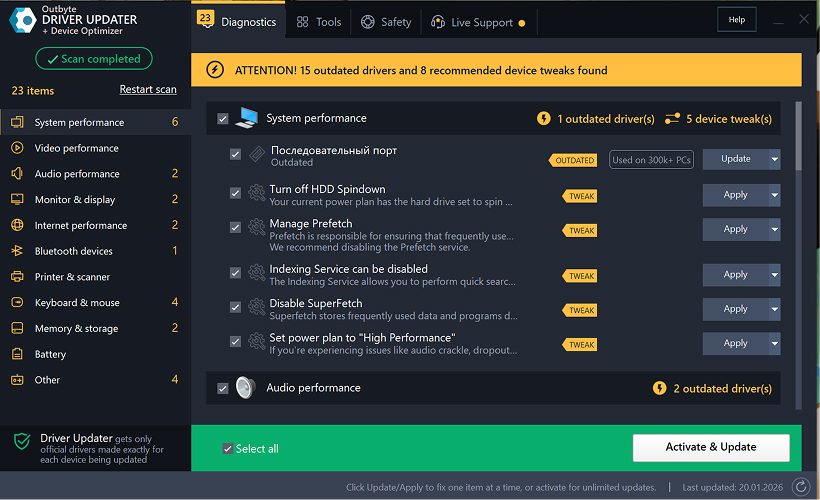
    Step 1: Launch the Program and Scan Your Computer
    Download and install Outbyte Driver Updater on your Windows PC.
    After launching the program, it will automatically start scanning your system and checking installed drivers.
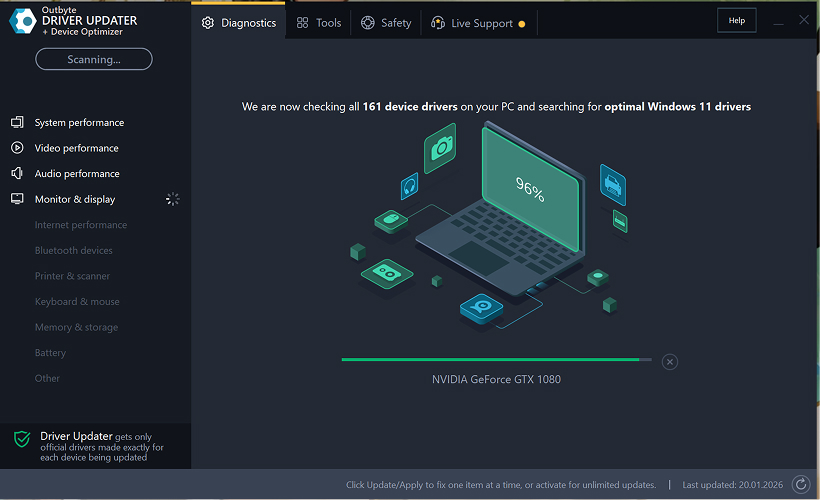
    Step 2: Close the Activation Window

    After the scan, an “Activate now” window may appear.
    To continue for free:
    • click the close (X) button in the top-right corner of the window.
    No information needs to be entered
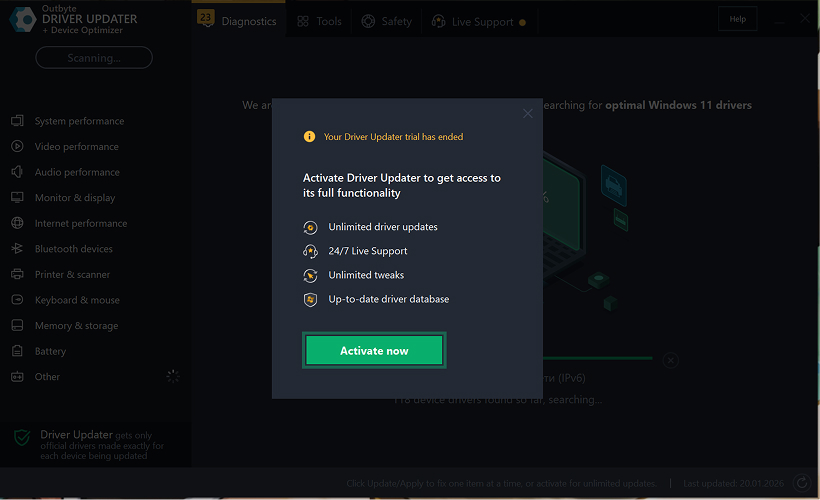
    Step 3: Select the Driver Category
    From the menu on the left, choose the device category you want to update, such as:
    • audio drivers;
    • video and graphics drivers;
    • network and Wi-Fi drivers;
    • Bluetooth drivers;
    • printer and scanner drivers.

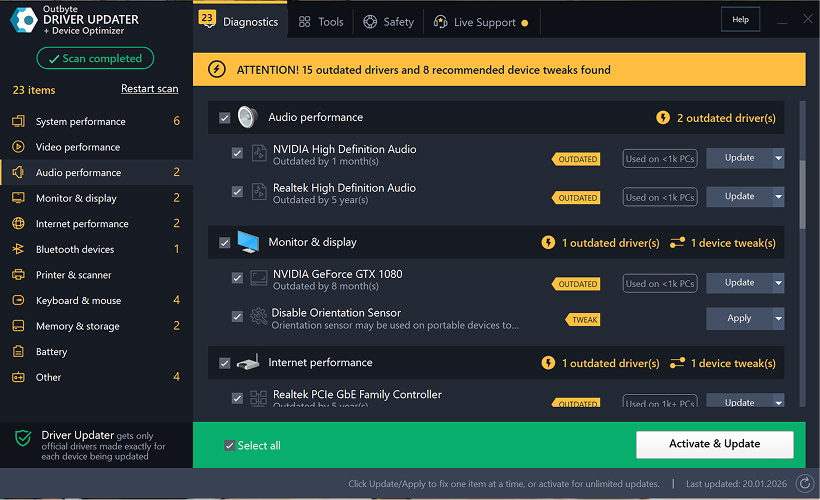
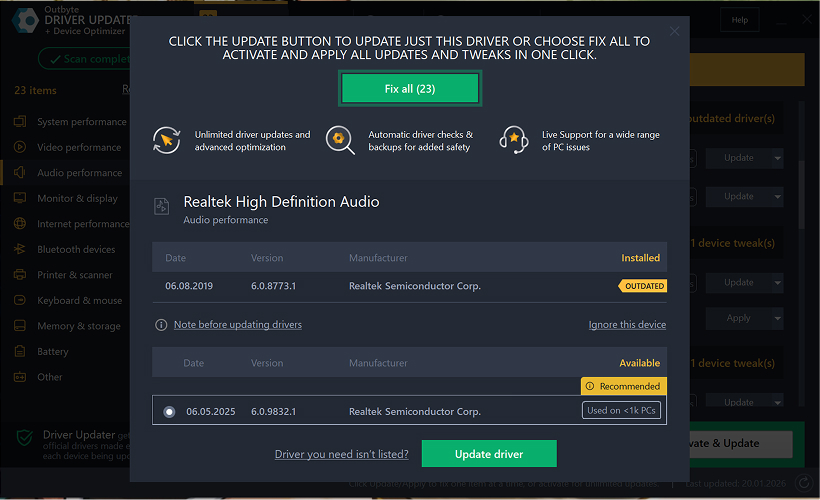
    Step 4: Click “Update” Next to the Selected Driver

    In the driver list, locate the driver you want to update and click the Update button next to it.
    Step 5: Confirm the Driver Update

    In the pop-up window, click Update driver.
    At this stage, no personal data or payment details are required.
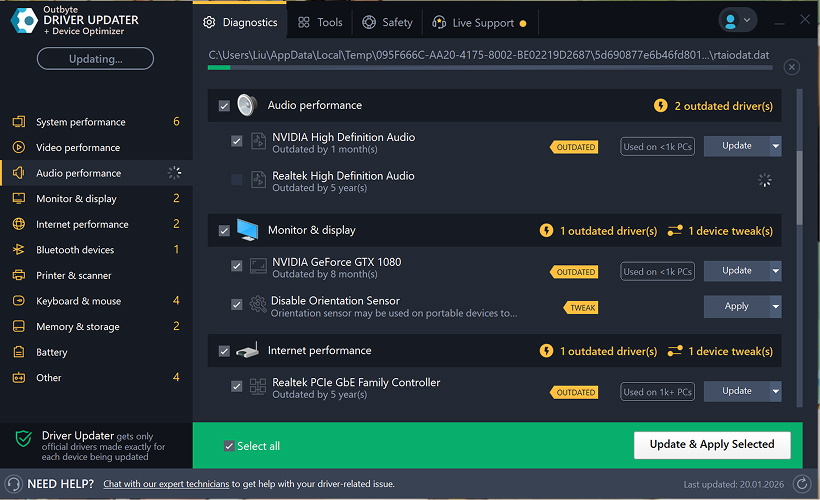
    Step 6: Wait for the Update Process to Finish

    The program will begin downloading and installing the selected driver.
    Please wait until the process is complete.
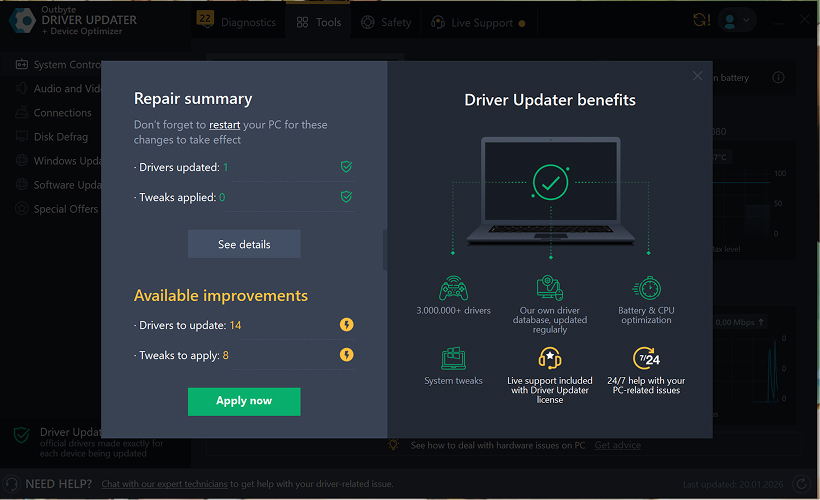
    Step 7: Apply Changes and Restart Your Computer

    After the installation finishes, click Apply now to apply the changes.
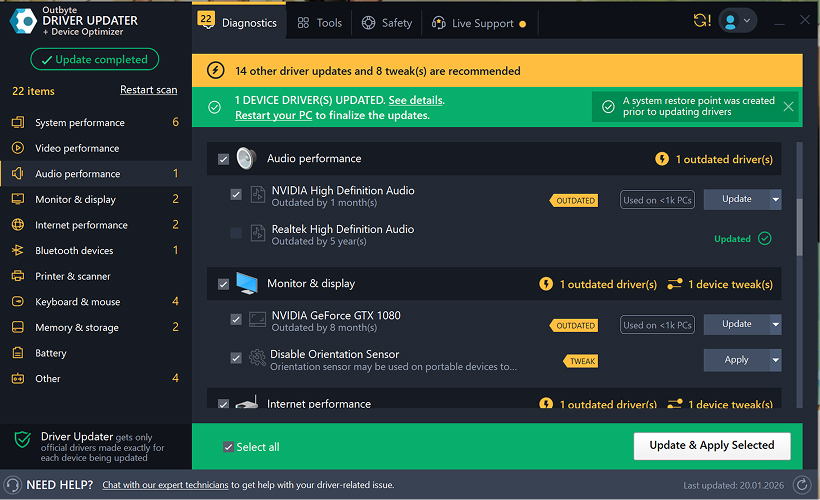
    To ensure the updated driver works correctly, restart your computer.
    Important Notes
    • Free updates are available one driver at a time.
    • No registration is required for the free update.
    • No credit card or payment information is requested.
    • All actions are performed locally within the program after scanning your system.
    • Free update availability may depend on the driver type and system configuration.
    Learn to pair your wireless mouse with a different USB receiver in simple steps. Check compatibility (e.g., Logitech Unifying receivers), install required software/drivers, and use pairing modes to sync devices. Troubleshoot connection issues and optimize performance for seamless use.
    Simplify your workspace with Logitech Unifying Software, enabling effortless connection of up to six compatible devices through a single receiver. Enjoy quick setup, clutter-free connectivity, and enhanced productivity as your keyboard, mouse, and other peripherals work in perfect harmony.
    Learn how to set up your Epson L3250 printer with this step-by-step guide. Unbox, install ink, connect to power, and download drivers via Epson’s website or included CD. Configure Wi-Fi settings for wireless printing and run a test page to ensure proper installation. Simplify your setup process and start printing effortlessly.
    Transform your smartphone into an HD webcam with DroidCam. Enjoy wireless connectivity and seamless video streaming for crystal-clear video calls, live streams, or online meetings. Works with PC/Mac.
    Learn how to enable Bluetooth on your PC in a few simple steps. Check compatibility, activate Bluetooth via Windows Settings or the system tray, pair your device, and troubleshoot common issues. This guide ensures seamless wireless connections for headphones, speakers, or peripherals.
    Learn how to set up your Epson L3250 printer quickly and efficiently. This guide covers unboxing, installing ink cartridges, connecting to power, and configuring Wi-Fi for seamless wireless printing. Follow step-by-step instructions to install drivers, align the printer head, and troubleshoot common issues. Perfect for home or office use, the Epson L3250 ensures hassle-free installation and high-quality printing, scanning, and copying.
    Download the latest Epson L3250 printer drivers and software to ensure seamless connectivity and optimal performance. Compatible with Windows and macOS, these tools enable easy setup, wireless printing, and advanced features. Visit the official Epson support page for secure, up-to-date downloads tailored to your operating system. Simplify installation and maximize your printer’s capabilities with reliable drivers and utilities.
    Discover innovative strategies to amplify your message and connect deeply with audiences – no microphone needed. Harness the power of body language, visual storytelling, and creative platforms to make your voice heard in any setting.
    The Valeton GP 100 Wah is a professional-grade guitar pedal designed for musicians seeking dynamic sound control and expressive tonal shaping. Featuring a responsive wah circuit, it delivers smooth, vintage-inspired sweeps and modern versatility for rock, funk, blues, and beyond. Built with durable components and an intuitive design, the GP 100 ensures reliable performance on stage or in the studio. Adjustable parameters and a true bypass switch provide seamless integration into any pedalboard setup, while its compact size maximizes space efficiency. Elevate your playing with rich, articulate wah effects tailored to your musical style.
    Virtual CloneDrive offers effortless disc image mounting and virtual drive cloning, enabling you to access ISO, BIN, IMG, and other formats without physical media. Streamline workflows, run software, or backup data with a lightweight, user-friendly tool that integrates seamlessly into your system. Simplify disc management and enhance productivity—no hardware required.