Software de Confianza

Outbyte Driver Updater
- 1,000,000+ controladores
- Descargado: 1,143,473 veces
- Windows 11 / 10 / 8 / 7





 Descargar
Skylake-U GT1 HD Graphics 510
Descargar
Skylake-U GT1 HD Graphics 510
Descargar
Skylake-U GT1 HD Graphics 510

Información del Sistema
Su PC está funcionando con:
Driver details
Driver Name:
Skylake-U GT1 HD Graphics 510
Provider:
Intel Corporation
Version:
30.0.101.1338
Release Date:
1/20/2022
Architecture:
AMD64
File Size:
394.0 MB
Driver ID:
pci\ven_8086&dev_1906&subsys_06db1028
Supported OS:
Windows 10
WHQL:
Signed
Oferta especial
Descargar
Todos los enlaces han sido escaneados por un programa antivirus.
Manual download (.cab, 394.0 MB) from Microsoft servers
— install via Device Manager.
Compatible hardware
- Skylake-U GT1 [HD Graphics 510] (Intel Corporation)
- Skylake-U GT2 [HD Graphics 520] (Intel Corporation)
- Skylake-Y GT2 [HD Graphics 515] (Intel Corporation)
- Skylake-S GT2 [HD Graphics 530] (Intel Corporation)
- HD Graphics 520 (Intel Corporation)
- Skylake-U GT3 [Iris Graphics 540] (Intel Corporation)
- HD Graphics 535 (Intel Corporation)
- Skylake-U GT3 [Iris Graphics 550] (Intel Corporation)
- Skylake-S GT1 [HD Graphics 510] (Intel Corporation)
- HD Graphics 510 (Intel Corporation)
- Skylake-H GT4 [Iris Pro Graphics 580] (Intel Corporation)
- Iris Graphics 555 (Intel Corporation)
- Skylake-H GT2 [HD Graphics 530] (Intel Corporation)
- Skylake-H GT3 [Iris Graphics P555] (Intel Corporation)
- Skylake-H GT4 [Iris Pro Graphics P580] (Intel Corporation)
- Skylake-DT/H GT2 [HD Graphics P530] (Intel Corporation)
Supported Hardware IDs
hdaudio\func_01&ven_8086&dev_2811
hdaudio\func_01&ven_8086&dev_2811&subsys_80860101
hdaudio\func_01&ven_8086&dev_2812
hdaudio\func_01&ven_8086&dev_2812&subsys_80860101
hdaudio\func_01&ven_8086&dev_2815
hdaudio\func_01&ven_8086&dev_2815&subsys_80860101
hdaudio\func_01&ven_8086&dev_2816
hdaudio\func_01&ven_8086&dev_2816&subsys_80860101
hdaudio\func_01&ven_8086&dev_281b
hdaudio\func_01&ven_8086&dev_281b&subsys_80860101
Show all 209 hardware IDs
hdaudio\sgpc_func_01&ven_8086&dev_2811
hdaudio\sgpc_func_01&ven_8086&dev_2811&subsys_80860101
intelaudio\func_01&ven_8086&dev_2811
intelaudio\func_01&ven_8086&dev_2811&subsys_80860101
intelaudio\func_01&ven_8086&dev_2812
intelaudio\func_01&ven_8086&dev_2812&subsys_80860101
intelaudio\func_01&ven_8086&dev_2815
intelaudio\func_01&ven_8086&dev_2815&subsys_80860101
intelaudio\func_01&ven_8086&dev_2816
intelaudio\func_01&ven_8086&dev_2816&subsys_80860101
intelaudio\func_01&ven_8086&dev_281b
intelaudio\func_01&ven_8086&dev_281b&subsys_80860101
pci\ven_8086&dev_1902&subsys_06d61028
pci\ven_8086&dev_1902&subsys_06d91028
pci\ven_8086&dev_1902&subsys_06da1028
pci\ven_8086&dev_1902&subsys_06db1028
pci\ven_8086&dev_1902&subsys_06dc1028
pci\ven_8086&dev_1902&subsys_06dd1028
pci\ven_8086&dev_1902&subsys_06de1028
pci\ven_8086&dev_1902&subsys_06df1028
pci\ven_8086&dev_1902&subsys_06e01028
pci\ven_8086&dev_1902&subsys_06e61028
pci\ven_8086&dev_1902&subsys_071b1028
pci\ven_8086&dev_1906&subsys_06d61028
pci\ven_8086&dev_1906&subsys_06d91028
pci\ven_8086&dev_1906&subsys_06da1028
pci\ven_8086&dev_1906&subsys_06db1028
pci\ven_8086&dev_1906&subsys_06dc1028
pci\ven_8086&dev_1906&subsys_06dd1028
pci\ven_8086&dev_1906&subsys_06de1028
pci\ven_8086&dev_1906&subsys_06df1028
pci\ven_8086&dev_1906&subsys_06e01028
pci\ven_8086&dev_1906&subsys_06e61028
pci\ven_8086&dev_1906&subsys_071b1028
pci\ven_8086&dev_190b&subsys_06d61028
pci\ven_8086&dev_190b&subsys_06d91028
pci\ven_8086&dev_190b&subsys_06da1028
pci\ven_8086&dev_190b&subsys_06db1028
pci\ven_8086&dev_190b&subsys_06dc1028
pci\ven_8086&dev_190b&subsys_06dd1028
pci\ven_8086&dev_190b&subsys_06de1028
pci\ven_8086&dev_190b&subsys_06df1028
pci\ven_8086&dev_190b&subsys_06e01028
pci\ven_8086&dev_190b&subsys_06e61028
pci\ven_8086&dev_190b&subsys_071b1028
pci\ven_8086&dev_1912&subsys_06d61028
pci\ven_8086&dev_1912&subsys_06d91028
pci\ven_8086&dev_1912&subsys_06da1028
pci\ven_8086&dev_1912&subsys_06db1028
pci\ven_8086&dev_1912&subsys_06dc1028
pci\ven_8086&dev_1912&subsys_06dd1028
pci\ven_8086&dev_1912&subsys_06de1028
pci\ven_8086&dev_1912&subsys_06df1028
pci\ven_8086&dev_1912&subsys_06e01028
pci\ven_8086&dev_1912&subsys_06e61028
pci\ven_8086&dev_1912&subsys_071b1028
pci\ven_8086&dev_1916&subsys_06d61028
pci\ven_8086&dev_1916&subsys_06d91028
pci\ven_8086&dev_1916&subsys_06da1028
pci\ven_8086&dev_1916&subsys_06db1028
pci\ven_8086&dev_1916&subsys_06dc1028
pci\ven_8086&dev_1916&subsys_06dd1028
pci\ven_8086&dev_1916&subsys_06de1028
pci\ven_8086&dev_1916&subsys_06df1028
pci\ven_8086&dev_1916&subsys_06e01028
pci\ven_8086&dev_1916&subsys_06e61028
pci\ven_8086&dev_1916&subsys_071b1028
pci\ven_8086&dev_191b&subsys_06d61028
pci\ven_8086&dev_191b&subsys_06d91028
pci\ven_8086&dev_191b&subsys_06da1028
pci\ven_8086&dev_191b&subsys_06db1028
pci\ven_8086&dev_191b&subsys_06dc1028
pci\ven_8086&dev_191b&subsys_06dd1028
pci\ven_8086&dev_191b&subsys_06de1028
pci\ven_8086&dev_191b&subsys_06df1028
pci\ven_8086&dev_191b&subsys_06e01028
pci\ven_8086&dev_191b&subsys_06e61028
pci\ven_8086&dev_191b&subsys_071b1028
pci\ven_8086&dev_191d&subsys_06d61028
pci\ven_8086&dev_191d&subsys_06d91028
pci\ven_8086&dev_191d&subsys_06da1028
pci\ven_8086&dev_191d&subsys_06db1028
pci\ven_8086&dev_191d&subsys_06dc1028
pci\ven_8086&dev_191d&subsys_06dd1028
pci\ven_8086&dev_191d&subsys_06de1028
pci\ven_8086&dev_191d&subsys_06df1028
pci\ven_8086&dev_191d&subsys_06e01028
pci\ven_8086&dev_191d&subsys_06e61028
pci\ven_8086&dev_191d&subsys_071b1028
pci\ven_8086&dev_191e&subsys_06d61028
pci\ven_8086&dev_191e&subsys_06d91028
pci\ven_8086&dev_191e&subsys_06da1028
pci\ven_8086&dev_191e&subsys_06db1028
pci\ven_8086&dev_191e&subsys_06dc1028
pci\ven_8086&dev_191e&subsys_06dd1028
pci\ven_8086&dev_191e&subsys_06de1028
pci\ven_8086&dev_191e&subsys_06df1028
pci\ven_8086&dev_191e&subsys_06e01028
pci\ven_8086&dev_191e&subsys_06e61028
pci\ven_8086&dev_191e&subsys_071b1028
pci\ven_8086&dev_1921&subsys_06d61028
pci\ven_8086&dev_1921&subsys_06d91028
pci\ven_8086&dev_1921&subsys_06da1028
pci\ven_8086&dev_1921&subsys_06db1028
pci\ven_8086&dev_1921&subsys_06dc1028
pci\ven_8086&dev_1921&subsys_06dd1028
pci\ven_8086&dev_1921&subsys_06de1028
pci\ven_8086&dev_1921&subsys_06df1028
pci\ven_8086&dev_1921&subsys_06e01028
pci\ven_8086&dev_1921&subsys_06e61028
pci\ven_8086&dev_1921&subsys_071b1028
pci\ven_8086&dev_1923&subsys_06d61028
pci\ven_8086&dev_1923&subsys_06d91028
pci\ven_8086&dev_1923&subsys_06da1028
pci\ven_8086&dev_1923&subsys_06db1028
pci\ven_8086&dev_1923&subsys_06dc1028
pci\ven_8086&dev_1923&subsys_06dd1028
pci\ven_8086&dev_1923&subsys_06de1028
pci\ven_8086&dev_1923&subsys_06df1028
pci\ven_8086&dev_1923&subsys_06e01028
pci\ven_8086&dev_1923&subsys_06e61028
pci\ven_8086&dev_1923&subsys_071b1028
pci\ven_8086&dev_1926&subsys_06d61028
pci\ven_8086&dev_1926&subsys_06d91028
pci\ven_8086&dev_1926&subsys_06da1028
pci\ven_8086&dev_1926&subsys_06db1028
pci\ven_8086&dev_1926&subsys_06dc1028
pci\ven_8086&dev_1926&subsys_06dd1028
pci\ven_8086&dev_1926&subsys_06de1028
pci\ven_8086&dev_1926&subsys_06df1028
pci\ven_8086&dev_1926&subsys_06e01028
pci\ven_8086&dev_1926&subsys_06e61028
pci\ven_8086&dev_1926&subsys_071b1028
pci\ven_8086&dev_1927&subsys_06d61028
pci\ven_8086&dev_1927&subsys_06d91028
pci\ven_8086&dev_1927&subsys_06da1028
pci\ven_8086&dev_1927&subsys_06db1028
pci\ven_8086&dev_1927&subsys_06dc1028
pci\ven_8086&dev_1927&subsys_06dd1028
pci\ven_8086&dev_1927&subsys_06de1028
pci\ven_8086&dev_1927&subsys_06df1028
pci\ven_8086&dev_1927&subsys_06e01028
pci\ven_8086&dev_1927&subsys_06e61028
pci\ven_8086&dev_1927&subsys_071b1028
pci\ven_8086&dev_192b&subsys_06d61028
pci\ven_8086&dev_192b&subsys_06d91028
pci\ven_8086&dev_192b&subsys_06da1028
pci\ven_8086&dev_192b&subsys_06db1028
pci\ven_8086&dev_192b&subsys_06dc1028
pci\ven_8086&dev_192b&subsys_06dd1028
pci\ven_8086&dev_192b&subsys_06de1028
pci\ven_8086&dev_192b&subsys_06df1028
pci\ven_8086&dev_192b&subsys_06e01028
pci\ven_8086&dev_192b&subsys_06e61028
pci\ven_8086&dev_192b&subsys_071b1028
pci\ven_8086&dev_192d&subsys_06d61028
pci\ven_8086&dev_192d&subsys_06d91028
pci\ven_8086&dev_192d&subsys_06da1028
pci\ven_8086&dev_192d&subsys_06db1028
pci\ven_8086&dev_192d&subsys_06dc1028
pci\ven_8086&dev_192d&subsys_06dd1028
pci\ven_8086&dev_192d&subsys_06de1028
pci\ven_8086&dev_192d&subsys_06df1028
pci\ven_8086&dev_192d&subsys_06e01028
pci\ven_8086&dev_192d&subsys_06e61028
pci\ven_8086&dev_192d&subsys_071b1028
pci\ven_8086&dev_193a&subsys_06d61028
pci\ven_8086&dev_193a&subsys_06d91028
pci\ven_8086&dev_193a&subsys_06da1028
pci\ven_8086&dev_193a&subsys_06db1028
pci\ven_8086&dev_193a&subsys_06dc1028
pci\ven_8086&dev_193a&subsys_06dd1028
pci\ven_8086&dev_193a&subsys_06de1028
pci\ven_8086&dev_193a&subsys_06df1028
pci\ven_8086&dev_193a&subsys_06e01028
pci\ven_8086&dev_193a&subsys_06e61028
pci\ven_8086&dev_193a&subsys_071b1028
pci\ven_8086&dev_193b&subsys_06d61028
pci\ven_8086&dev_193b&subsys_06d91028
pci\ven_8086&dev_193b&subsys_06da1028
pci\ven_8086&dev_193b&subsys_06db1028
pci\ven_8086&dev_193b&subsys_06dc1028
pci\ven_8086&dev_193b&subsys_06dd1028
pci\ven_8086&dev_193b&subsys_06de1028
pci\ven_8086&dev_193b&subsys_06df1028
pci\ven_8086&dev_193b&subsys_06e01028
pci\ven_8086&dev_193b&subsys_06e61028
pci\ven_8086&dev_193b&subsys_071b1028
pci\ven_8086&dev_193d&subsys_06d61028
pci\ven_8086&dev_193d&subsys_06d91028
pci\ven_8086&dev_193d&subsys_06da1028
pci\ven_8086&dev_193d&subsys_06db1028
pci\ven_8086&dev_193d&subsys_06dc1028
pci\ven_8086&dev_193d&subsys_06dd1028
pci\ven_8086&dev_193d&subsys_06de1028
pci\ven_8086&dev_193d&subsys_06df1028
pci\ven_8086&dev_193d&subsys_06e01028
pci\ven_8086&dev_193d&subsys_06e61028
pci\ven_8086&dev_193d&subsys_071b1028
Match against Device Manager → Details → Hardware Ids to confirm this driver fits your device.
File details
File name:
6501a25b-5e91-4fbd-9723-def83954948f_0e13dea60a160e4bdfdb1bbab6377d711790f944.cab
File size:
413128477 bytes (393.9 MB)
Signed / DriverVer:
07/29/2021,11.2.0.9
Provider (INF):
Intel(R) Corporation
Catalog file:
IntcDAud.cat
SHA-256:
68be42b84ee5ea623ef2a6fb8bdba8c3a8c4c9bb438771efaf32a51a4e24ab9b
To verify: open PowerShell and run Get-FileHash <filename.cab>
What's inside the package (220 files)
AGS.dll 61.1 KB
AGSOfflinePackage.zip 626.6 KB
ColorImageEnhancement.wmv 366.3 KB
ControlLib.dll 216.3 KB
ControlLib32.dll 172.9 KB
DnnlPlugin.dll 47.8 MB
FilmModeDetection.wmv 626.4 KB
GSCAuxDriver.inf 11.9 KB
GSCAuxDriverx64.sys 85.1 KB
GfxDownloadWrapper.exe 159.6 KB
HdBusExt.inf 7.3 KB
ImageStabilization.wmv 394.2 KB
IntelControlLib.dll 390.4 KB
IntelControlLib32.dll 328.5 KB
IntelCpHDCPSvc.exe 339.1 KB
IntelCpHeciSvc.exe 511.1 KB
IntelGpuCompiler32.dll 127.3 KB
IntelGpuCompiler64.dll 165.3 KB
IntelGraphicsAGS.exe 79.6 KB
Intel_OpenCL_ICD32.dll 363.8 KB
Intel_OpenCL_ICD64.dll 496.8 KB
LiteDB.dll 364.8 KB
MSHdaDac.inf 30.3 KB
NLog.config 1.9 KB
NLog.dll 874.9 KB
Newtonsoft.Json.dll 701.7 KB
OSSCOPYRIGHT.txt 1.3 KB
OneApp.IGCC.COMLibrary.dll 24.8 KB
OneApp.IGCC.CommunicationService.dll 34.8 KB
OneApp.IGCC.CoreLibrary.dll 840.4 KB
OneApp.IGCC.WinService.exe 88.1 KB
OneApp.IGCC.WinService.exe.config 1.6 KB
OpromUpdateTool.exe 184.6 KB
TeeDriverGscW8x64.sys 257.6 KB
UMED.dll 149.6 KB
UniversalAdapter32.dll 287.8 KB
UniversalAdapter64.dll 345.5 KB
VulkanRT-EULA.txt 3.9 KB
acxdac.cat 171.3 KB
c_32.cpa 1.2 MB
c_64.cpa 1.3 MB
cp_resources.bin 2.4 MB
cpa_32.vp 1.0 KB
cpa_64.vp 1.0 KB
cui_dch.inf 39.5 KB
dev_32.vp 55.8 KB
dev_64.vp 55.0 KB
gscauxdriver.cat 171.8 KB
gscheci.cat 171.8 KB
gscheci.inf 12.3 KB
h265e_32.vp 73.8 KB
h265e_64.vp 13.3 KB
hdbusext.cat 171.3 KB
he_32.vp 72.3 KB
he_64.vp 12.7 KB
ig11icd32.dll 13.1 MB
ig11icd64.dll 16.4 MB
ig9icd32.dll 12.7 MB
ig9icd64.dll 15.9 MB
iga32.dll 2.3 MB
iga64.dll 2.9 MB
igc32.dll 46.4 MB
igc64.dll 54.8 MB
igcc_dch.inf 5.8 KB
igd10iumd32.dll 23.0 MB
igd10iumd64.dll 27.3 MB
igd10mg32.dll 1.8 MB
igd10mg64.dll 1.8 MB
igd11dxva32.dll 73.3 MB
igd11dxva64.dll 74.6 MB
igd12dxva32.dll 72.8 MB
igd12dxva64.dll 74.1 MB
igd12um32icl.dll 9.4 MB
igd12um32kbl.dll 9.3 MB
igd12um32xel.dll 9.5 MB
igd12um64icl.dll 9.9 MB
igd12um64kbl.dll 9.8 MB
igd12um64xel.dll 10.0 MB
igd12umd32.dll 114.0 KB
igd12umd64.dll 150.1 KB
igd9dxva32.dll 60.3 MB
igd9dxva64.dll 61.6 MB
igdail32.dll 163.8 KB
igdail64.dll 198.8 KB
igdde32.dll 343.5 KB
igdde64.dll 422.1 KB
igdext32.dll 240.2 KB
igdext64.dll 296.4 KB
igdfcl32.dll 951.8 KB
igdfcl64.dll 1.0 MB
igdgmm32.dll 3.0 MB
igdgmm64.dll 3.8 MB
igdinfo32.dll 138.0 KB
igdinfo64.dll 164.0 KB
igdkmd64.sys 38.1 MB
igdkmdn64.sys 38.4 MB
igdkmdnd64.sys 38.4 MB
igdlh.cat 9.1 MB
igdmd32.dll 5.0 MB
igdmd64.dll 6.4 MB
igdml32.dll 2.2 MB
igdml64.dll 2.9 MB
igdrcl32.dll 4.6 MB
igdrcl64.dll 5.2 MB
igdumdim32.dll 1.4 MB
igdumdim64.dll 1.6 MB
igfx11cmrt32.dll 180.8 KB
igfx11cmrt64.dll 225.0 KB
igfxCUIService.exe 393.1 KB
igfxCUIServiceN.exe 391.6 KB
igfxCUIServicePS.dll 403.3 KB
igfxCUIServicePSN.dll 404.3 KB
igfxDH.dll 961.8 KB
igfxDHN.dll 955.8 KB
igfxDI.dll 417.3 KB
igfxDIN.dll 370.3 KB
igfxEM.exe 751.0 KB
igfxEMN.exe 745.0 KB
igfxLHM.dll 2.1 MB
igfxSDK.exe 971.6 KB
igfxSDKLib.dll 99.8 KB
igfxcmrt32.dll 178.8 KB
igfxcmrt64.dll 221.9 KB
igfxexps.dll 60.9 KB
igfxexps32.dll 52.3 KB
igfxext.exe 337.1 KB
igfxextN.exe 339.1 KB
iglhxa64.cpa 1.3 MB
iglhxa64.vp 1.0 KB
iglhxc64.vp 43.1 KB
iglhxc64_dev.vp 42.2 KB
iglhxg64.vp 42.7 KB
iglhxg64_dev.vp 42.7 KB
iglhxo64.vp 41.5 KB
iglhxo64_dev.vp 42.1 KB
iglhxs64.vp 5.7 KB
iglhxsn64.vp 6.3 KB
iglhxsnd64.vp 6.3 KB
igsc.dll 187.5 KB
igvk32.dll 18.5 MB
igvk32.json 135 B
igvk64.dll 20.6 MB
igvk64.json 135 B
igxelpicd32.dll 13.1 MB
igxelpicd64.dll 15.7 MB
igxelpplusicd32.dll 13.1 MB
igxelpplusicd64.dll 15.7 MB
iigd_dch.inf 504.3 KB
iigd_dch_d.inf 286.3 KB
intel_gfx_api-x64.dll 589.8 KB
intel_gfx_api-x86.dll 452.1 KB
libLLVM-9.so 36.7 MB
libUniversalAdapter64.so 494.0 KB
libigc.so 39.2 MB
libigd12um64icl.so 4.4 MB
libigd12um64kbl.so 4.3 MB
libigd12um64xel.so 4.6 MB
libigd12umd64.so 42.1 KB
libigdfcl.so 949.7 KB
libigdgmm.so.12 2.1 MB
libmfx32-gen.dll 22.3 MB
libmfx64-gen.dll 23.5 MB
libmfxhw32.dll 26.2 MB
libmfxhw64.dll 27.8 MB
libopencl-clang.so.9 77.1 MB
libwsl_compute_helper.so 494.0 KB
memcntrl.inf 3.4 KB
mfx_loader_dll_hw32.dll 703.2 KB
mfx_loader_dll_hw64.dll 938.8 KB
mfx_mft_av1hve_32.dll 2.3 MB
mfx_mft_av1hve_32.vp 73.5 KB
mfx_mft_av1hve_64.dll 2.9 MB
mfx_mft_av1hve_64.vp 13.1 KB
mfx_mft_encrypt_32.dll 2.2 MB
mfx_mft_encrypt_64.dll 2.7 MB
mfx_mft_h264ve_32.dll 2.3 MB
mfx_mft_h264ve_64.dll 2.9 MB
mfx_mft_h265ve_32.dll 2.3 MB
mfx_mft_h265ve_64.dll 2.9 MB
mfx_mft_mjpgvd_32.dll 2.2 MB
mfx_mft_mjpgvd_64.dll 2.7 MB
mfx_mft_vp9ve_32.dll 2.3 MB
mfx_mft_vp9ve_64.dll 2.9 MB
mfxplugin32_av1e_gacc.dll 8.2 MB
mfxplugin32_hw.dll 19.6 MB
mfxplugin64_av1e_gacc.dll 12.0 MB
mfxplugin64_hw.dll 26.6 MB
mj_32.vp 68.0 KB
mj_64.vp 12.4 KB
opencl-clang32.dll 59.1 MB
opencl-clang64.dll 79.6 MB
vp9e_32.vp 73.4 KB
vp9e_64.vp 13.1 KB
vpl_dispatcher_32.dll 435.0 KB
vpl_dispatcher_64.dll 501.2 KB
vulkan-1-32.dll 1.0 MB
vulkan-1-64.dll 1.2 MB
vulkaninfo-32.exe 1.4 MB
vulkaninfo-64.exe 1.8 MB
ze_intel_gpu64.dll 4.4 MB
ze_loader.dll 376.3 KB
ze_tracing_layer.dll 451.8 KB
ze_validation_layer.dll 148.3 KB
dg1_c_oprom.rom 1.0 MB
MiniCtaDriver.inf 4.2 KB
MiniCtaDriver.sys 37.6 KB
minictadriver.cat 171.8 KB
dg1_gfx_fwupdate.bin 2.0 MB
IntcDAud.inf 4.9 MB
IntcDAud.sys 305.1 KB
intcdaud.cat 174.5 KB
IntcDAud.inf 4.9 MB
IntcDAud.sys 362.1 KB
intcdaud.cat 175.1 KB
IntcDAud.inf 4.9 MB
IntcDAud.sys 344.6 KB
intcdaud.cat 174.9 KB
IntcDAud.inf 4.9 MB
IntcDAud.sys 645.6 KB
intcdaud.cat 177.5 KB
All versions of this driver
| Version | Release Date | Architecture | OS | |
|---|---|---|---|---|
| 30.0.101.3111 | 6/9/2022 | AMD64 | Windows 10 | 30.0.101.3111 |
| 30.0.101.1339 | 1/21/2022 | AMD64 | Windows 10 | 30.0.101.1339 |
| 30.0.101.1338 | 1/20/2022 | AMD64 | Windows 10 | (this page) |
| 27.20.100.9416 | 3/24/2021 | AMD64 | Windows 10 | 27.20.100.9416 |
| 27.20.100.8854 | 10/14/2020 | AMD64 | Windows 10 | 27.20.100.8854 |
| 27.20.100.8477 | 7/8/2020 | AMD64 | Windows 10 | 27.20.100.8477 |
| 26.20.100.8142 | 4/11/2020 | AMD64 | Windows 10 | 26.20.100.8142 |
| 24.20.100.6286 | 8/15/2018 | AMD64 | Windows 10 | 24.20.100.6286 |
| 24.20.100.6025 | 4/25/2018 | AMD64 | Windows 10 | 24.20.100.6025 |
| 23.20.16.5038 | 4/18/2018 | AMD64 | Windows 10 | 23.20.16.5038 |
| 23.20.16.4973 | 2/28/2018 | AMD64 | Windows 10 | 23.20.16.4973 |
| 23.20.16.4973 | 2/28/2018 | AMD64 | Windows 10 | 23.20.16.4973 |
| 23.20.16.4973 | 2/28/2018 | AMD64 | Windows 10 | 23.20.16.4973 |
| 23.20.16.4901 | 12/18/2017 | AMD64 | Windows 10 | 23.20.16.4901 |
| 23.20.16.4849 | 10/27/2017 | AMD64 | Windows 10 | 23.20.16.4849 |
| 22.20.16.4836 | 10/17/2017 | AMD64 | Windows 10 | 22.20.16.4836 |
| 21.20.16.4821 | 10/2/2017 | X86 | Windows 7 | 21.20.16.4821 |
| 21.20.16.4720 | 6/27/2017 | AMD64 | Windows 7 | 21.20.16.4720 |
| 21.20.16.4678 | 5/17/2017 | X86 | Windows 7 | 21.20.16.4678 |
| 21.20.16.4590 | 1/18/2017 | AMD64 | Windows 10 | 21.20.16.4590 |
| 21.20.16.4574 | 12/23/2016 | AMD64 | Windows 10 | 21.20.16.4574 |
| 21.20.16.4574 | 12/23/2016 | AMD64 | Windows 10 | 21.20.16.4574 |
| 21.20.16.4574 | 12/23/2016 | AMD64 | Windows 10 | 21.20.16.4574 |
| 21.20.16.4551 | 11/18/2016 | AMD64 | Windows 8.1, Windows 8, Windows 7 | 21.20.16.4551 |
| 21.20.16.4482 | 6/30/2016 | AMD64 | Windows 10 | 21.20.16.4482 |
Related drivers
- CometLake-U GT2 UHD Graphics (v31.0.101.2140)
- Alder Lake-S GT1 UHD Graphics 770 (v32.0.101.7080)
- Alder Lake-N UHD Graphics (v32.0.101.7077)
- TigerLake-LP GT2 Iris Xe Graphics (v32.0.101.7077)
- Alder Lake-S GT1 UHD Graphics 770 (v32.0.101.7077)
- Xeon E3-1200 v3 4th Gen Core Processor Integrated Graphics Controller (v20.19.15.4568)
- Alder Lake-S GT1 UHD Graphics 770 (v32.0.101.7077)
- TigerLake-LP GT2 Iris Xe Graphics (v32.0.101.7077)
- Alder Lake-S GT1 UHD Graphics 770 (v32.0.101.7026)
- Alder Lake-P GT1 UHD Graphics (v32.0.101.7077)
Controladores: La Base del Rendimiento Estable de los Dispositivos
¿Por qué son tan importantes los Controladores?
Los controladores desempeñan un papel crucial en la estabilidad del sistema. Los controladores obsoletos o dañados pueden causar:
Se recomienda actualizar los controladores cada 3-6 meses. Esto es especialmente importante antes de instalar un nuevo sistema operativo, ya que los controladores actualizados pueden ser necesarios para garantizar la compatibilidad.
¿Cómo mantener sus Controladores Actualizados?
Método automático para actualizar y descargar drivers (Recomendado):
Si prefieres no buscar manualmente el controlador adecuado, existen herramientas que detectan automáticamente el modelo de tu dispositivo y encuentran un controlador compatible. Esto reduce el riesgo de errores y ahorra tiempo.
Oferta especial
Descargar

Limitations: trial version offers an unlimited number of scans, free driver backup and rollback. Registration for the full version starts from USD 29.95. See more information about Outbyte and uninstall instructions. Please review Outbyte EULA and Privacy Policy
Todos los enlaces han sido escaneados por un programa antivirus.
Instalación manual del controlador
Nota: Instalar una versión incorrecta del controlador puede causar problemas en el sistema. Si no estás seguro de qué controlador elegir, recomendamos usar el método automático.
Descarga el controlador a través del Administrador de dispositivos. Cómo abrir el Administrador de dispositivos:
Cómo instalar controladores usando el Administrador de dispositivos:
Cómo actualizar un controlador de forma gratuita con Outbyte Driver Updater
Mantener los controladores de tu dispositivo actualizados ayuda a garantizar un rendimiento estable de Windows y el funcionamiento correcto del hardware. A continuación se presenta una guía paso a paso que explica cómo actualizar un solo controlador de forma gratuita usando Outbyte Driver Updater. Esta guía describe un método para actualizar un controlador seleccionado sin activar una licencia y sin proporcionar información personal ni detalles de pago.
¿Puedes actualizar un controlador gratis sin registro?
Sí.
Outbyte Driver Updater te permite:
- escanear tu computadora en busca de controladores desactualizados sin costo;
- ver una lista de los controladores detectados;
- actualizar un controlador seleccionado de forma gratuita;
- evitar ingresar una dirección de correo electrónico, nombre, número de tarjeta de crédito o cualquier otro dato personal.
El proceso de actualización gratuita solo requiere el programa instalado y los pasos estándar de escaneo y actualización.
Paso 1: Inicia el programa y escanea tu computadora
Descarga e instala Outbyte Driver Updater en tu PC con Windows.
Después de iniciar el programa, comenzará automáticamente a escanear tu sistema y verificar los controladores instalados.
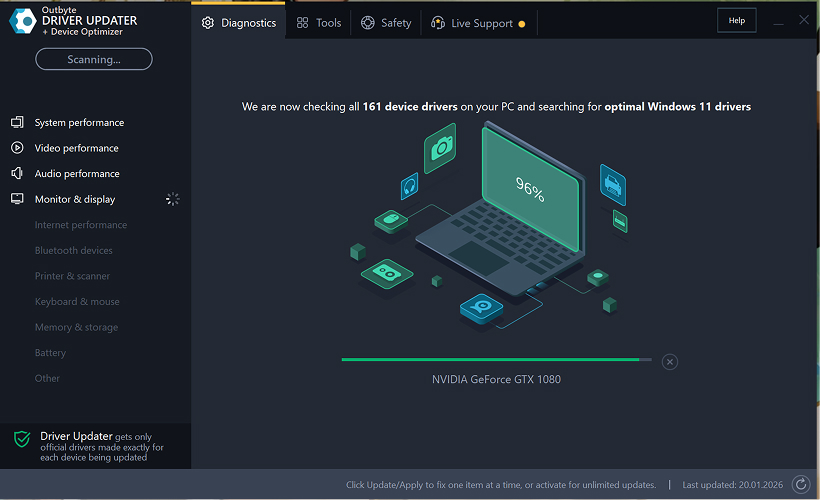
Paso 2: Cierra la ventana de activación
Después del escaneo, puede aparecer una ventana de "Activar ahora".
Para continuar gratis:
- haz clic en el botón de cerrar (X) en la esquina superior derecha de la ventana.
No es necesario ingresar ninguna información
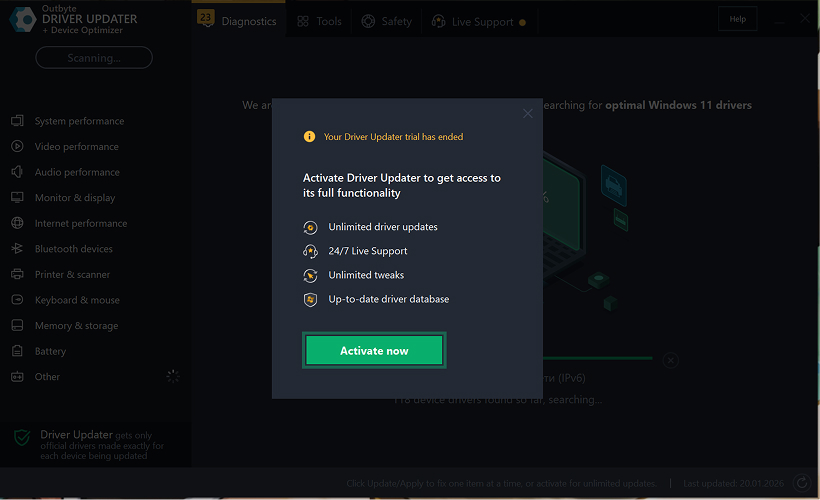
Paso 3: Selecciona la categoría del controlador
Desde el menú de la izquierda, elige la categoría del dispositivo que deseas actualizar, como:
- controladores de audio;
- controladores de video y gráficos;
- controladores de red y Wi-Fi;
- controladores Bluetooth;
- controladores de impresora y escáner.
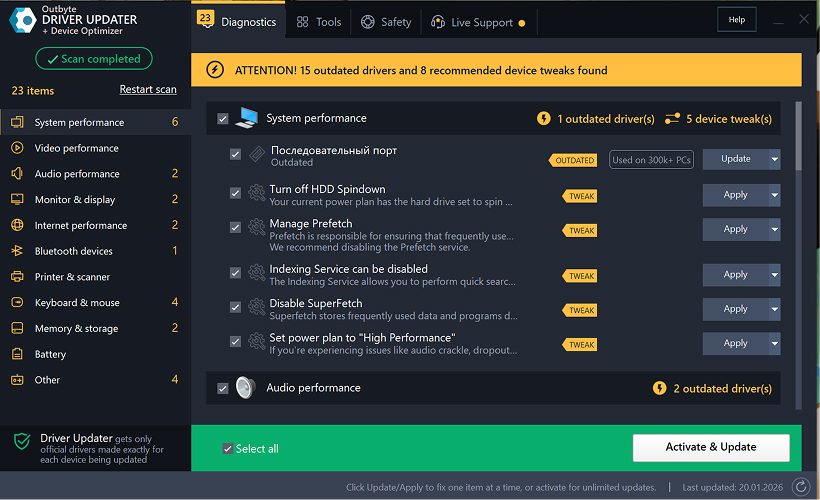
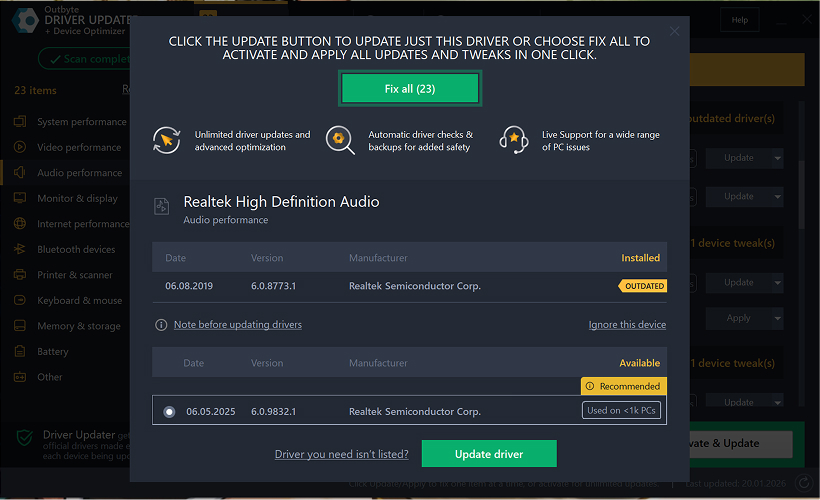
Paso 4: Haz clic en "Actualizar" junto al controlador seleccionado
En la lista de controladores, localiza el controlador que deseas actualizar y haz clic en el botón Actualizar junto a él.
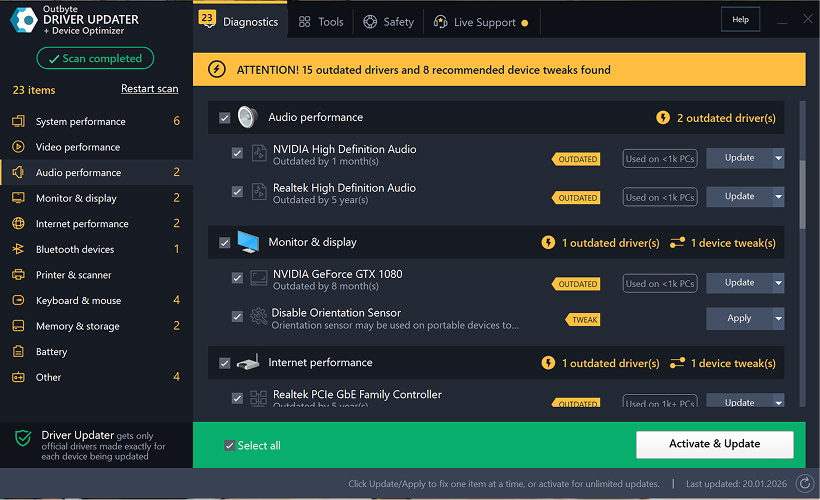
Paso 5: Confirma la actualización del controlador
En la ventana emergente, haz clic en Actualizar controlador.
En esta etapa, no se requieren datos personales ni detalles de pago.
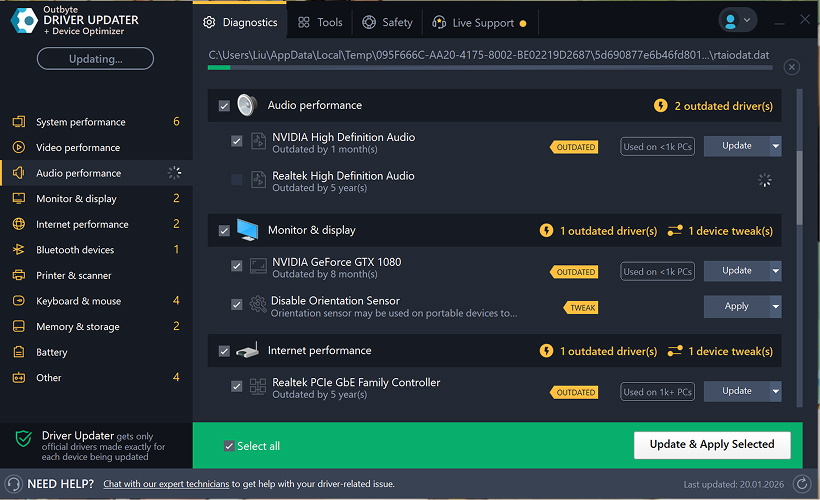
Paso 6: Espera a que finalice el proceso de actualización
El programa comenzará a descargar e instalar el controlador seleccionado.
Por favor, espera hasta que se complete el proceso.
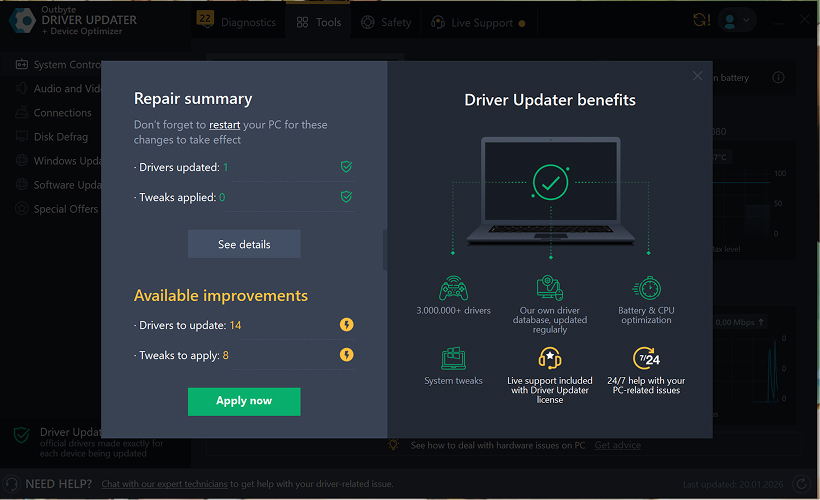
Paso 7: Aplica los cambios y reinicia tu computadora
Después de que termine la instalación, haz clic en Aplicar ahora para aplicar los cambios.
Para asegurar que el controlador actualizado funcione correctamente, reinicia tu computadora.
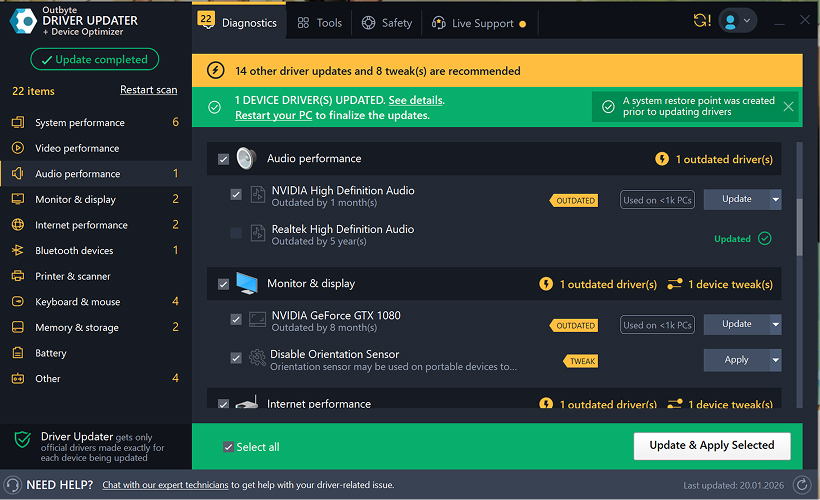
Notas importantes
- Las actualizaciones gratuitas están disponibles de a un controlador por vez.
- No se requiere registro para la actualización gratuita.
- No se solicita tarjeta de crédito ni información de pago.
- Todas las acciones se realizan localmente dentro del programa después de escanear tu sistema.
- La disponibilidad de actualizaciones gratuitas puede depender del tipo de controlador y la configuración del sistema.
Learn to pair your wireless mouse with a different USB receiver in simple steps. Check compatibility (e.g., Logitech Unifying receivers), install required software/drivers, and use pairing modes to sync devices. Troubleshoot connection issues and optimize performance for seamless use.
Simplify your workspace with Logitech Unifying Software, enabling effortless connection of up to six compatible devices through a single receiver. Enjoy quick setup, clutter-free connectivity, and enhanced productivity as your keyboard, mouse, and other peripherals work in perfect harmony.
Learn how to set up your Epson L3250 printer with this step-by-step guide. Unbox, install ink, connect to power, and download drivers via Epson’s website or included CD. Configure Wi-Fi settings for wireless printing and run a test page to ensure proper installation. Simplify your setup process and start printing effortlessly.
Transform your smartphone into an HD webcam with DroidCam. Enjoy wireless connectivity and seamless video streaming for crystal-clear video calls, live streams, or online meetings. Works with PC/Mac.
Learn how to enable Bluetooth on your PC in a few simple steps. Check compatibility, activate Bluetooth via Windows Settings or the system tray, pair your device, and troubleshoot common issues. This guide ensures seamless wireless connections for headphones, speakers, or peripherals.
Learn how to set up your Epson L3250 printer quickly and efficiently. This guide covers unboxing, installing ink cartridges, connecting to power, and configuring Wi-Fi for seamless wireless printing. Follow step-by-step instructions to install drivers, align the printer head, and troubleshoot common issues. Perfect for home or office use, the Epson L3250 ensures hassle-free installation and high-quality printing, scanning, and copying.
Download the latest Epson L3250 printer drivers and software to ensure seamless connectivity and optimal performance. Compatible with Windows and macOS, these tools enable easy setup, wireless printing, and advanced features. Visit the official Epson support page for secure, up-to-date downloads tailored to your operating system. Simplify installation and maximize your printer’s capabilities with reliable drivers and utilities.
Discover innovative strategies to amplify your message and connect deeply with audiences – no microphone needed. Harness the power of body language, visual storytelling, and creative platforms to make your voice heard in any setting.
The Valeton GP 100 Wah is a professional-grade guitar pedal designed for musicians seeking dynamic sound control and expressive tonal shaping. Featuring a responsive wah circuit, it delivers smooth, vintage-inspired sweeps and modern versatility for rock, funk, blues, and beyond. Built with durable components and an intuitive design, the GP 100 ensures reliable performance on stage or in the studio. Adjustable parameters and a true bypass switch provide seamless integration into any pedalboard setup, while its compact size maximizes space efficiency. Elevate your playing with rich, articulate wah effects tailored to your musical style.
Virtual CloneDrive offers effortless disc image mounting and virtual drive cloning, enabling you to access ISO, BIN, IMG, and other formats without physical media. Streamline workflows, run software, or backup data with a lightweight, user-friendly tool that integrates seamlessly into your system. Simplify disc management and enhance productivity—no hardware required.