
Download
Navi 33 Radeon RX 7600 7600 XT 7600M XT 7600S 7700S PRO W7600
Informations Système
Votre PC fonctionne actuellement avec :
Driver details
Driver Name:
Navi 33 Radeon RX 7600 7600 XT 7600M XT 7600S 7700S PRO W7600
Provider:
Advanced Micro Devices, Inc.
Version:
32.0.21043.1005
Release Date:
2/18/2026
Architecture:
AMD64
File Size:
726.7 MB
Driver ID:
pci\ven_1002&dev_7480&subsys_0bff1028&rev_c7
Supported OS:
Windows 11
WHQL:
Signed
Offre spéciale
Download
Tous les liens ont été analysés par un programme antivirus.
Manual download (.cab, 726.7 MB) from Microsoft servers
— install via Device Manager.
Compatible hardware
- Navi 33 [Radeon RX 7600/7600 XT/7600M XT/7600S/7700S / PRO W7600] (Advanced Micro Devices, Inc. [AMD/ATI])
- Raphael (Advanced Micro Devices, Inc. [AMD/ATI])
- Navi 31 [Radeon RX 7900 XT/7900 XTX/7900 GRE/7900M] (Advanced Micro Devices, Inc. [AMD/ATI])
Supported Hardware IDs
pci\ven_1002&dev_164e&subsys_0bfd1028&rev_d8
pci\ven_1002&dev_164e&subsys_0bfd1028&rev_d9
pci\ven_1002&dev_164e&subsys_0bfd1028&rev_da
pci\ven_1002&dev_164e&subsys_0bfe1028&rev_d8
pci\ven_1002&dev_164e&subsys_0bfe1028&rev_d9
pci\ven_1002&dev_164e&subsys_0bfe1028&rev_da
pci\ven_1002&dev_164e&subsys_0bff1028&rev_d8
pci\ven_1002&dev_164e&subsys_0bff1028&rev_d9
pci\ven_1002&dev_164e&subsys_0bff1028&rev_da
pci\ven_1002&dev_164e&subsys_0bff1028&rev_db
Show all 274 hardware IDs
pci\ven_1002&dev_164e&subsys_0c4a1028&rev_d8
pci\ven_1002&dev_164e&subsys_0c4a1028&rev_d9
pci\ven_1002&dev_164e&subsys_0c4a1028&rev_da
pci\ven_1002&dev_164e&subsys_0c4b1028&rev_d8
pci\ven_1002&dev_164e&subsys_0c4b1028&rev_d9
pci\ven_1002&dev_164e&subsys_0c4b1028&rev_da
pci\ven_1002&dev_164e&subsys_0c4c1028&rev_d8
pci\ven_1002&dev_164e&subsys_0c4c1028&rev_d9
pci\ven_1002&dev_164e&subsys_0c4c1028&rev_da
pci\ven_1002&dev_164e&subsys_0c4c1028&rev_db
pci\ven_1002&dev_164e&subsys_0cd01028&rev_d8
pci\ven_1002&dev_6700
pci\ven_1002&dev_6701
pci\ven_1002&dev_6702
pci\ven_1002&dev_6703
pci\ven_1002&dev_6704
pci\ven_1002&dev_6705
pci\ven_1002&dev_6706
pci\ven_1002&dev_6707
pci\ven_1002&dev_6708
pci\ven_1002&dev_6709
pci\ven_1002&dev_6718
pci\ven_1002&dev_6719
pci\ven_1002&dev_671c
pci\ven_1002&dev_671d
pci\ven_1002&dev_671f
pci\ven_1002&dev_6720
pci\ven_1002&dev_6721
pci\ven_1002&dev_6722
pci\ven_1002&dev_6723
pci\ven_1002&dev_6724
pci\ven_1002&dev_6725
pci\ven_1002&dev_6726
pci\ven_1002&dev_6727
pci\ven_1002&dev_6728
pci\ven_1002&dev_6729
pci\ven_1002&dev_6738
pci\ven_1002&dev_6739
pci\ven_1002&dev_673e
pci\ven_1002&dev_6740
pci\ven_1002&dev_6741
pci\ven_1002&dev_6742
pci\ven_1002&dev_6743
pci\ven_1002&dev_6744
pci\ven_1002&dev_6746
pci\ven_1002&dev_6747
pci\ven_1002&dev_6748
pci\ven_1002&dev_6749
pci\ven_1002&dev_674a
pci\ven_1002&dev_6750
pci\ven_1002&dev_6751
pci\ven_1002&dev_6758
pci\ven_1002&dev_6759
pci\ven_1002&dev_675b
pci\ven_1002&dev_675d
pci\ven_1002&dev_675f
pci\ven_1002&dev_6760
pci\ven_1002&dev_6761
pci\ven_1002&dev_6762
pci\ven_1002&dev_6763
pci\ven_1002&dev_6764
pci\ven_1002&dev_6765
pci\ven_1002&dev_6766
pci\ven_1002&dev_6767
pci\ven_1002&dev_6768
pci\ven_1002&dev_6770
pci\ven_1002&dev_6771
pci\ven_1002&dev_6772
pci\ven_1002&dev_6778
pci\ven_1002&dev_6779
pci\ven_1002&dev_677b
pci\ven_1002&dev_6840
pci\ven_1002&dev_6841
pci\ven_1002&dev_6842
pci\ven_1002&dev_6843
pci\ven_1002&dev_6849
pci\ven_1002&dev_684c
pci\ven_1002&dev_6850
pci\ven_1002&dev_6858
pci\ven_1002&dev_6859
pci\ven_1002&dev_6880
pci\ven_1002&dev_6888
pci\ven_1002&dev_6889
pci\ven_1002&dev_688a
pci\ven_1002&dev_688c
pci\ven_1002&dev_688d
pci\ven_1002&dev_6898
pci\ven_1002&dev_6899
pci\ven_1002&dev_689b
pci\ven_1002&dev_689c
pci\ven_1002&dev_689d
pci\ven_1002&dev_689e
pci\ven_1002&dev_68a0
pci\ven_1002&dev_68a1
pci\ven_1002&dev_68a8
pci\ven_1002&dev_68a9
pci\ven_1002&dev_68b0
pci\ven_1002&dev_68b8
pci\ven_1002&dev_68b9
pci\ven_1002&dev_68ba
pci\ven_1002&dev_68be
pci\ven_1002&dev_68bf
pci\ven_1002&dev_68c0
pci\ven_1002&dev_68c1
pci\ven_1002&dev_68c7
pci\ven_1002&dev_68c8
pci\ven_1002&dev_68c9
pci\ven_1002&dev_68d8
pci\ven_1002&dev_68d9
pci\ven_1002&dev_68da
pci\ven_1002&dev_68de
pci\ven_1002&dev_68e0
pci\ven_1002&dev_68e1
pci\ven_1002&dev_68e4
pci\ven_1002&dev_68e5
pci\ven_1002&dev_68e8
pci\ven_1002&dev_68e9
pci\ven_1002&dev_68f1
pci\ven_1002&dev_68f2
pci\ven_1002&dev_68f8
pci\ven_1002&dev_68f9
pci\ven_1002&dev_68fa
pci\ven_1002&dev_68fe
pci\ven_1002&dev_744c&subsys_0c4c1028&rev_cf
pci\ven_1002&dev_7480&subsys_0bff1028&rev_c7
pci\ven_1002&dev_7480&subsys_0c4c1028&rev_c7
pci\ven_1002&dev_9400
pci\ven_1002&dev_9403
pci\ven_1002&dev_9405
pci\ven_1002&dev_940a
pci\ven_1002&dev_940b
pci\ven_1002&dev_940f
pci\ven_1002&dev_9440
pci\ven_1002&dev_9441
pci\ven_1002&dev_9442
pci\ven_1002&dev_9443
pci\ven_1002&dev_9444
pci\ven_1002&dev_944a
pci\ven_1002&dev_944c
pci\ven_1002&dev_944e
pci\ven_1002&dev_9450
pci\ven_1002&dev_9452
pci\ven_1002&dev_9456
pci\ven_1002&dev_945a
pci\ven_1002&dev_9460
pci\ven_1002&dev_9462
pci\ven_1002&dev_9480
pci\ven_1002&dev_9488
pci\ven_1002&dev_9490
pci\ven_1002&dev_9491
pci\ven_1002&dev_9495
pci\ven_1002&dev_9498
pci\ven_1002&dev_949c
pci\ven_1002&dev_949e
pci\ven_1002&dev_949f
pci\ven_1002&dev_94a0
pci\ven_1002&dev_94a1
pci\ven_1002&dev_94a3
pci\ven_1002&dev_94b3
pci\ven_1002&dev_94b4
pci\ven_1002&dev_94b5
pci\ven_1002&dev_94c1
pci\ven_1002&dev_94c3
pci\ven_1002&dev_94c4
pci\ven_1002&dev_94c6
pci\ven_1002&dev_94c7
pci\ven_1002&dev_94c8
pci\ven_1002&dev_94c9
pci\ven_1002&dev_94cb
pci\ven_1002&dev_94cc
pci\ven_1002&dev_9501
pci\ven_1002&dev_9504
pci\ven_1002&dev_9505
pci\ven_1002&dev_9506
pci\ven_1002&dev_9507
pci\ven_1002&dev_9508
pci\ven_1002&dev_9509
pci\ven_1002&dev_950f
pci\ven_1002&dev_9511
pci\ven_1002&dev_9513
pci\ven_1002&dev_9515
pci\ven_1002&dev_9519
pci\ven_1002&dev_9540
pci\ven_1002&dev_954f
pci\ven_1002&dev_9552
pci\ven_1002&dev_9553
pci\ven_1002&dev_9555
pci\ven_1002&dev_9557
pci\ven_1002&dev_955f
pci\ven_1002&dev_9581
pci\ven_1002&dev_9583
pci\ven_1002&dev_9586
pci\ven_1002&dev_9587
pci\ven_1002&dev_9588
pci\ven_1002&dev_9589
pci\ven_1002&dev_958a
pci\ven_1002&dev_958b
pci\ven_1002&dev_958c
pci\ven_1002&dev_958d
pci\ven_1002&dev_9591
pci\ven_1002&dev_9593
pci\ven_1002&dev_9596
pci\ven_1002&dev_9598
pci\ven_1002&dev_95c0
pci\ven_1002&dev_95c2
pci\ven_1002&dev_95c4
pci\ven_1002&dev_95c5
pci\ven_1002&dev_95c6
pci\ven_1002&dev_95c9
pci\ven_1002&dev_95cc
pci\ven_1002&dev_95cd
pci\ven_1002&dev_95ce
pci\ven_1002&dev_95cf
pci\ven_1002&dev_9610
pci\ven_1002&dev_9611
pci\ven_1002&dev_9612
pci\ven_1002&dev_9613
pci\ven_1002&dev_9614
pci\ven_1002&dev_9615
pci\ven_1002&dev_9616
pci\ven_1002&dev_964e
pci\ven_1002&dev_964f
pci\ven_1002&dev_9710
pci\ven_1002&dev_9712
pci\ven_1002&dev_9713
pci\ven_1002&dev_9714
pci\ven_1002&dev_9715
pci\ven_1002&dev_9900
pci\ven_1002&dev_9901
pci\ven_1002&dev_9903
pci\ven_1002&dev_9904
pci\ven_1002&dev_9905
pci\ven_1002&dev_9906
pci\ven_1002&dev_9907
pci\ven_1002&dev_9908
pci\ven_1002&dev_9909
pci\ven_1002&dev_990a
pci\ven_1002&dev_990b
pci\ven_1002&dev_990c
pci\ven_1002&dev_990d
pci\ven_1002&dev_990e
pci\ven_1002&dev_990f
pci\ven_1002&dev_9910
pci\ven_1002&dev_9913
pci\ven_1002&dev_9917
pci\ven_1002&dev_9918
pci\ven_1002&dev_9919
pci\ven_1002&dev_9990
pci\ven_1002&dev_9991
pci\ven_1002&dev_9992
pci\ven_1002&dev_9993
pci\ven_1002&dev_9994
pci\ven_1002&dev_9995
pci\ven_1002&dev_9996
pci\ven_1002&dev_9997
pci\ven_1002&dev_9998
pci\ven_1002&dev_9999
pci\ven_1002&dev_999a
pci\ven_1002&dev_999b
pci\ven_1002&dev_999c
pci\ven_1002&dev_999d
pci\ven_1002&dev_99a0
pci\ven_1002&dev_99a2
pci\ven_1002&dev_99a4
Match against Device Manager → Details → Hardware Ids to confirm this driver fits your device.
File details
File name:
61692a82-71fe-44a3-a204-d10e9b32049d_f0232400f5d2f20f23e4779b7c7b3050fb773a2d.cab
File size:
762021220 bytes (726.7 MB)
Signed / DriverVer:
02/18/2026, 32.0.21043.1005
Provider (INF):
Advanced Micro Devices, Inc.
Catalog file:
u0198950.cat
SHA-256:
e4f33e157819f8a04ffae0f5e5009bf93d55963ce3b492da0650f5cb392e24c9
To verify: open PowerShell and run Get-FileHash <filename.cab>
What's inside the package (181 files)
amduw23e.cat 34.7 KB
amduw23e.inf 9.8 KB
u0198950.cat 2.7 MB
u0198950.inf 139.6 KB
amd-smi.exe 3.4 MB
amd-vulkan32.json 703 B
amd-vulkan64.json 703 B
amd_opencl32.dll 217.1 KB
amd_opencl64.dll 251.1 KB
amdadlx32.dll 4.7 MB
amdadlx64.dll 4.9 MB
amdadlxserv.exe 185.1 KB
amdadlxservps.dll 121.1 KB
amdadlxservps32.dll 78.6 KB
amdav1enc32.dll 1.9 MB
amdav1enc64.dll 2.0 MB
amdave32.dll 152.0 KB
amdave64.dll 176.4 KB
amdefctb.dat 503.1 KB
amdenc32.dll 1.1 MB
amdenc64.dll 1.4 MB
amdept.dat 35.7 KB
amdgcf.dat 30 B
amdgfxinfo32.dll 449.1 KB
amdgfxinfo64.dll 588.1 KB
amdh264enc32.dll 1.9 MB
amdh264enc64.dll 2.0 MB
amdh265enc32.dll 1.9 MB
amdh265enc64.dll 2.0 MB
amdhdl32.dll 130.0 KB
amdhdl64.dll 154.7 KB
amdhwdecoder_32.dll 255.6 KB
amdhwdecoder_64.dll 308.6 KB
amdicdxx.dat 1.5 MB
amdihk32.dll 204.1 KB
amdihk64.dll 262.5 KB
amdinstallmanager.msi 26.5 MB
amdkernelevents.mc 21.2 KB
amdkmdag.sys 97.4 MB
amdkmpfd.ctz 11.0 KB
amdkmpfd.itz 2.0 KB
amdkmpfd.stz 124.2 KB
amdlvr32.dll 984.6 KB
amdlvr64.dll 1.1 MB
amdmiracast.dll 542.7 KB
amdn1b32.dll 16.4 MB
amdn1b64.dll 19.4 MB
amdpcom32.dll 138.8 KB
amdpcom64.dll 166.2 KB
amdsacli32.dll 540.1 KB
amdsacli64.dll 607.0 KB
amdsasrv64.dll 1.2 MB
amduve32.dll 175.2 KB
amduve64.dll 208.2 KB
amdverag.dll 109.6 KB
amdvlk32.dll 84.4 MB
amdvlk64.dll 97.9 MB
amdvlk_nexus.cab 68.1 MB
amdxc32.dll 70.7 MB
amdxc64.dll 78.8 MB
amdxc64.so 120.0 MB
amdxcffx64.dll 13.9 MB
amdxcstub32.dll 126.5 KB
amdxcstub64.dll 150.1 KB
amdxn32.dll 34.4 MB
amdxn64.dll 38.8 MB
amdxx32.dll 43.1 MB
amdxx64.dll 48.5 MB
amf-mft-mjpeg-decoder32.dll 1.3 MB
amf-mft-mjpeg-decoder64.dll 1.6 MB
amf-pa-ml32.dll 334.1 KB
amf-pa-ml64.dll 371.1 KB
amfrt32.dll 129.1 KB
amfrt64.dll 153.6 KB
amfrtdrv32.dll 29.3 MB
amfrtdrv64.dll 30.4 MB
atiadlxx.dll 2.1 MB
atiadlxy.dll 1.7 MB
atiapfxx.blb 535.8 KB
atidemgy.dll 472.1 KB
atidx9loader32.dll 125.1 KB
atidx9loader64.dll 148.1 KB
atidxxstub32.dll 100.1 KB
atidxxstub64.dll 126.3 KB
atieah32.exe 422.1 KB
atieah64.exe 556.1 KB
atieclxx.exe 1.0 MB
atiesrxx.exe 666.6 KB
atig6pxx.dll 206.1 KB
atiglpxx.dll 172.6 KB
atiicdxx.dat 720.1 KB
atimpc32.dll 138.8 KB
atimpc64.dll 166.2 KB
atimuixx.dll 205.6 KB
atio6axx.dll 61.3 MB
atioglxx.dll 52.3 MB
atisamu32.dll 156.6 KB
atisamu64.dll 196.1 KB
ativvaxy_cik.dat 229.1 KB
ativvaxy_cik_nd.dat 228.9 KB
ativvaxy_cz_nd.dat 266.5 KB
ativvaxy_el_nd.dat 367.4 KB
ativvaxy_fj.dat 261.9 KB
ativvaxy_fj_nd.dat 261.7 KB
ativvaxy_gl_nd.dat 371.2 KB
ativvaxy_nv.dat 394.6 KB
ativvaxy_rv.dat 357.7 KB
ativvaxy_stn_nd.dat 271.9 KB
ativvaxy_vcn3.dat 566.3 KB
ativvaxy_vcn3_1.dat 558.7 KB
ativvaxy_vcn4.dat 386.1 KB
ativvaxy_vcn4_0_a.dat 386.1 KB
ativvaxy_vcn4_0_a_1.dat 386.1 KB
ativvaxy_vcn5.dat 430.9 KB
ativvaxy_vg.dat 558.7 KB
ativvaxy_vg20.dat 370.3 KB
ativvaxy_vg20_nd.dat 373.9 KB
ativvaxy_vi.dat 317.5 KB
ativvaxy_vi_nd.dat 317.3 KB
ativvsnl.dat 20.3 KB
ativvsny.dat 25 B
ativvsva.dat 153.4 KB
ativvsvl.dat 200.1 KB
ccc2_install.exe 277.9 MB
detoured32.dll 13.8 KB
detoured64.dll 13.8 KB
eeurestart.exe 523.6 KB
featuresync.dll 1008.6 KB
gamemanager32.dll 477.6 KB
gamemanager64.dll 626.1 KB
h9_easu_sx1_10_sy1_10.bin 364.5 KB
h9_easu_sx1_20_sy1_20.bin 364.5 KB
h9_easu_sx1_30_sy1_30.bin 364.5 KB
h9_easu_sx1_40_sy1_40.bin 364.5 KB
h9_easu_sx1_50_sy1_50.bin 364.5 KB
h9_easu_sx1_60_sy1_60.bin 364.5 KB
h9_easu_sx1_70_sy1_70.bin 364.5 KB
h9_easu_sx1_80_sy1_80.bin 364.5 KB
h9_easu_sx1_90_sy1_90.bin 364.5 KB
h9_easu_sx2_00_sy2_00.bin 364.5 KB
libamdenc64.so 1.5 MB
libamdsmi_guest.dll 577.6 KB
libamdsmi_host.dll 587.6 KB
regamdcomp.exe 304.1 KB
vulkan32.dll 1.3 MB
vulkan64.dll 1.4 MB
vulkaninfo32.exe 1.8 MB
vulkaninfo64.exe 2.3 MB
amdafd.ctz 10.7 KB
amdafd.itz 1.4 KB
amdfendr.ctz 11.9 KB
amdfendr.itz 2.8 KB
amdfendr.stz 396.7 KB
amdfendrmgr.stz 65.2 KB
amdfendrsr.etz 651.7 KB
amdlogum.exe 470.1 KB
amdwin-u0198950.cat 40.3 KB
amdwin-u0198950.inf 1.9 KB
dgtrayicon.exe 546.1 KB
rapidfire.dll 672.6 KB
rapidfire64.dll 792.6 KB
rapidfireserver.dll 57.1 KB
rapidfireserver64.dll 60.1 KB
amd_comgr32.dll 99.0 MB
amd_comgr_2.dll 116.0 MB
amd_opencl32.dll 217.1 KB
amd_opencl64.dll 251.1 KB
amdhip64_6.dll 17.0 MB
amdhsail32.dll 53.3 MB
amdhsail64.dll 65.0 MB
amdmmcl.dll 152.1 KB
amdmmcl6.dll 182.6 KB
amdocl.cat 41.5 KB
amdocl.inf 2.4 KB
amdocl32.dll 12.3 MB
amdocl64.dll 13.5 MB
clinfo.exe 348.6 KB
hiprt0200064.dll 779.1 KB
hiprt02000_amd.hipfb 9.5 MB
oro_compiled_kernels.hipfb 2.3 MB
regamdcomp.exe 304.1 KB
Related drivers
- Mendocino Radeon 610M (v31.0.12044.19001)
- Mendocino Radeon 610M (v31.0.12032.4003)
- Raphael (v31.0.14001.46001)
- Cezanne Radeon Vega Series Radeon Vega Mobile Series (v31.0.12042.4)
- Raven Ridge Radeon Vega Series Radeon Vega Mobile Series (v27.20.1030.1)
- Picasso Raven 2 Radeon Vega Series Radeon Vega Mobile Series (v26.20.14054.2004)
- Cezanne Radeon Vega Series Radeon Vega Mobile Series (v30.0.14052.5)
- Barcelo (v30.0.13036.2)
- Baffin Radeon RX 550 640SP RX 560 560X (v27.20.1000.8009)
- Kaveri Radeon R6 Graphics (v15.201.1101.0)
Pilotes : La Base d’un Fonctionnement Stable des Périphériques
Pourquoi les Pilotes sont-ils si Importants ?
Les pilotes jouent un rôle crucial dans la stabilité du système. Des pilotes obsolètes ou corrompus peuvent entraîner :
Il est recommandé de mettre à jour les pilotes tous les 3 à 6 mois. Ceci est particulièrement important avant d’installer un nouveau système d’exploitation, car des pilotes mis à jour peuvent être nécessaires pour garantir la compatibilité.
Comment Maintenir vos Pilotes à Jour ?
Méthode automatique pour mettre à jour et télécharger les pilotes (Recommandé) :
Si vous préférez ne pas rechercher manuellement le bon pilote, il existe des outils capables de détecter automatiquement le modèle de votre appareil et de trouver un pilote compatible. Cela réduit les risques d’erreurs et vous fait gagner du temps.
Installation manuelle du pilote
Remarque : Installer un pilote incorrect peut entraîner des problèmes système. Si vous ne savez pas quel pilote choisir, nous vous recommandons d’utiliser la méthode automatique.
Téléchargez le pilote via le Gestionnaire de périphériques. Comment ouvrir le Gestionnaire de périphériques :
Comment installer les pilotes en utilisant le Gestionnaire de périphériques :
How to Update a Driver for Free Using Outbyte Driver Updater
Garder vos pilotes de périphérique à jour contribue à assurer des performances Windows stables et un bon fonctionnement du matériel. Vous trouverez ci-dessous un guide étape par étape expliquant comment mettre à jour un seul pilote gratuitement en utilisant Outbyte Driver Updater. Ce guide décrit une méthode pour mettre à jour un pilote sélectionné sans activer de licence et sans fournir d'informations personnelles ou de détails de paiement.
Pouvez-vous mettre à jour un pilote gratuitement sans inscription ?
Oui.
Outbyte Driver Updater vous permet de :
- analyser votre ordinateur à la recherche de pilotes obsolètes sans frais ;
- afficher une liste des pilotes détectés ;
- mettre à jour un pilote sélectionné gratuitement ;
- éviter de saisir une adresse e-mail, un nom, un numéro de carte bancaire ou toute autre donnée personnelle.
Le processus de mise à jour gratuite ne nécessite que le programme installé et les étapes standard d'analyse et de mise à jour.
Étape 1 : Lancez le programme et analysez votre ordinateur
Téléchargez et installez Outbyte Driver Updater sur votre PC Windows.
Après le lancement du programme, il commencera automatiquement à analyser votre système et à vérifier les pilotes installés.
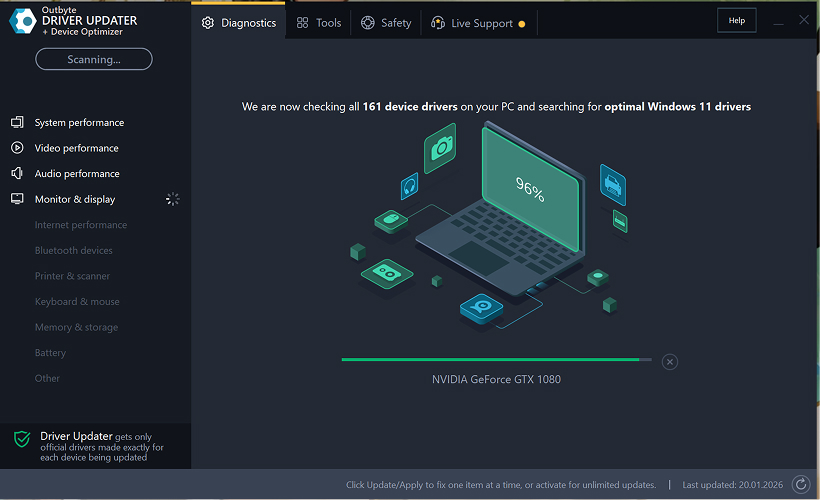
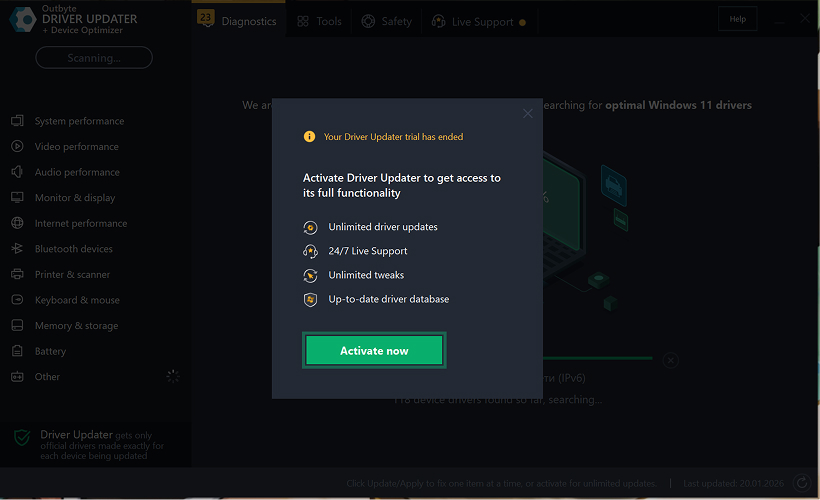
Étape 2 : Fermez la fenêtre d'activation
Après l'analyse, une fenêtre « Activer maintenant » peut apparaître.
Pour continuer gratuitement :
- cliquez sur le bouton de fermeture (X) dans le coin supérieur droit de la fenêtre.
Aucune information ne doit être saisie
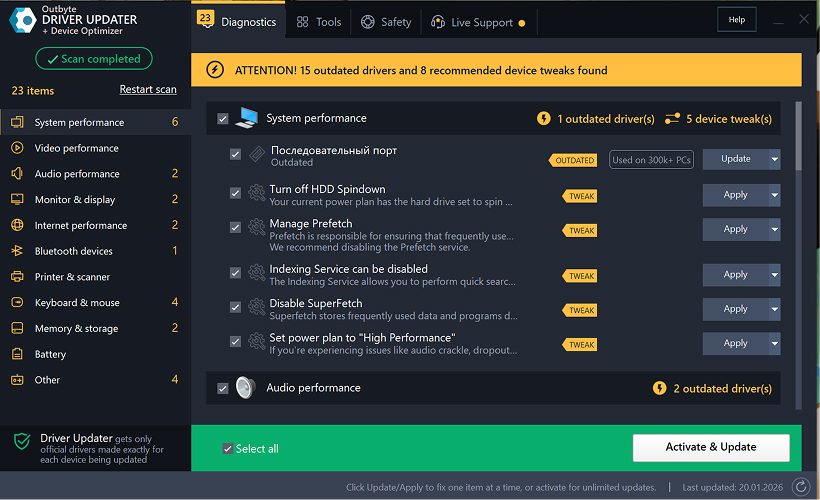
Étape 3 : Sélectionnez la catégorie de pilote
Dans le menu de gauche, choisissez la catégorie de périphérique que vous souhaitez mettre à jour, par exemple :
- pilotes audio ;
- pilotes vidéo et graphiques ;
- pilotes réseau et Wi-Fi ;
- pilotes Bluetooth ;
- pilotes d'imprimante et de scanner.
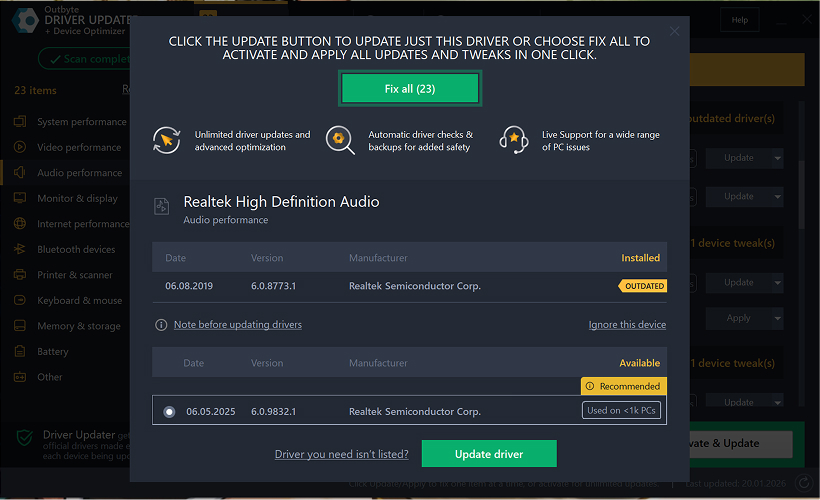
Étape 4 : Cliquez sur « Mettre à jour » à côté du pilote sélectionné
Dans la liste des pilotes, localisez le pilote que vous souhaitez mettre à jour et cliquez sur le bouton Mettre à jour à côté de celui-ci.
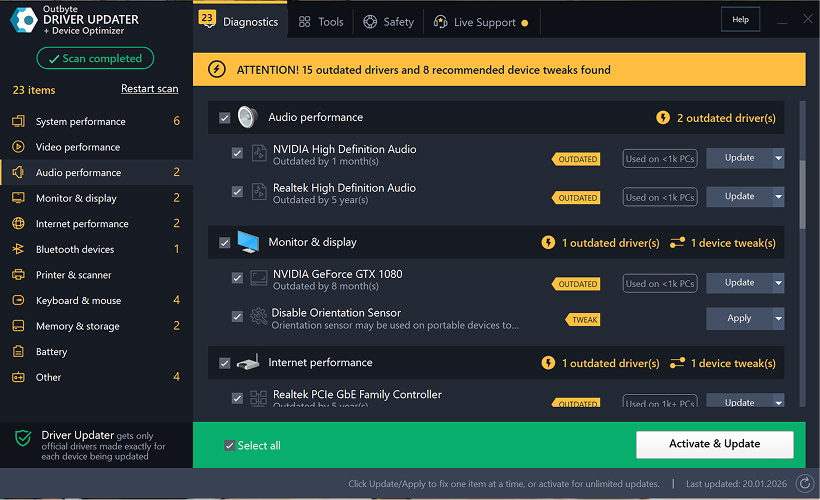
Étape 5 : Confirmez la mise à jour du pilote
Dans la fenêtre contextuelle, cliquez sur Mettre à jour le pilote.
À ce stade, aucune donnée personnelle ou détail de paiement n'est requis.
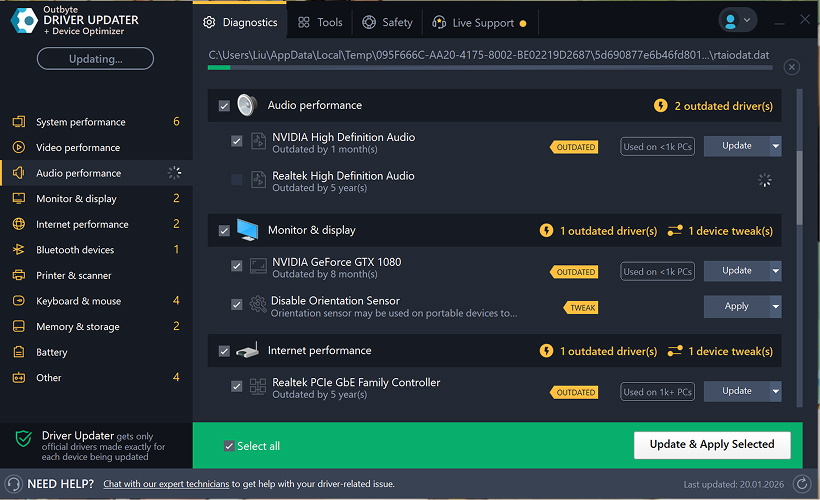
Étape 6 : Attendez la fin du processus de mise à jour
Le programme commencera à télécharger et à installer le pilote sélectionné.
Veuillez patienter jusqu'à ce que le processus soit terminé.
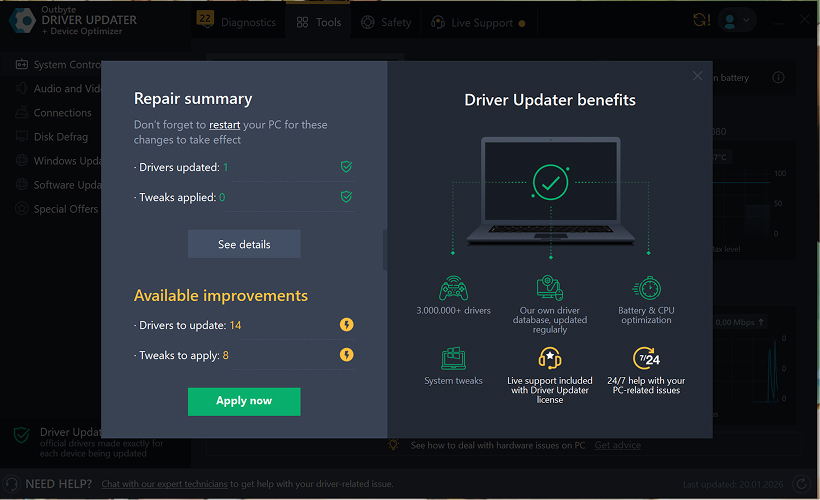
Étape 7 : Appliquez les modifications et redémarrez votre ordinateur
Une fois l'installation terminée, cliquez sur Appliquer maintenant pour appliquer les modifications.
Pour vous assurer que le pilote mis à jour fonctionne correctement, redémarrez votre ordinateur.
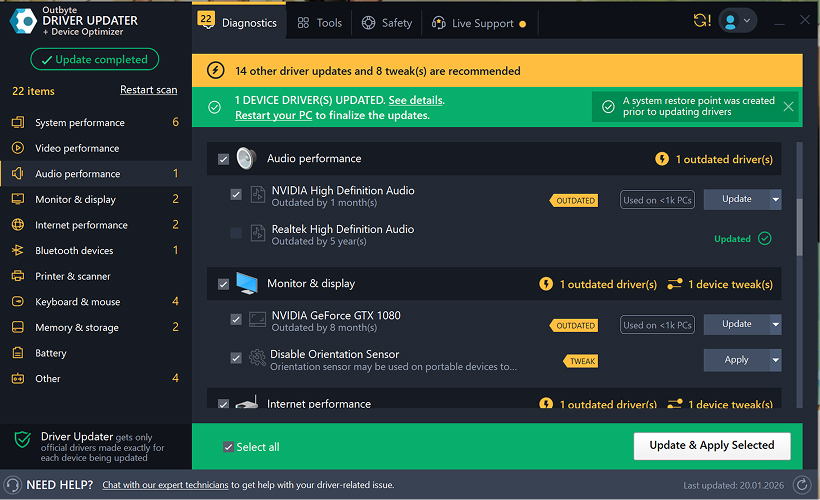
Remarques importantes
- Les mises à jour gratuites sont disponibles un pilote à la fois.
- Aucune inscription n'est requise pour la mise à jour gratuite.
- Aucune carte bancaire ou information de paiement n'est demandée.
- Toutes les actions sont effectuées localement dans le programme après l'analyse de votre système.
- La disponibilité de la mise à jour gratuite peut dépendre du type de pilote et de la configuration du système.
Learn to pair your wireless mouse with a different USB receiver in simple steps. Check compatibility (e.g., Logitech Unifying receivers), install required software/drivers, and use pairing modes to sync devices. Troubleshoot connection issues and optimize performance for seamless use.
Simplify your workspace with Logitech Unifying Software, enabling effortless connection of up to six compatible devices through a single receiver. Enjoy quick setup, clutter-free connectivity, and enhanced productivity as your keyboard, mouse, and other peripherals work in perfect harmony.
Learn how to set up your Epson L3250 printer with this step-by-step guide. Unbox, install ink, connect to power, and download drivers via Epson’s website or included CD. Configure Wi-Fi settings for wireless printing and run a test page to ensure proper installation. Simplify your setup process and start printing effortlessly.
Transform your smartphone into an HD webcam with DroidCam. Enjoy wireless connectivity and seamless video streaming for crystal-clear video calls, live streams, or online meetings. Works with PC/Mac.
Learn how to enable Bluetooth on your PC in a few simple steps. Check compatibility, activate Bluetooth via Windows Settings or the system tray, pair your device, and troubleshoot common issues. This guide ensures seamless wireless connections for headphones, speakers, or peripherals.
Learn how to set up your Epson L3250 printer quickly and efficiently. This guide covers unboxing, installing ink cartridges, connecting to power, and configuring Wi-Fi for seamless wireless printing. Follow step-by-step instructions to install drivers, align the printer head, and troubleshoot common issues. Perfect for home or office use, the Epson L3250 ensures hassle-free installation and high-quality printing, scanning, and copying.
Download the latest Epson L3250 printer drivers and software to ensure seamless connectivity and optimal performance. Compatible with Windows and macOS, these tools enable easy setup, wireless printing, and advanced features. Visit the official Epson support page for secure, up-to-date downloads tailored to your operating system. Simplify installation and maximize your printer’s capabilities with reliable drivers and utilities.
Discover innovative strategies to amplify your message and connect deeply with audiences – no microphone needed. Harness the power of body language, visual storytelling, and creative platforms to make your voice heard in any setting.
The Valeton GP 100 Wah is a professional-grade guitar pedal designed for musicians seeking dynamic sound control and expressive tonal shaping. Featuring a responsive wah circuit, it delivers smooth, vintage-inspired sweeps and modern versatility for rock, funk, blues, and beyond. Built with durable components and an intuitive design, the GP 100 ensures reliable performance on stage or in the studio. Adjustable parameters and a true bypass switch provide seamless integration into any pedalboard setup, while its compact size maximizes space efficiency. Elevate your playing with rich, articulate wah effects tailored to your musical style.
Virtual CloneDrive offers effortless disc image mounting and virtual drive cloning, enabling you to access ISO, BIN, IMG, and other formats without physical media. Streamline workflows, run software, or backup data with a lightweight, user-friendly tool that integrates seamlessly into your system. Simplify disc management and enhance productivity—no hardware required.