Software affidabile

Outbyte Driver Updater
- 1.000.000+ driver
- Scaricato: 1,143,473 volte
- Windows 11 / 10 / 8 / 7





 Scarica
GM108M GeForce MX130
Scarica
GM108M GeForce MX130
Scarica
GM108M GeForce MX130

Informazioni di Sistema
Il tuo PC sta attualmente eseguendo:
Driver details
Driver Name:
GM108M GeForce MX130
Provider:
NVIDIA
Version:
27.21.14.5763
Release Date:
12/8/2020
Architecture:
AMD64
File Size:
493.3 MB
Driver ID:
pci\\ven_10de&dev_174d&subsys_1b4f1043
Supported OS:
Windows 10
WHQL:
Signed
Offerta speciale
Scarica
Tutti i link sono stati scansionati da un programma antivirus.
Manual download (.cab, 493.3 MB) from Microsoft servers
— install via Device Manager.
Compatible hardware
- GM108M [GeForce MX130] (NVIDIA Corporation)
- GM108M [GeForce MX110] (NVIDIA Corporation)
- GP104M [GeForce GTX 1070 Mobile] (NVIDIA Corporation)
- GP104GLM [Quadro P3200 Mobile] (NVIDIA Corporation)
- GP106M [GeForce GTX 1060 Mobile] (NVIDIA Corporation)
- GP107M [GeForce GTX 1050 Ti Mobile] (NVIDIA Corporation)
- GP107M [GeForce GTX 1050 Mobile] (NVIDIA Corporation)
- GP107M [GeForce MX150] (NVIDIA Corporation)
- GP107M [GeForce GTX 1050 3 GB Max-Q] (NVIDIA Corporation)
- GP107M [GeForce MX350] (NVIDIA Corporation)
- GP108M [GeForce MX150] (NVIDIA Corporation)
- GP108M [GeForce MX230] (NVIDIA Corporation)
- GP108M [GeForce MX250] (NVIDIA Corporation)
- GP108M [GeForce MX330] (NVIDIA Corporation)
- GP108BM [GeForce MX250] (NVIDIA Corporation)
- TU104M [GeForce RTX 2080 Mobile] (NVIDIA Corporation)
- TU104M [GeForce RTX 2070 SUPER Mobile / Max-Q] (NVIDIA Corporation)
- TU104M [GeForce RTX 2080 SUPER Mobile / Max-Q] (NVIDIA Corporation)
- TU104GLM [Quadro RTX 5000 Mobile / Max-Q] (NVIDIA Corporation)
- TU104GLM [Quadro RTX 4000 Mobile / Max-Q] (NVIDIA Corporation)
- TU104BM [GeForce RTX 2080 Mobile] (NVIDIA Corporation)
- TU104BM [GeForce RTX 2070 SUPER Mobile / Max-Q] (NVIDIA Corporation)
- TU104BM [GeForce RTX 2080 SUPER Mobile / Max-Q] (NVIDIA Corporation)
- TU106M [GeForce RTX 2070 Mobile] (NVIDIA Corporation)
- TU106M [GeForce RTX 2060 Mobile] (NVIDIA Corporation)
- TU106M [GeForce RTX 2060 Max-Q] (NVIDIA Corporation)
- TU106M [GeForce RTX 2070 Mobile / Max-Q Refresh] (NVIDIA Corporation)
- TU106GLM [Quadro RTX 3000 Mobile / Max-Q] (NVIDIA Corporation)
- TU106BM [GeForce RTX 2070 Mobile / Max-Q] (NVIDIA Corporation)
- TU106BM [GeForce RTX 2060 Mobile] (NVIDIA Corporation)
- TU117M [GeForce GTX 1650 Mobile / Max-Q] (NVIDIA Corporation)
- TU117M [GeForce GTX 1650 Ti Mobile] (NVIDIA Corporation)
- TU117M [GeForce MX450] (NVIDIA Corporation)
- TU117GLM [Quadro T2000 Mobile / Max-Q] (NVIDIA Corporation)
- TU117GLM [Quadro T1000 Mobile] (NVIDIA Corporation)
- TU116M [GeForce GTX 1660 Ti Mobile] (NVIDIA Corporation)
Supported Hardware IDs
pci\\ven_10de&dev_174d&subsys_1b4f1043
pci\\ven_10de&dev_174d&subsys_1b5f1043
pci\\ven_10de&dev_174d&subsys_1b7f1043
pci\\ven_10de&dev_174d&subsys_1bae1043
pci\\ven_10de&dev_174d&subsys_1bce1043
pci\\ven_10de&dev_174d&subsys_1bee1043
pci\\ven_10de&dev_174d&subsys_1bfe1043
pci\\ven_10de&dev_174d&subsys_1bff1043
pci\\ven_10de&dev_174d&subsys_1c1e1043
pci\\ven_10de&dev_174d&subsys_1c4e1043
Show all 300 hardware IDs
pci\\ven_10de&dev_174d&subsys_1c8e1043
pci\\ven_10de&dev_174d&subsys_1d3e1043
pci\\ven_10de&dev_174d&subsys_1d7f1043
pci\\ven_10de&dev_174d&subsys_1e1e1043
pci\\ven_10de&dev_174d&subsys_1e4e1043
pci\\ven_10de&dev_174d&subsys_1edf1043
pci\\ven_10de&dev_174d&subsys_1eff1043
pci\\ven_10de&dev_174e&subsys_116f1043
pci\\ven_10de&dev_174e&subsys_119f1043
pci\\ven_10de&dev_174e&subsys_125f1043
pci\\ven_10de&dev_174e&subsys_127f1043
pci\\ven_10de&dev_174e&subsys_13df1043
pci\\ven_10de&dev_174e&subsys_14af1043
pci\\ven_10de&dev_174e&subsys_152f1043
pci\\ven_10de&dev_174e&subsys_15bf1043
pci\\ven_10de&dev_174e&subsys_15ef1043
pci\\ven_10de&dev_174e&subsys_16011043
pci\\ven_10de&dev_174e&subsys_17311043
pci\\ven_10de&dev_174e&subsys_180f1043
pci\\ven_10de&dev_174e&subsys_183f1043
pci\\ven_10de&dev_174e&subsys_1a3f1043
pci\\ven_10de&dev_174e&subsys_1a6e1043
pci\\ven_10de&dev_174e&subsys_1aa11043
pci\\ven_10de&dev_174e&subsys_1cde1043
pci\\ven_10de&dev_174e&subsys_1cee1043
pci\\ven_10de&dev_174e&subsys_1cfe1043
pci\\ven_10de&dev_174e&subsys_1d2e1043
pci\\ven_10de&dev_174e&subsys_1dfe1043
pci\\ven_10de&dev_174e&subsys_1e3e1043
pci\\ven_10de&dev_174e&subsys_1e7e1043
pci\\ven_10de&dev_174e&subsys_1e9e1043
pci\\ven_10de&dev_174e&subsys_1f1f1043
pci\\ven_10de&dev_174e&subsys_1f7e1043
pci\\ven_10de&dev_1ba1&subsys_15d11043
pci\\ven_10de&dev_1ba1&subsys_1cce1043
pci\\ven_10de&dev_1bbb&subsys_17f11043
pci\\ven_10de&dev_1c20&subsys_14711043
pci\\ven_10de&dev_1c20&subsys_1a2e1043
pci\\ven_10de&dev_1c20&subsys_1b4e1043
pci\\ven_10de&dev_1c20&subsys_1b9e1043
pci\\ven_10de&dev_1c8c&subsys_1a4e1043
pci\\ven_10de&dev_1c8c&subsys_1b3e1043
pci\\ven_10de&dev_1c8d&subsys_114f1043
pci\\ven_10de&dev_1c8d&subsys_11d11043
pci\\ven_10de&dev_1c8d&subsys_122f1043
pci\\ven_10de&dev_1c8d&subsys_12df1043
pci\\ven_10de&dev_1c8d&subsys_12ff1043
pci\\ven_10de&dev_1c8d&subsys_13411043
pci\\ven_10de&dev_1c8d&subsys_13511043
pci\\ven_10de&dev_1c8d&subsys_13b11043
pci\\ven_10de&dev_1c8d&subsys_14311043
pci\\ven_10de&dev_1c8d&subsys_14411043
pci\\ven_10de&dev_1c8d&subsys_14811043
pci\\ven_10de&dev_1c8d&subsys_14a11043
pci\\ven_10de&dev_1c8d&subsys_18c11043
pci\\ven_10de&dev_1c8d&subsys_1b5e1043
pci\\ven_10de&dev_1c90&subsys_1d4e1043
pci\\ven_10de&dev_1c91&subsys_10bf1043
pci\\ven_10de&dev_1c91&subsys_18f11043
pci\\ven_10de&dev_1c92&subsys_12ff1043
pci\\ven_10de&dev_1c92&subsys_149f1043
pci\\ven_10de&dev_1c92&subsys_1b311043
pci\\ven_10de&dev_1c92&subsys_1bb11043
pci\\ven_10de&dev_1c94&subsys_12921043
pci\\ven_10de&dev_1c94&subsys_14721043
pci\\ven_10de&dev_1c94&subsys_15b21043
pci\\ven_10de&dev_1c94&subsys_164c1043
pci\\ven_10de&dev_1c94&subsys_1a7f1043
pci\\ven_10de&dev_1c94&subsys_1a8f1043
pci\\ven_10de&dev_1c94&subsys_1b0f1043
pci\\ven_10de&dev_1c94&subsys_1b3f1043
pci\\ven_10de&dev_1c94&subsys_1b8f1043
pci\\ven_10de&dev_1c94&subsys_1bcf1043
pci\\ven_10de&dev_1c94&subsys_1caf1043
pci\\ven_10de&dev_1c94&subsys_1ccf1043
pci\\ven_10de&dev_1c94&subsys_1d0f1043
pci\\ven_10de&dev_1c94&subsys_1d1f1043
pci\\ven_10de&dev_1c94&subsys_1e2f1043
pci\\ven_10de&dev_1c94&subsys_1e5f1043
pci\\ven_10de&dev_1c94&subsys_1eaf1043
pci\\ven_10de&dev_1c94&subsys_1f2f1043
pci\\ven_10de&dev_1c96&subsys_10921043
pci\\ven_10de&dev_1c96&subsys_11c21043
pci\\ven_10de&dev_1c96&subsys_11d21043
pci\\ven_10de&dev_1c96&subsys_1d6f1043
pci\\ven_10de&dev_1c96&subsys_1f3f1043
pci\\ven_10de&dev_1d10&subsys_1a5e1043
pci\\ven_10de&dev_1d10&subsys_1aee1043
pci\\ven_10de&dev_1d10&subsys_1c0e1043
pci\\ven_10de&dev_1d10&subsys_1c2e1043
pci\\ven_10de&dev_1d10&subsys_1cae1043
pci\\ven_10de&dev_1d10&subsys_1d1e1043
pci\\ven_10de&dev_1d10&subsys_1d6e1043
pci\\ven_10de&dev_1d10&subsys_1e0e1043
pci\\ven_10de&dev_1d10&subsys_1f1e1043
pci\\ven_10de&dev_1d11&subsys_117f1043
pci\\ven_10de&dev_1d11&subsys_11af1043
pci\\ven_10de&dev_1d11&subsys_126f1043
pci\\ven_10de&dev_1d11&subsys_128f1043
pci\\ven_10de&dev_1d11&subsys_13ef1043
pci\\ven_10de&dev_1d11&subsys_145f1043
pci\\ven_10de&dev_1d11&subsys_14cf1043
pci\\ven_10de&dev_1d11&subsys_159f1043
pci\\ven_10de&dev_1d11&subsys_15cf1043
pci\\ven_10de&dev_1d11&subsys_160f1043
pci\\ven_10de&dev_1d11&subsys_166f1043
pci\\ven_10de&dev_1d11&subsys_18511043
pci\\ven_10de&dev_1d11&subsys_1efe1043
pci\\ven_10de&dev_1d12&subsys_1b2e1043
pci\\ven_10de&dev_1d12&subsys_1c5e1043
pci\\ven_10de&dev_1d12&subsys_1c6e1043
pci\\ven_10de&dev_1d12&subsys_1c7e1043
pci\\ven_10de&dev_1d12&subsys_1d5e1043
pci\\ven_10de&dev_1d12&subsys_1ebe1043
pci\\ven_10de&dev_1d13&subsys_118f1043
pci\\ven_10de&dev_1d13&subsys_11bf1043
pci\\ven_10de&dev_1d13&subsys_11cf1043
pci\\ven_10de&dev_1d13&subsys_11df1043
pci\\ven_10de&dev_1d13&subsys_121f1043
pci\\ven_10de&dev_1d13&subsys_146f1043
pci\\ven_10de&dev_1d13&subsys_147f1043
pci\\ven_10de&dev_1d13&subsys_14df1043
pci\\ven_10de&dev_1d13&subsys_15af1043
pci\\ven_10de&dev_1d13&subsys_15df1043
pci\\ven_10de&dev_1d13&subsys_15ff1043
pci\\ven_10de&dev_1d13&subsys_161f1043
pci\\ven_10de&dev_1d13&subsys_162f1043
pci\\ven_10de&dev_1d13&subsys_164f1043
pci\\ven_10de&dev_1d13&subsys_167f1043
pci\\ven_10de&dev_1d13&subsys_168f1043
pci\\ven_10de&dev_1d13&subsys_169f1043
pci\\ven_10de&dev_1d13&subsys_16af1043
pci\\ven_10de&dev_1d13&subsys_19711043
pci\\ven_10de&dev_1d13&subsys_19bf1043
pci\\ven_10de&dev_1d13&subsys_1a011043
pci\\ven_10de&dev_1d13&subsys_1aaf1043
pci\\ven_10de&dev_1d13&subsys_1f0e1043
pci\\ven_10de&dev_1d13&subsys_1fbe1043
pci\\ven_10de&dev_1d16&subsys_10421043
pci\\ven_10de&dev_1d16&subsys_14c21043
pci\\ven_10de&dev_1d16&subsys_15421043
pci\\ven_10de&dev_1d16&subsys_15821043
pci\\ven_10de&dev_1d16&subsys_159c1043
pci\\ven_10de&dev_1d16&subsys_15dc1043
pci\\ven_10de&dev_1d16&subsys_178c1043
pci\\ven_10de&dev_1d16&subsys_17ac1043
pci\\ven_10de&dev_1d16&subsys_1a1f1043
pci\\ven_10de&dev_1d16&subsys_1a2f1043
pci\\ven_10de&dev_1d16&subsys_1adf1043
pci\\ven_10de&dev_1d16&subsys_1aff1043
pci\\ven_10de&dev_1d16&subsys_1b2f1043
pci\\ven_10de&dev_1d16&subsys_1b9f1043
pci\\ven_10de&dev_1d16&subsys_1baf1043
pci\\ven_10de&dev_1d16&subsys_1c0f1043
pci\\ven_10de&dev_1d16&subsys_1cbf1043
pci\\ven_10de&dev_1d16&subsys_1d8f1043
pci\\ven_10de&dev_1d16&subsys_1dbf1043
pci\\ven_10de&dev_1d16&subsys_1ddf1043
pci\\ven_10de&dev_1d16&subsys_1e4f1043
pci\\ven_10de&dev_1d16&subsys_1e9f1043
pci\\ven_10de&dev_1d16&subsys_1eef1043
pci\\ven_10de&dev_1d16&subsys_1f0f1043
pci\\ven_10de&dev_1d16&subsys_1f5f1043
pci\\ven_10de&dev_1d52&subsys_120f1043
pci\\ven_10de&dev_1d52&subsys_124f1043
pci\\ven_10de&dev_1d52&subsys_12bf1043
pci\\ven_10de&dev_1d52&subsys_13ff1043
pci\\ven_10de&dev_1d52&subsys_148f1043
pci\\ven_10de&dev_1d52&subsys_14ff1043
pci\\ven_10de&dev_1d52&subsys_150f1043
pci\\ven_10de&dev_1d52&subsys_170f1043
pci\\ven_10de&dev_1d52&subsys_176f1043
pci\\ven_10de&dev_1d52&subsys_1a0f1043
pci\\ven_10de&dev_1d52&subsys_1b011043
pci\\ven_10de&dev_1e90&subsys_131f1043
pci\\ven_10de&dev_1e90&subsys_137f1043
pci\\ven_10de&dev_1e90&subsys_141f1043
pci\\ven_10de&dev_1e90&subsys_17511043
pci\\ven_10de&dev_1e91&subsys_17cf1043
pci\\ven_10de&dev_1e91&subsys_193f1043
pci\\ven_10de&dev_1e91&subsys_199f1043
pci\\ven_10de&dev_1e91&subsys_1e611043
pci\\ven_10de&dev_1e91&subsys_1f211043
pci\\ven_10de&dev_1e93&subsys_1a5f1043
pci\\ven_10de&dev_1eb5&subsys_1a411043
pci\\ven_10de&dev_1eb5&subsys_1a511043
pci\\ven_10de&dev_1eb5&subsys_1dd11043
pci\\ven_10de&dev_1eb6&subsys_129f1043
pci\\ven_10de&dev_1eb6&subsys_12af1043
pci\\ven_10de&dev_1ed0&subsys_135f1043
pci\\ven_10de&dev_1ed0&subsys_138f1043
pci\\ven_10de&dev_1ed0&subsys_15c11043
pci\\ven_10de&dev_1ed0&subsys_16e11043
pci\\ven_10de&dev_1ed0&subsys_17011043
pci\\ven_10de&dev_1ed1&subsys_165f1043
pci\\ven_10de&dev_1ed1&subsys_173f1043
pci\\ven_10de&dev_1ed1&subsys_186f1043
pci\\ven_10de&dev_1ed3&subsys_1d611043
pci\\ven_10de&dev_1ed3&subsys_1e511043
pci\\ven_10de&dev_1ed3&subsys_1f011043
pci\\ven_10de&dev_1f10&subsys_11ef1043
pci\\ven_10de&dev_1f10&subsys_13211043
pci\\ven_10de&dev_1f10&subsys_132f1043
pci\\ven_10de&dev_1f10&subsys_136f1043
pci\\ven_10de&dev_1f10&subsys_17111043
pci\\ven_10de&dev_1f10&subsys_18711043
pci\\ven_10de&dev_1f10&subsys_18811043
pci\\ven_10de&dev_1f10&subsys_1e6e1043
pci\\ven_10de&dev_1f10&subsys_1ffe1043
pci\\ven_10de&dev_1f11&subsys_100f1043
pci\\ven_10de&dev_1f11&subsys_10ef1043
pci\\ven_10de&dev_1f11&subsys_11ff1043
pci\\ven_10de&dev_1f11&subsys_140f1043
pci\\ven_10de&dev_1f11&subsys_19e11043
pci\\ven_10de&dev_1f11&subsys_1ef11043
pci\\ven_10de&dev_1f11&subsys_1f411043
pci\\ven_10de&dev_1f11&subsys_1f8e1043
pci\\ven_10de&dev_1f11&subsys_1fae1043
pci\\ven_10de&dev_1f11&subsys_1fee1043
pci\\ven_10de&dev_1f12&subsys_1e111043
pci\\ven_10de&dev_1f12&subsys_1f111043
pci\\ven_10de&dev_1f14&subsys_174f1043
pci\\ven_10de&dev_1f14&subsys_17bf1043
pci\\ven_10de&dev_1f14&subsys_190f1043
pci\\ven_10de&dev_1f14&subsys_192f1043
pci\\ven_10de&dev_1f14&subsys_198f1043
pci\\ven_10de&dev_1f15&subsys_12021043
pci\\ven_10de&dev_1f15&subsys_12d21043
pci\\ven_10de&dev_1f15&subsys_13121043
pci\\ven_10de&dev_1f15&subsys_140f1043
pci\\ven_10de&dev_1f15&subsys_1c5f1043
pci\\ven_10de&dev_1f15&subsys_1c6f1043
pci\\ven_10de&dev_1f15&subsys_1c7f1043
pci\\ven_10de&dev_1f15&subsys_1c8f1043
pci\\ven_10de&dev_1f15&subsys_1c9f1043
pci\\ven_10de&dev_1f15&subsys_1e211043
pci\\ven_10de&dev_1f36&subsys_13cf1043
pci\\ven_10de&dev_1f50&subsys_13af1043
pci\\ven_10de&dev_1f50&subsys_18911043
pci\\ven_10de&dev_1f50&subsys_1f2e1043
pci\\ven_10de&dev_1f51&subsys_103f1043
pci\\ven_10de&dev_1f51&subsys_139f1043
pci\\ven_10de&dev_1f51&subsys_1fce1043
pci\\ven_10de&dev_1f55&subsys_1cdf1043
pci\\ven_10de&dev_1f91&subsys_105f1043
pci\\ven_10de&dev_1f91&subsys_106f1043
pci\\ven_10de&dev_1f91&subsys_109f1043
pci\\ven_10de&dev_1f91&subsys_10cf1043
pci\\ven_10de&dev_1f91&subsys_12cf1043
pci\\ven_10de&dev_1f91&subsys_156f1043
pci\\ven_10de&dev_1f91&subsys_1a811043
pci\\ven_10de&dev_1f91&subsys_1ab11043
pci\\ven_10de&dev_1f95&subsys_16df1043
pci\\ven_10de&dev_1f95&subsys_16ef1043
pci\\ven_10de&dev_1f95&subsys_178f1043
pci\\ven_10de&dev_1f95&subsys_195f1043
pci\\ven_10de&dev_1f95&subsys_196f1043
pci\\ven_10de&dev_1f95&subsys_1abf1043
pci\\ven_10de&dev_1f95&subsys_1dff1043
pci\\ven_10de&dev_1f95&subsys_1e1f1043
pci\\ven_10de&dev_1f95&subsys_1e911043
pci\\ven_10de&dev_1f97&subsys_12e21043
pci\\ven_10de&dev_1f97&subsys_1d3f1043
pci\\ven_10de&dev_1f99&subsys_10021043
pci\\ven_10de&dev_1f99&subsys_10621043
pci\\ven_10de&dev_1f99&subsys_13b21043
pci\\ven_10de&dev_1f99&subsys_14021043
pci\\ven_10de&dev_1f99&subsys_177f1043
pci\\ven_10de&dev_1f99&subsys_18af1043
pci\\ven_10de&dev_1f99&subsys_18bf1043
pci\\ven_10de&dev_1f99&subsys_18cf1043
pci\\ven_10de&dev_1f99&subsys_19021043
pci\\ven_10de&dev_1f99&subsys_194f1043
pci\\ven_10de&dev_1f9c&subsys_166c1043
pci\\ven_10de&dev_1f9c&subsys_1daf1043
pci\\ven_10de&dev_1f9c&subsys_1e6f1043
pci\\ven_10de&dev_1f9c&subsys_1e7f1043
pci\\ven_10de&dev_1fb8&subsys_13bf1043
pci\\ven_10de&dev_1fb8&subsys_1c911043
pci\\ven_10de&dev_1fb8&subsys_1ca11043
pci\\ven_10de&dev_1fb9&subsys_157f1043
pci\\ven_10de&dev_1fb9&subsys_1ac11043
pci\\ven_10de&dev_2191&subsys_101f1043
pci\\ven_10de&dev_2191&subsys_10af1043
pci\\ven_10de&dev_2191&subsys_10df1043
pci\\ven_10de&dev_2191&subsys_10ff1043
pci\\ven_10de&dev_2191&subsys_110f1043
pci\\ven_10de&dev_2191&subsys_16cf1043
pci\\ven_10de&dev_2191&subsys_16ff1043
pci\\ven_10de&dev_2191&subsys_171f1043
Match against Device Manager → Details → Hardware Ids to confirm this driver fits your device.
Related drivers
- GP106M GeForce GTX 1060 Mobile (v32.0.15.7703)
- TU104M GeForce RTX 2080 Mobile (v32.0.15.7703)
- TU104M GeForce RTX 2080 Mobile (v32.0.15.5597)
- GA107BM GN20-P0-R-K2 GeForce RTX 3050 6GB Laptop GPU (v32.0.15.9194)
- TU104M GeForce RTX 2070 SUPER Mobile Max-Q (v32.0.15.9186)
- TU104M GeForce RTX 2070 SUPER Mobile Max-Q (v32.0.15.9166)
- GP106 GeForce GTX 1060 3GB (v32.0.15.8195)
- AD103M GN21-X11 GeForce RTX 4090 Laptop GPU (v32.0.15.8183)
- GA103M GeForce RTX 3080 Ti Laptop GPU (v32.0.15.8183)
- GP106M GeForce GTX 1060 Mobile (v32.0.15.8183)
Driver: La Base per un Funzionamento Stabile dei Dispositivi
Perché i Driver sono così Importanti?
I driver svolgono un ruolo cruciale nella stabilità del sistema. Driver obsoleti o danneggiati possono causare:
Si consiglia di aggiornare i driver ogni 3-6 mesi. Questo è particolarmente importante prima di installare un nuovo sistema operativo, poiché i driver aggiornati possono essere necessari per garantire la compatibilità.
Come Mantenere Aggiornati i tuoi Driver?
Metodo automatico per aggiornare e scaricare i driver (Consigliato):
Se preferisci non cercare manualmente il driver corretto, esistono strumenti che rilevano automaticamente il modello del tuo dispositivo e trovano un driver compatibile. Questo riduce il rischio di errori e fa risparmiare tempo.
Offerta speciale
Scarica

Limitations: trial version offers an unlimited number of scans, free driver backup and rollback. Registration for the full version starts from USD 29.95. See more information about Outbyte and uninstall instructions. Please review Outbyte EULA and Privacy Policy
Tutti i link sono stati scansionati da un programma antivirus.
Installazione manuale del driver
Nota: L'installazione di un driver errato può causare problemi al sistema. Se non sei sicuro di quale driver scegliere, ti consigliamo il metodo automatico.
Scarica il driver tramite Gestione dispositivi. Come aprire Gestione dispositivi:
Come installare i driver utilizzando Gestione dispositivi:
How to Update a Driver for Free Using Outbyte Driver Updater
Mantenere i driver del dispositivo aggiornati aiuta a garantire prestazioni stabili di Windows e il corretto funzionamento dell'hardware. Di seguito è riportata una guida passo-passo che spiega come aggiornare un singolo driver gratuitamente utilizzando Outbyte Driver Updater. Questa guida descrive un metodo per aggiornare un driver selezionato senza attivare una licenza e senza fornire informazioni personali o dettagli di pagamento.
È Possibile Aggiornare un Driver Gratuitamente Senza Registrazione?
Sì.
Outbyte Driver Updater ti consente di:
- scansionare il tuo computer alla ricerca di driver obsoleti senza costi;
- visualizzare un elenco dei driver rilevati;
- aggiornare un driver selezionato gratuitamente;
- evitare di inserire un indirizzo email, nome, numero di carta di credito o qualsiasi altro dato personale.
Il processo di aggiornamento gratuito richiede solo il programma installato e i passaggi standard di scansione e aggiornamento.
Passaggio 1: Avvia il Programma e Scansiona il Tuo Computer
Scarica e installa Outbyte Driver Updater sul tuo PC Windows.
Dopo aver avviato il programma, inizierà automaticamente a scansionare il tuo sistema e a controllare i driver installati.
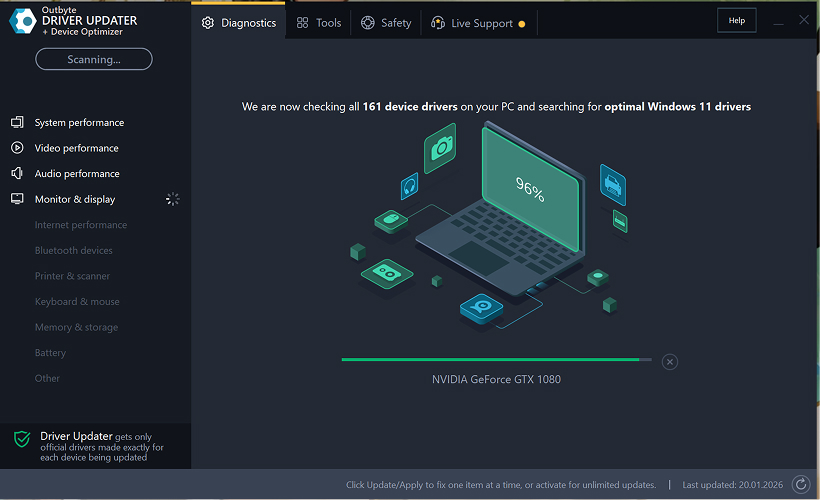
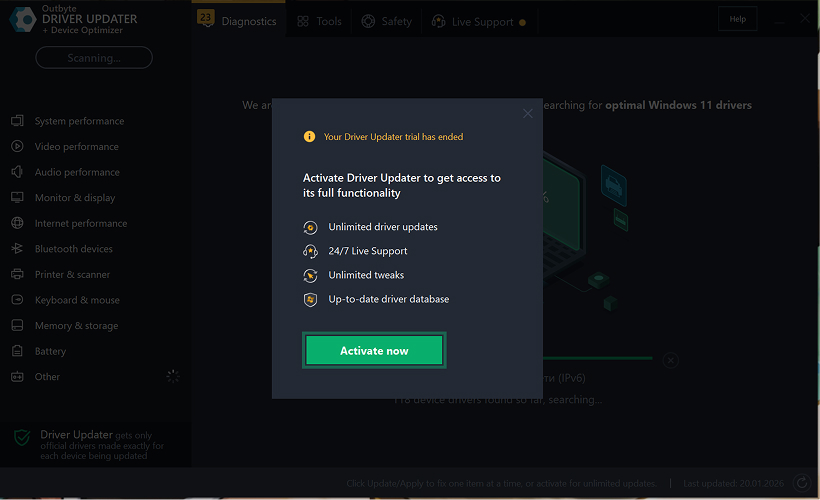
Passaggio 2: Chiudi la Finestra di Attivazione
Dopo la scansione, potrebbe apparire una finestra "Attiva ora".
Per continuare gratuitamente:
- fai clic sul pulsante di chiusura (X) nell'angolo in alto a destra della finestra.
Non è necessario inserire alcuna informazione
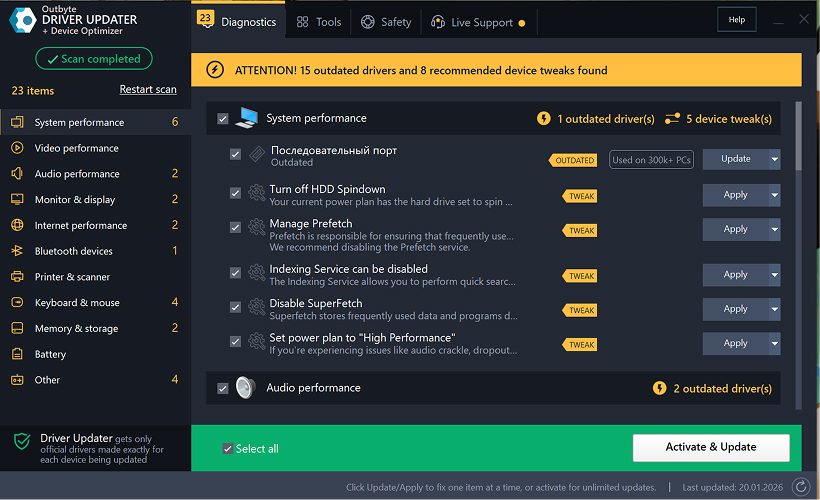
Passaggio 3: Seleziona la Categoria del Driver
Dal menu a sinistra, scegli la categoria del dispositivo che desideri aggiornare, come:
- driver audio;
- driver video e grafici;
- driver di rete e Wi-Fi;
- driver Bluetooth;
- driver di stampanti e scanner.
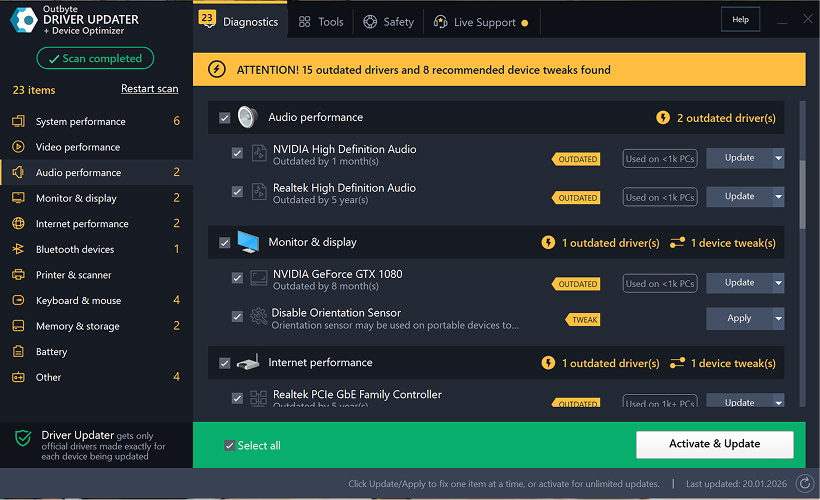
Passaggio 4: Fai Clic su "Aggiorna" Accanto al Driver Selezionato
Nell'elenco dei driver, individua il driver che desideri aggiornare e fai clic sul pulsante Aggiorna accanto ad esso.
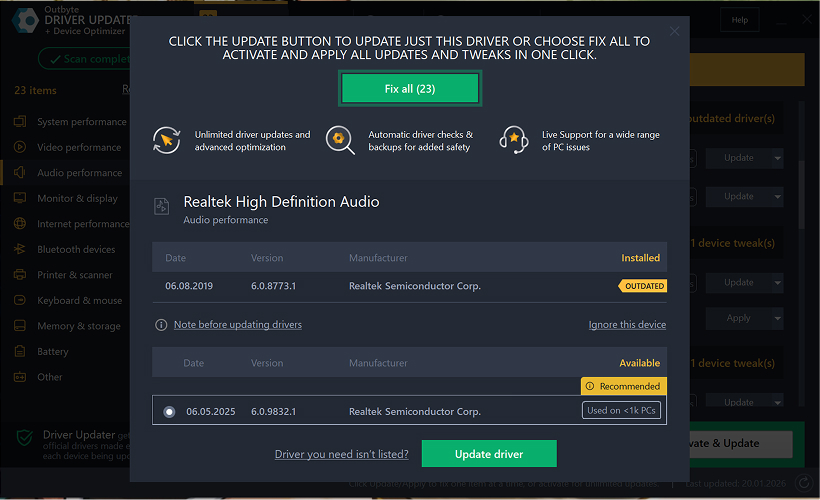
Passaggio 5: Conferma l'Aggiornamento del Driver
Nella finestra popup, fai clic su Aggiorna driver.
In questa fase, non sono richiesti dati personali o dettagli di pagamento.
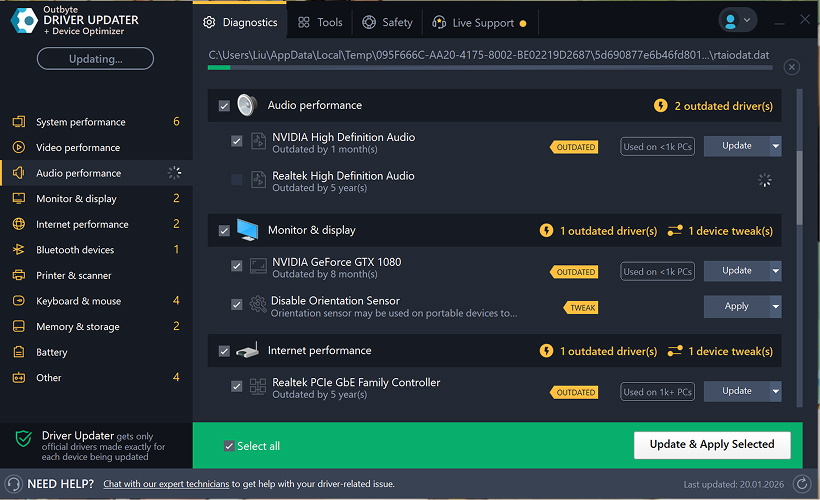
Passaggio 6: Attendi il Completamento del Processo di Aggiornamento
Il programma inizierà a scaricare e installare il driver selezionato.
Attendi fino al completamento del processo.
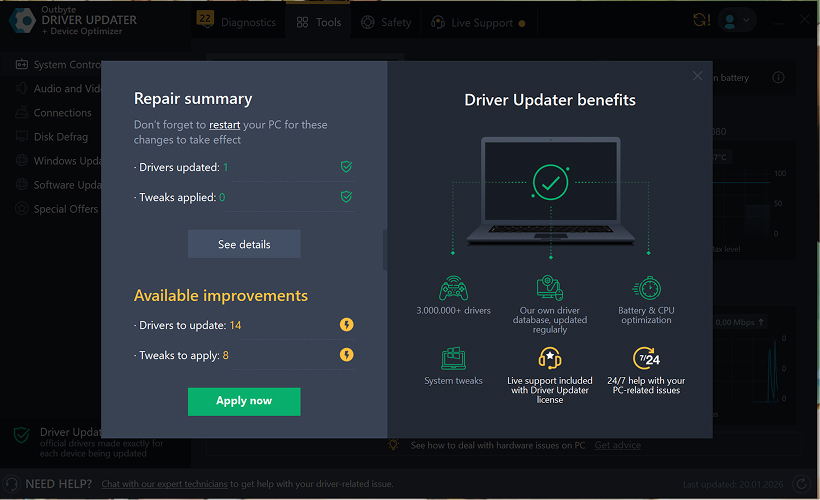
Passaggio 7: Applica le Modifiche e Riavvia il Computer
Al termine dell'installazione, fai clic su Applica ora per applicare le modifiche.
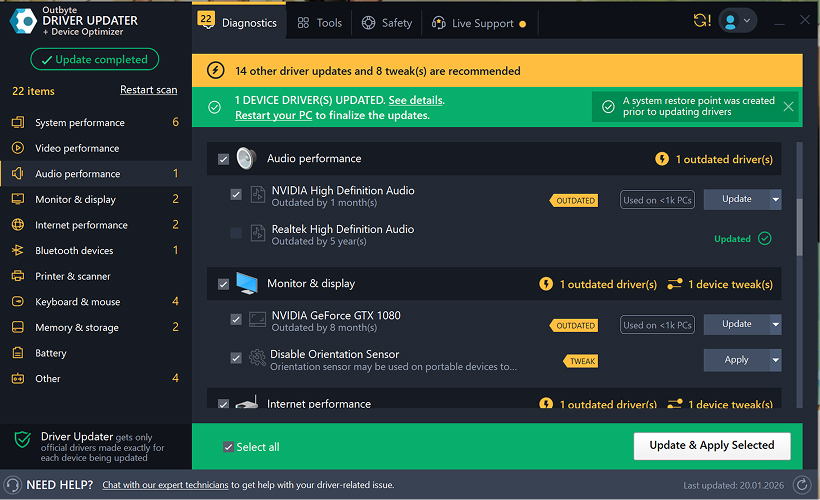
Per garantire che il driver aggiornato funzioni correttamente, riavvia il computer.
Note Importanti
- Gli aggiornamenti gratuiti sono disponibili un driver alla volta.
- Non è richiesta alcuna registrazione per l'aggiornamento gratuito.
- Non vengono richieste informazioni di carta di credito o di pagamento.
- Tutte le azioni vengono eseguite localmente all'interno del programma dopo la scansione del sistema.
- La disponibilità dell'aggiornamento gratuito può dipendere dal tipo di driver e dalla configurazione del sistema.
Learn to pair your wireless mouse with a different USB receiver in simple steps. Check compatibility (e.g., Logitech Unifying receivers), install required software/drivers, and use pairing modes to sync devices. Troubleshoot connection issues and optimize performance for seamless use.
Simplify your workspace with Logitech Unifying Software, enabling effortless connection of up to six compatible devices through a single receiver. Enjoy quick setup, clutter-free connectivity, and enhanced productivity as your keyboard, mouse, and other peripherals work in perfect harmony.
Learn how to set up your Epson L3250 printer with this step-by-step guide. Unbox, install ink, connect to power, and download drivers via Epson’s website or included CD. Configure Wi-Fi settings for wireless printing and run a test page to ensure proper installation. Simplify your setup process and start printing effortlessly.
Transform your smartphone into an HD webcam with DroidCam. Enjoy wireless connectivity and seamless video streaming for crystal-clear video calls, live streams, or online meetings. Works with PC/Mac.
Learn how to enable Bluetooth on your PC in a few simple steps. Check compatibility, activate Bluetooth via Windows Settings or the system tray, pair your device, and troubleshoot common issues. This guide ensures seamless wireless connections for headphones, speakers, or peripherals.
Learn how to set up your Epson L3250 printer quickly and efficiently. This guide covers unboxing, installing ink cartridges, connecting to power, and configuring Wi-Fi for seamless wireless printing. Follow step-by-step instructions to install drivers, align the printer head, and troubleshoot common issues. Perfect for home or office use, the Epson L3250 ensures hassle-free installation and high-quality printing, scanning, and copying.
Download the latest Epson L3250 printer drivers and software to ensure seamless connectivity and optimal performance. Compatible with Windows and macOS, these tools enable easy setup, wireless printing, and advanced features. Visit the official Epson support page for secure, up-to-date downloads tailored to your operating system. Simplify installation and maximize your printer’s capabilities with reliable drivers and utilities.
Discover innovative strategies to amplify your message and connect deeply with audiences – no microphone needed. Harness the power of body language, visual storytelling, and creative platforms to make your voice heard in any setting.
The Valeton GP 100 Wah is a professional-grade guitar pedal designed for musicians seeking dynamic sound control and expressive tonal shaping. Featuring a responsive wah circuit, it delivers smooth, vintage-inspired sweeps and modern versatility for rock, funk, blues, and beyond. Built with durable components and an intuitive design, the GP 100 ensures reliable performance on stage or in the studio. Adjustable parameters and a true bypass switch provide seamless integration into any pedalboard setup, while its compact size maximizes space efficiency. Elevate your playing with rich, articulate wah effects tailored to your musical style.
Virtual CloneDrive offers effortless disc image mounting and virtual drive cloning, enabling you to access ISO, BIN, IMG, and other formats without physical media. Streamline workflows, run software, or backup data with a lightweight, user-friendly tool that integrates seamlessly into your system. Simplify disc management and enhance productivity—no hardware required.