Pålitelig Programvare

Outbyte Driver Updater
- 1,000,000+ drivere
- Nedlastet: 1,143,473 ganger
- Windows 11 / 10 / 8 / 7




 Last Ned
GF100GLM Quadro 5000M
Last Ned
GF100GLM Quadro 5000M
Last Ned
GF100GLM Quadro 5000M

Systeminformasjon
PC-en din kjører for øyeblikket:
Driver details
Driver Name:
GF100GLM Quadro 5000M
Provider:
NVIDIA
Version:
21.21.13.7699
Release Date:
2/26/2017
Architecture:
AMD64
File Size:
300.1 MB
Driver ID:
pci\ven_10de&dev_06da&subsys_1520103c
Supported OS:
Windows 8.1, Windows 8, Windows 7
WHQL:
Signed
Spesialtilbud
Last Ned
Alle lenker er skannet av antivirusprogram.
Manual download (.cab, 300.1 MB) from Microsoft servers
— install via Device Manager.
Compatible hardware
- GF100GLM [Quadro 5000M] (NVIDIA Corporation)
- GF106GLM [Quadro 2000M] (NVIDIA Corporation)
- GF108GLM [Quadro 1000M] (NVIDIA Corporation)
- GF104GLM [Quadro 3000M] (NVIDIA Corporation)
- GF104GLM [Quadro 4000M] (NVIDIA Corporation)
- GK107GLM [Quadro K1100M] (NVIDIA Corporation)
- GK107GLM [Quadro K2000M] (NVIDIA Corporation)
- GK107GLM [Quadro K1000M] (NVIDIA Corporation)
- GF100GLM [Quadro 5010M] (NVIDIA Corporation)
- GK104GLM [Quadro K3100M] (NVIDIA Corporation)
- GK104GLM [Quadro K4100M] (NVIDIA Corporation)
- GK104GLM [Quadro K5100M] (NVIDIA Corporation)
- GK104GLM [Quadro K5000M] (NVIDIA Corporation)
- GK104GLM [Quadro K4000M] (NVIDIA Corporation)
- GK104GLM [Quadro K3000M] (NVIDIA Corporation)
- GK106GLM [Quadro K2100M] (NVIDIA Corporation)
- GK208GLM [Quadro K610M] (NVIDIA Corporation)
- GM107GLM [Quadro M2000M] (NVIDIA Corporation)
- GM107GLM [Quadro M1000M] (NVIDIA Corporation)
- GM107GLM [Quadro M600M] (NVIDIA Corporation)
- GM107GLM [Quadro K2200M] (NVIDIA Corporation)
- GM204GLM [Quadro M5000M / M5000 SE] (NVIDIA Corporation)
- GM204GLM [Quadro M4000M] (NVIDIA Corporation)
- GM204GLM [Quadro M3000M] (NVIDIA Corporation)
Supported Hardware IDs
pci\ven_10de&dev_06da&subsys_1520103c
pci\ven_10de&dev_0dda&subsys_1631103c
pci\ven_10de&dev_0dfa&subsys_1631103c
pci\ven_10de&dev_0e3a&subsys_1630103c
pci\ven_10de&dev_0e3b&subsys_1630103c
pci\ven_10de&dev_0ff6&subsys_1909103c
pci\ven_10de&dev_0ff6&subsys_190a103c
pci\ven_10de&dev_0ff6&subsys_197a103c
pci\ven_10de&dev_0ff6&subsys_197b103c
pci\ven_10de&dev_0ff6&subsys_2253103c
Show all 61 hardware IDs
pci\ven_10de&dev_0ff6&subsys_2254103c
pci\ven_10de&dev_0ff6&subsys_2255103c
pci\ven_10de&dev_0ff6&subsys_2256103c
pci\ven_10de&dev_0ffb&subsys_176b103c
pci\ven_10de&dev_0ffc&subsys_176b103c
pci\ven_10de&dev_109a&subsys_1630103c
pci\ven_10de&dev_11b6&subsys_190a103c
pci\ven_10de&dev_11b6&subsys_197a103c
pci\ven_10de&dev_11b6&subsys_2255103c
pci\ven_10de&dev_11b6&subsys_2256103c
pci\ven_10de&dev_11b7&subsys_190a103c
pci\ven_10de&dev_11b7&subsys_197a103c
pci\ven_10de&dev_11b7&subsys_2255103c
pci\ven_10de&dev_11b7&subsys_2256103c
pci\ven_10de&dev_11b8&subsys_190a103c
pci\ven_10de&dev_11b8&subsys_197a103c
pci\ven_10de&dev_11b8&subsys_2255103c
pci\ven_10de&dev_11b8&subsys_2256103c
pci\ven_10de&dev_11bc&subsys_176c103c
pci\ven_10de&dev_11bd&subsys_176c103c
pci\ven_10de&dev_11be&subsys_176c103c
pci\ven_10de&dev_11fc&subsys_1909103c
pci\ven_10de&dev_11fc&subsys_197b103c
pci\ven_10de&dev_11fc&subsys_2253103c
pci\ven_10de&dev_11fc&subsys_2254103c
pci\ven_10de&dev_12b9&subsys_1909103c
pci\ven_10de&dev_12b9&subsys_190a103c
pci\ven_10de&dev_12b9&subsys_197a103c
pci\ven_10de&dev_12b9&subsys_197b103c
pci\ven_10de&dev_12b9&subsys_2253103c
pci\ven_10de&dev_12b9&subsys_2254103c
pci\ven_10de&dev_13b0&subsys_80d5103c
pci\ven_10de&dev_13b0&subsys_80d6103c
pci\ven_10de&dev_13b0&subsys_8109103c
pci\ven_10de&dev_13b0&subsys_810a103c
pci\ven_10de&dev_13b1&subsys_80d4103c
pci\ven_10de&dev_13b1&subsys_80d5103c
pci\ven_10de&dev_13b1&subsys_80d6103c
pci\ven_10de&dev_13b1&subsys_8108103c
pci\ven_10de&dev_13b1&subsys_8109103c
pci\ven_10de&dev_13b1&subsys_810a103c
pci\ven_10de&dev_13b2&subsys_80d5103c
pci\ven_10de&dev_13b2&subsys_810a103c
pci\ven_10de&dev_13b3&subsys_2255103c
pci\ven_10de&dev_13b3&subsys_2256103c
pci\ven_10de&dev_13f8&subsys_80d6103c
pci\ven_10de&dev_13f8&subsys_8109103c
pci\ven_10de&dev_13f9&subsys_80d6103c
pci\ven_10de&dev_13f9&subsys_8109103c
pci\ven_10de&dev_13fa&subsys_80d6103c
pci\ven_10de&dev_13fa&subsys_8109103c
Match against Device Manager → Details → Hardware Ids to confirm this driver fits your device.
File details
File name:
765bb261-52da-4372-a6d0-71913f14d163_43848419379b7173049b70b5bbd70cb1a45b2985.cab
File size:
314629686 bytes (300.0 MB)
Signed / DriverVer:
02/26/2017, 21.21.13.7699
Provider (INF):
NVIDIA
Catalog file:
nvbl.CAT
SHA-256:
a93f1eb881e7b72d36d45d0c6c9c371a834c3ca55a39e44d92e8dd81ab3c78dc
To verify: open PowerShell and run Get-FileHash <filename.cab>
What's inside the package (339 files)
0000.ui.forms 60.1 KB
0000.ui.strings 1.3 KB
0401.ui.forms 4.2 KB
0401.ui.strings 11.4 KB
0404.ui.forms 4.5 KB
0404.ui.strings 9.4 KB
0405.ui.forms 4.6 KB
0405.ui.strings 10.0 KB
0406.ui.forms 4.4 KB
0406.ui.strings 9.7 KB
0407.ui.forms 6.2 KB
0407.ui.strings 10.6 KB
0408.ui.forms 6.8 KB
0408.ui.strings 14.1 KB
0409.ui.forms 4.3 KB
0409.ui.strings 9.4 KB
040a.ui.forms 5.0 KB
040a.ui.strings 10.1 KB
040b.ui.forms 5.8 KB
040b.ui.strings 9.9 KB
040c.ui.forms 6.7 KB
040c.ui.strings 10.5 KB
040d.ui.forms 4.4 KB
040d.ui.strings 11.5 KB
040e.ui.forms 4.4 KB
040e.ui.strings 10.2 KB
0410.ui.forms 4.5 KB
0410.ui.strings 10.2 KB
0411.ui.forms 4.4 KB
0411.ui.strings 11.5 KB
0412.ui.forms 4.4 KB
0412.ui.strings 10.3 KB
0413.ui.forms 5.7 KB
0413.ui.strings 10.1 KB
0414.ui.forms 4.6 KB
0414.ui.strings 9.7 KB
0415.ui.forms 6.8 KB
0415.ui.strings 10.1 KB
0416.ui.forms 5.4 KB
0416.ui.strings 9.9 KB
0419.ui.forms 5.8 KB
0419.ui.strings 12.8 KB
041b.ui.forms 4.6 KB
041b.ui.strings 10.2 KB
041d.ui.forms 4.6 KB
041d.ui.strings 9.7 KB
041e.ui.forms 5.7 KB
041e.ui.strings 16.3 KB
041f.ui.forms 5.0 KB
041f.ui.strings 9.9 KB
0424.ui.forms 5.3 KB
0424.ui.strings 9.9 KB
0804.ui.strings 8.9 KB
0809.ui.strings 9.4 KB
080a.ui.strings 10.1 KB
0816.ui.forms 5.5 KB
0816.ui.strings 10.2 KB
3DVision.exe 16.5 MB
Adjustments.fx 3.7 KB
Adjustments.yaml 1.8 KB
Advanced.tvp 32.0 KB
BlacknWhite.fx 966 B
BlacknWhite.yaml 1.1 KB
CAD.tvp 29.1 KB
DCC.tvp 30.4 KB
DisplayDriver.nvi 59.1 KB
DisplayDriverExt.dll 1.1 MB
EULA.txt 8.3 KB
Finance.tvp 32.2 KB
GeForce_iCafe.exe 2.6 MB
GeForce_iCafeExt.dll 205.3 KB
HDAudio.nvi 10.1 KB
HDAudioExt.dll 880.4 KB
Halftone.fx 2.8 KB
Halftone.yaml 1.4 KB
HighresBlender32.exe 3.7 MB
HighresBlender64.exe 4.1 MB
MiracastVirtualAudio.nvi 13.1 KB
NV3DVision.nvi 14.3 KB
NV3DVisionExt.dll 853.9 KB
NVI2.dll 4.7 MB
NVI2SystemService32.sys 31.0 KB
NVI2SystemService64.sys 30.4 KB
NVI2UI.dll 1.4 MB
NVIRUSB.nvi 15.9 KB
NVIRUSBExt.dll 892.5 KB
NVNetworkService.exe 1.8 MB
NVNetworkServiceAPI.dll 769.9 KB
NVPrxy32.dll 902.0 KB
NVPrxy64.dll 1.5 MB
NVWMIExt.dll 897.4 KB
NVWRSAR.dll 273.4 KB
NVWRSCS.dll 276.9 KB
NVWRSDA.dll 288.5 KB
NVWRSDE.dll 301.0 KB
NVWRSEL.dll 325.5 KB
NVWRSENG.dll 278.5 KB
NVWRSENU.dll 276.4 KB
NVWRSES.dll 322.9 KB
NVWRSESM.dll 315.9 KB
NVWRSFI.dll 291.9 KB
NVWRSFR.dll 316.0 KB
NVWRSHE.dll 272.0 KB
NVWRSHU.dll 306.0 KB
NVWRSIT.dll 313.9 KB
NVWRSJA.dll 209.4 KB
NVWRSKO.dll 197.0 KB
NVWRSNL.dll 309.0 KB
NVWRSNO.dll 289.4 KB
NVWRSPL.dll 288.5 KB
NVWRSPT.dll 314.0 KB
NVWRSPTB.dll 310.0 KB
NVWRSRU.dll 302.9 KB
NVWRSSK.dll 288.9 KB
NVWRSSL.dll 291.9 KB
NVWRSSV.dll 287.5 KB
NVWRSTH.dll 285.0 KB
NVWRSTR.dll 294.9 KB
NVWRSZHC.dll 164.9 KB
NVWRSZHT.dll 168.4 KB
NVWmi.nvi 10.3 KB
NView.nvi 37.1 KB
NViewExt.dll 911.4 KB
NvCamera.nvi 6.7 KB
NvCamera32.dll 5.6 MB
NvCamera64.dll 6.6 MB
NvCameraConfiguration.exe 103.4 KB
NvCameraEnable.exe 318.0 KB
NvContainerSetup.exe 3.9 MB
NvCplSetupInt.exe 92.5 MB
NvImageConvert32.exe 3.5 MB
NvImageConvert64.exe 3.9 MB
NvSplash.exe 2.2 MB
NvSplash.wmv 1.5 MB
NvSplashService.exe 104.0 KB
NvSplash_ZH.wmv 1.4 MB
NvTelemetry.dll 1.0 MB
Retro.fx 5.4 KB
Retro.yaml 1.5 KB
Sepia.fx 1.0 KB
Sepia.yaml 1.1 KB
SpecialFX.fx 5.5 KB
SpecialFX.yaml 1.9 KB
SphericalEquirect32.exe 3.7 MB
SphericalEquirect64.exe 4.1 MB
VulkanRT-Installer.exe 666.1 KB
box_checked_disabled.png 937 B
box_checked_enabled.png 821 B
box_partialcheckboxed_enabled.png 3.1 KB
box_unchecked_disabled.png 180 B
box_unchecked_enabled.png 701 B
btn_disable_135.png 720 B
btn_disable_180.png 738 B
btn_disable_90.png 705 B
btn_primary_135.png 870 B
btn_primary_180.png 894 B
btn_primary_90.png 852 B
btn_primary_focus_135.png 882 B
btn_primary_focus_180.png 908 B
btn_primary_focus_90.png 863 B
btn_primary_pressed_135.png 842 B
btn_primary_pressed_180.png 867 B
btn_primary_pressed_90.png 822 B
btn_secondary_135.png 815 B
btn_secondary_180.png 833 B
btn_secondary_90.png 796 B
btn_secondary_focus_135.png 801 B
btn_secondary_focus_180.png 824 B
btn_secondary_focus_90.png 789 B
btn_secondary_pressed_135.png 819 B
btn_secondary_pressed_180.png 841 B
btn_secondary_pressed_90.png 803 B
check.png 731 B
checkmark.png 641 B
chunkyGrain.bmp 7.0 MB
circled_checkmark.png 2.9 KB
d3dcompiler_47_32.dll 3.3 MB
d3dcompiler_47_64.dll 3.9 MB
dbInstaller.exe 456.0 KB
default.tvp 52.5 KB
error.png 2.4 KB
filternames.cfg 147 B
flxcomm64.dl_ 1.2 MB
flxconnect64.dl_ 5.4 MB
flxcore64.dl_ 5.3 MB
generic.tvp 30.1 KB
info.png 2.1 KB
install_bg.png 60.8 KB
install_bg_rtl.png 61.5 KB
license.txt 26.0 KB
logo.png 19.0 KB
mcu.ex_ 553.1 KB
nView.dll 1.8 MB
nView64.dll 2.0 MB
nViewH.dll 1.7 MB
nViewH64.dll 2.0 MB
nViewMain.exe 1.3 MB
nViewMain64.exe 1.5 MB
noise.tga 7.7 MB
nv-vk32.json 669 B
nv-vk64.json 669 B
nvAppBar.exe 861.9 KB
nvPerfProvider.man 9.2 KB
nvShell.dll 776.0 KB
nvTaskBar.exe 540.4 KB
nvWmi.chm 336.9 KB
nvWmi.mof 133.5 KB
nvWmi64.exe 3.9 MB
nvapi.dl_ 1.6 MB
nvapi64.dl_ 2.0 MB
nvapo32v.dll 89.4 KB
nvapo64v.dll 96.5 KB
nvaudcaparm.dll 129.9 KB
nvbl.cat 852.9 KB
nvbl.inf 399.4 KB
nvcompiler32.dl_ 19.0 MB
nvcompiler64.dl_ 21.3 MB
nvcuda32.dl_ 3.2 MB
nvcuda64.dl_ 3.8 MB
nvcuvid32.dl_ 1.3 MB
nvcuvid64.dl_ 1.5 MB
nvd3d9wrap.dl_ 115.1 KB
nvd3d9wrapx.dl_ 126.4 KB
nvd3dum.dl_ 7.2 MB
nvd3dumx.dl_ 8.8 MB
nvdebugdump.ex_ 213.6 KB
nvdet.dl_ 17.9 KB
nvdetx.dl_ 19.1 KB
nvdispco64.dll 1.9 MB
nvdispgenco64.dll 1.5 MB
nvdrsdb.bi_ 466.2 KB
nvdxgiwrap.dl_ 80.4 KB
nvdxgiwrapx.dl_ 84.5 KB
nvencodeapi.dl_ 210.5 KB
nvencodeapi64.dl_ 241.5 KB
nvfatbinaryloader32.dl_ 307.6 KB
nvfatbinaryloader64.dl_ 352.4 KB
nvfbc.dl_ 388.2 KB
nvfbc64.dl_ 489.3 KB
nvgsyncdetours.dl_ 93.2 KB
nvhda.cat 29.5 KB
nvhda.inf 104.2 KB
nvhda32.sys 150.6 KB
nvhda32v.sys 183.4 KB
nvhda64.sys 186.0 KB
nvhda64v.sys 216.4 KB
nvhdagenco32.dll 924.0 KB
nvhdagenco64.dll 1.5 MB
nvhdap32.dll 52.0 KB
nvhdap64.dll 53.4 KB
nvidia-smi.1.pd_ 72.3 KB
nvidia-smi.ex_ 249.8 KB
nvifr.dl_ 348.6 KB
nvifr64.dl_ 437.8 KB
nvifropengl32.dl_ 219.7 KB
nvifropengl64.dl_ 242.9 KB
nvinfo.pb 40.4 KB
nvinit.dl_ 103.5 KB
nvinitx.dl_ 111.5 KB
nvir3dgenco32.dll 924.0 KB
nvir3dgenco64.dll 1.5 MB
nvkflt.sy_ 133.0 KB
nvlddmkm.sy_ 8.8 MB
nvmcumd.dl_ 528.2 KB
nvmcvadgenco32.dll 917.5 KB
nvmcvadgenco64.dll 1.5 MB
nvml.dl_ 432.9 KB
nvoglshim32.dl_ 92.6 KB
nvoglshim64.dl_ 98.9 KB
nvoglv32.dl_ 12.7 MB
nvoglv64.dl_ 15.4 MB
nvopencl32.dl_ 3.4 MB
nvopencl64.dl_ 4.0 MB
nvpciflt.sy_ 31.9 KB
nvptxjitcompiler32.dl_ 4.3 MB
nvptxjitcompiler64.dl_ 5.1 MB
nvsetup.exe 82.8 KB
nvst3.chm 78.6 KB
nvst3ARA.chm 78.3 KB
nvst3CHS.chm 77.0 KB
nvst3CHT.chm 78.9 KB
nvst3CSY.chm 80.5 KB
nvst3DAN.chm 74.4 KB
nvst3DEU.chm 77.2 KB
nvst3ELL.chm 81.0 KB
nvst3ENG.chm 73.7 KB
nvst3ESM.chm 75.4 KB
nvst3ESN.chm 75.3 KB
nvst3FIN.chm 79.3 KB
nvst3FRA.chm 76.0 KB
nvst3HEB.chm 81.1 KB
nvst3HUN.chm 81.2 KB
nvst3ITA.chm 76.2 KB
nvst3JPN.chm 87.4 KB
nvst3KOR.chm 78.9 KB
nvst3NLD.chm 73.6 KB
nvst3NOR.chm 72.5 KB
nvst3PLK.chm 80.6 KB
nvst3PTB.chm 75.2 KB
nvst3PTG.chm 75.3 KB
nvst3RUS.chm 78.8 KB
nvst3SKY.chm 82.0 KB
nvst3SLV.chm 79.0 KB
nvst3SVE.chm 73.3 KB
nvst3THA.chm 81.0 KB
nvst3TRK.chm 78.9 KB
nvstusb.cat 23.5 KB
nvstusb.inf 106.8 KB
nvstusb32.sys 450.9 KB
nvstusb64.sys 467.0 KB
nvumdshim.dl_ 237.9 KB
nvumdshimx.dl_ 265.0 KB
nvvadarm.cat 23.5 KB
nvvadarm.inf 7.7 KB
nvvadarm.sys 55.0 KB
nvwdmcpl.dll 2.5 MB
nvwgf2um.dl_ 8.1 MB
nvwgf2umx.dl_ 9.5 MB
nvwimg.dll 1.5 MB
nvwimg64.dll 1.5 MB
nwiz.exe 2.0 MB
opencl32.dl_ 102.4 KB
opencl64.dl_ 104.7 KB
presentations_bg.png 139.9 KB
presentations_bg_rtl.png 137.6 KB
pvsonydll32.dl_ 995.7 KB
pvsonydll64.dl_ 996.4 KB
radio_btn_selected.png 1.6 KB
radio_btn_unselected.png 1.4 KB
setup.cfg 9.6 KB
setup.exe 422.5 KB
splash.png 157.9 KB
splash_rtl.png 161.0 KB
theme.cfg 8.7 KB
tools_licenses.txt 6.4 KB
ui.tga 184.8 KB
uninstall_bg.png 63.0 KB
uninstall_bg_rtl.png 60.8 KB
warning.png 1.5 KB
All versions of this driver
| Version | Release Date | Architecture | OS | |
|---|---|---|---|---|
| 22.21.13.8607 | 12/19/2017 | AMD64 | Windows 10 | 22.21.13.8607 |
| 21.21.13.7761 | 8/14/2017 | X86 | Windows 8.1, Windows 8, Windows 7 | 21.21.13.7761 |
| 22.21.13.8216 | 5/9/2017 | AMD64 | Windows 8.1, Windows 8, Windows 7 | 22.21.13.8216 |
| 21.21.13.7699 | 2/26/2017 | AMD64 | Windows 8.1, Windows 8, Windows 7 | (this page) |
Related drivers
- GP106M GeForce GTX 1060 Mobile (v32.0.15.7703)
- TU104M GeForce RTX 2080 Mobile (v32.0.15.7703)
- TU104M GeForce RTX 2080 Mobile (v32.0.15.5597)
- GA107BM GN20-P0-R-K2 GeForce RTX 3050 6GB Laptop GPU (v32.0.15.9194)
- GM108M GeForce 930MX (v32.0.15.7371)
- TU104M GeForce RTX 2070 SUPER Mobile Max-Q (v32.0.15.9166)
- GF108M GeForce GT 620M 630M 635M 640M LE (v9.18.13.697)
- AD106GLM RTX 3000 Ada Generation Laptop GPU (v32.0.15.7371)
- GM108M GeForce MX130 (v32.0.15.8183)
- GP107GLM Quadro P620 (v31.0.15.3818)
Drivere: Grunnlaget for Stabil Enhetsytelse
Hvorfor er Drivere så Viktige?
Drivere spiller en avgjørende rolle i systemstabiliteten. Utdaterte eller ødelagte drivere kan føre til:
Det anbefales å oppdatere drivere hver 3-6 måned. Dette er spesielt viktig før du installerer et nytt operativsystem, da oppdaterte drivere kan være nødvendige for å sikre kompatibilitet.
Hvordan Holde Driverne Oppdatert?
Automatisk metode for oppdatering og nedlasting av drivere (Anbefalt):
Hvis du ikke ønsker å lete etter riktig driver manuelt, finnes det verktøy som automatisk oppdager enhetsmodellen din og finner en kompatibel driver. Dette reduserer risikoen for feil og sparer tid.
Spesialtilbud
Last Ned

Limitations: trial version offers an unlimited number of scans, free driver backup and rollback. Registration for the full version starts from USD 29.95. See more information about Outbyte and uninstall instructions. Please review Outbyte EULA and Privacy Policy
Alle lenker er skannet av antivirusprogram.
Manuell installasjon av driver
Merk: Installasjon av feil driver kan føre til systemproblemer. Hvis du er usikker på hvilken driver du skal velge, anbefaler vi den automatiske metoden.
Last ned driveren via Enhetsbehandling. Slik åpner du Enhetsbehandling:
Slik installerer du drivere ved hjelp av Enhetsbehandling:
How to Update a Driver for Free Using Outbyte Driver Updater
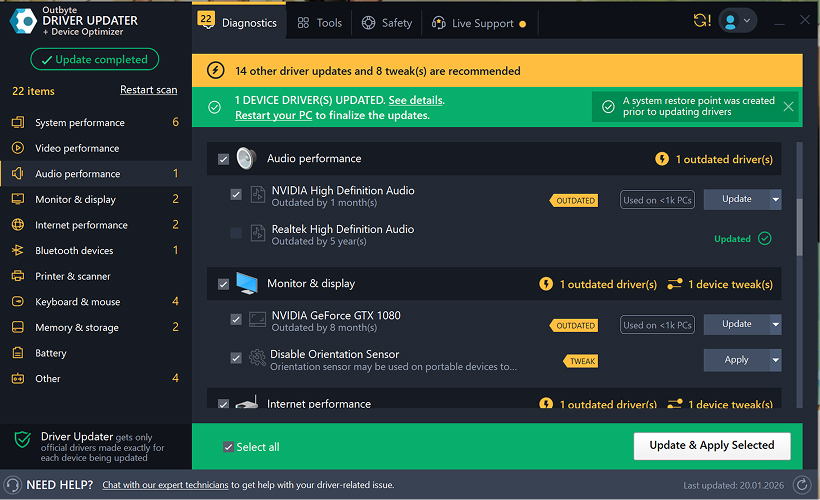
Å holde enhetsdriverne oppdatert bidrar til å sikre stabil Windows-ytelse og korrekt maskinvaredrift. Nedenfor finner du en trinnvis veiledning som forklarer hvordan du oppdaterer en enkelt driver gratis ved hjelp av Outbyte Driver Updater. Denne veiledningen beskriver en metode for å oppdatere én valgt driver uten å aktivere en lisens og uten å oppgi personlig informasjon eller betalingsdetaljer.
Kan du oppdatere en driver gratis uten registrering?
Ja.
Outbyte Driver Updater lar deg:
- skanne datamaskinen for utdaterte drivere uten kostnad;
- se en liste over oppdagede drivere;
- oppdatere én valgt driver gratis;
- unngå å oppgi e-postadresse, navn, kredittkortnummer eller andre personopplysninger.
Den gratis oppdateringsprosessen krever bare det installerte programmet og de vanlige skannings- og oppdateringstrinnene.
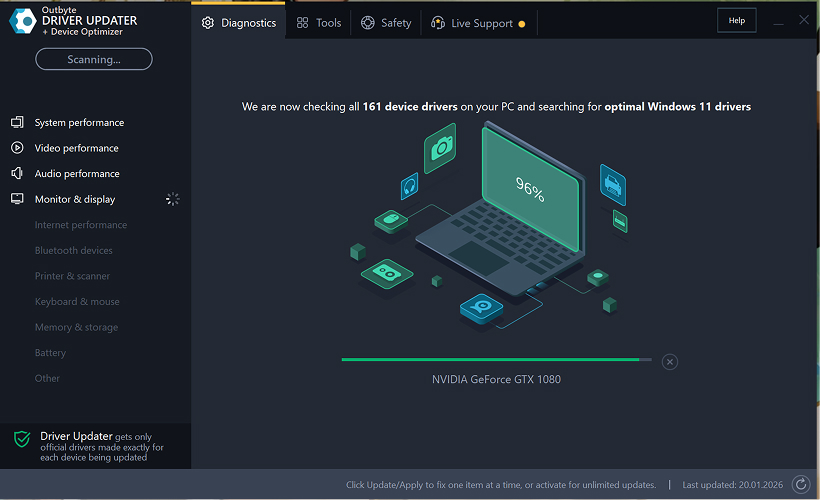
Trinn 1: Start programmet og skann datamaskinen
Last ned og installer Outbyte Driver Updater på Windows-PCen din.
Etter oppstart vil programmet automatisk begynne å skanne systemet og kontrollere installerte drivere.
Trinn 2: Lukk aktiveringsvinduet
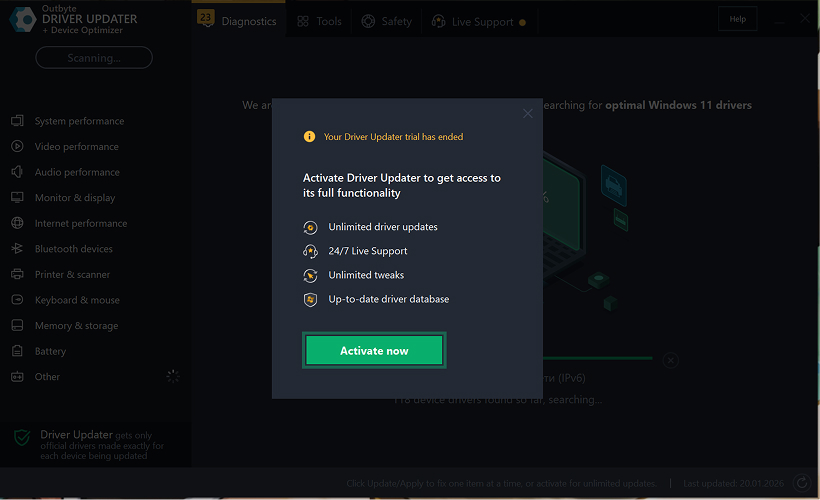
Etter skanningen kan et "Aktiver nå"-vindu vises.
For å fortsette gratis:
- klikk på lukk (X)-knappen i øvre høyre hjørne av vinduet.
Ingen informasjon behøver å oppgis
Trinn 3: Velg driverkategori
Fra menyen til venstre, velg enhetskategorien du vil oppdatere, for eksempel:
- lyddrivere;
- video- og grafikkdrivere;
- nettverk- og Wi-Fi-drivere;
- Bluetooth-drivere;
- skriver- og skannerdrivere.
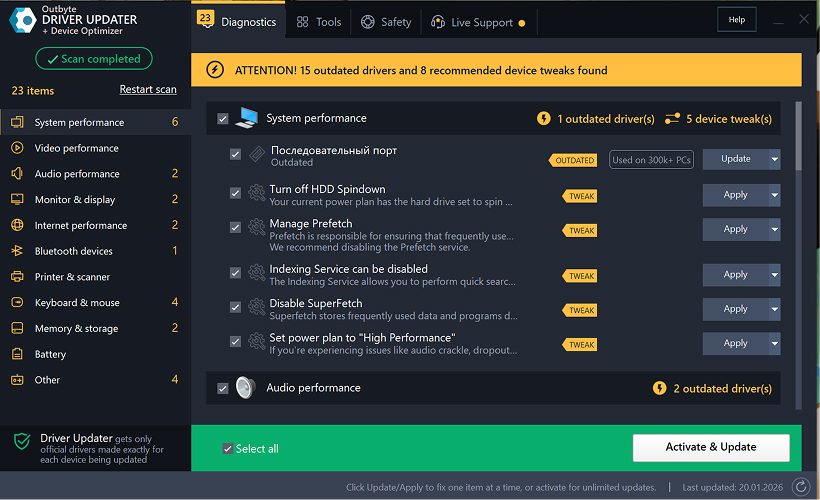
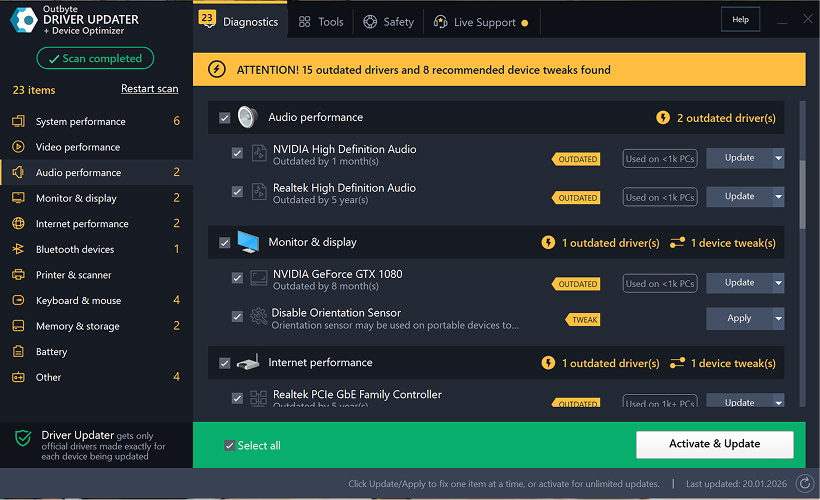
Trinn 4: Klikk "Oppdater" ved siden av den valgte driveren
I driverlisten, finn driveren du vil oppdatere og klikk på Oppdater-knappen ved siden av den.
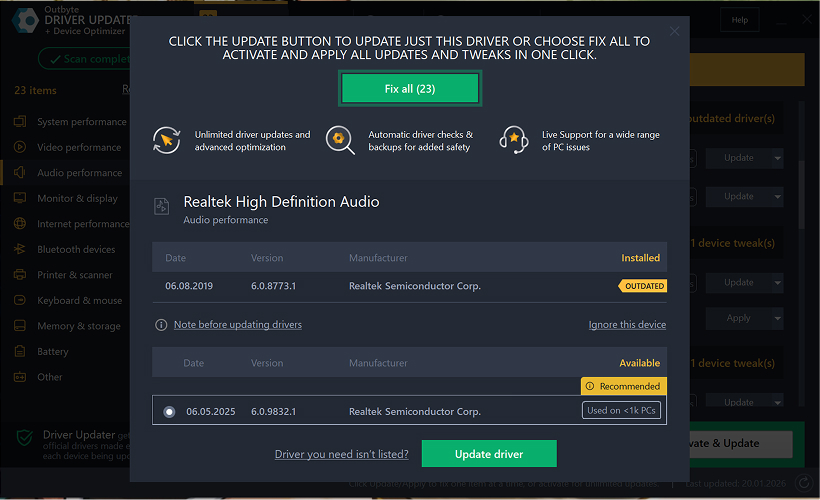
Trinn 5: Bekreft driveroppdateringen
I popup-vinduet, klikk Oppdater driver.
På dette stadiet kreves ingen personopplysninger eller betalingsdetaljer.
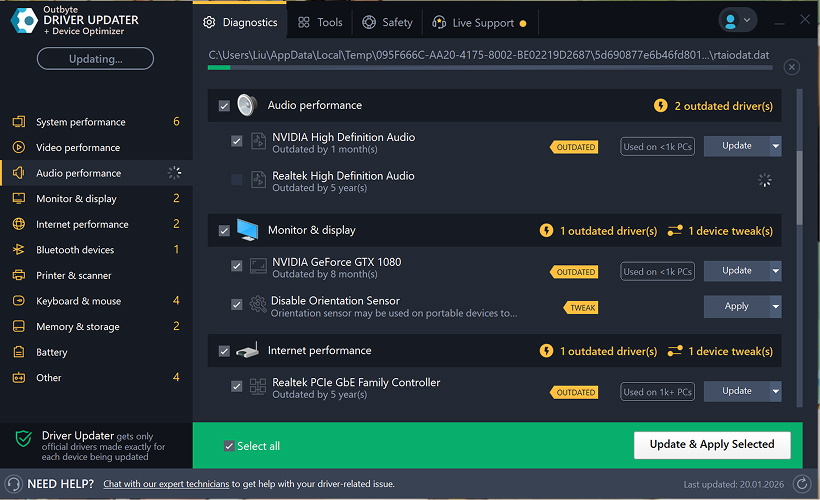
Trinn 6: Vent til oppdateringsprosessen er ferdig
Programmet vil begynne å laste ned og installere den valgte driveren.
Vennligst vent til prosessen er fullført.
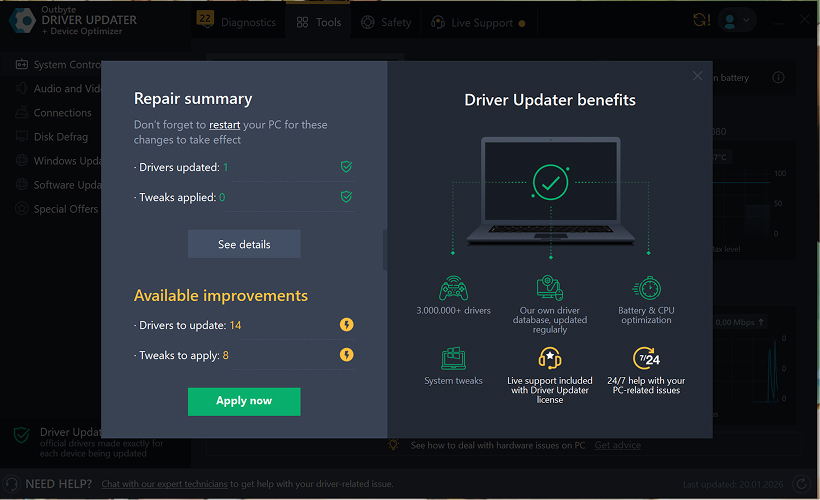
Trinn 7: Bruk endringer og start datamaskinen på nytt
Etter at installasjonen er ferdig, klikk Bruk nå for å aktivere endringene.
For å sikre at den oppdaterte driveren fungerer korrekt, start datamaskinen på nytt.
Viktige merknader
- Gratis oppdateringer er tilgjengelige én driver om gangen.
- Ingen registrering er påkrevd for den gratis oppdateringen.
- Ingen kredittkort- eller betalingsinformasjon blir forespurt.
- Alle handlinger utføres lokalt i programmet etter skanning av systemet.
- Tilgjengelighet for gratis oppdatering kan avhenge av drivertype og systemkonfigurasjon.
Learn to pair your wireless mouse with a different USB receiver in simple steps. Check compatibility (e.g., Logitech Unifying receivers), install required software/drivers, and use pairing modes to sync devices. Troubleshoot connection issues and optimize performance for seamless use.
Simplify your workspace with Logitech Unifying Software, enabling effortless connection of up to six compatible devices through a single receiver. Enjoy quick setup, clutter-free connectivity, and enhanced productivity as your keyboard, mouse, and other peripherals work in perfect harmony.
Learn how to set up your Epson L3250 printer with this step-by-step guide. Unbox, install ink, connect to power, and download drivers via Epson’s website or included CD. Configure Wi-Fi settings for wireless printing and run a test page to ensure proper installation. Simplify your setup process and start printing effortlessly.
Transform your smartphone into an HD webcam with DroidCam. Enjoy wireless connectivity and seamless video streaming for crystal-clear video calls, live streams, or online meetings. Works with PC/Mac.
Learn how to enable Bluetooth on your PC in a few simple steps. Check compatibility, activate Bluetooth via Windows Settings or the system tray, pair your device, and troubleshoot common issues. This guide ensures seamless wireless connections for headphones, speakers, or peripherals.
Learn how to set up your Epson L3250 printer quickly and efficiently. This guide covers unboxing, installing ink cartridges, connecting to power, and configuring Wi-Fi for seamless wireless printing. Follow step-by-step instructions to install drivers, align the printer head, and troubleshoot common issues. Perfect for home or office use, the Epson L3250 ensures hassle-free installation and high-quality printing, scanning, and copying.
Download the latest Epson L3250 printer drivers and software to ensure seamless connectivity and optimal performance. Compatible with Windows and macOS, these tools enable easy setup, wireless printing, and advanced features. Visit the official Epson support page for secure, up-to-date downloads tailored to your operating system. Simplify installation and maximize your printer’s capabilities with reliable drivers and utilities.
Discover innovative strategies to amplify your message and connect deeply with audiences – no microphone needed. Harness the power of body language, visual storytelling, and creative platforms to make your voice heard in any setting.
The Valeton GP 100 Wah is a professional-grade guitar pedal designed for musicians seeking dynamic sound control and expressive tonal shaping. Featuring a responsive wah circuit, it delivers smooth, vintage-inspired sweeps and modern versatility for rock, funk, blues, and beyond. Built with durable components and an intuitive design, the GP 100 ensures reliable performance on stage or in the studio. Adjustable parameters and a true bypass switch provide seamless integration into any pedalboard setup, while its compact size maximizes space efficiency. Elevate your playing with rich, articulate wah effects tailored to your musical style.
Virtual CloneDrive offers effortless disc image mounting and virtual drive cloning, enabling you to access ISO, BIN, IMG, and other formats without physical media. Streamline workflows, run software, or backup data with a lightweight, user-friendly tool that integrates seamlessly into your system. Simplify disc management and enhance productivity—no hardware required.