Pålitelig Programvare

Outbyte Driver Updater
- 1,000,000+ drivere
- Nedlastet: 1,143,473 ganger
- Windows 11 / 10 / 8 / 7





 Last Ned
RTS5229 PCI Express Card Reader
Last Ned
RTS5229 PCI Express Card Reader
Last Ned
RTS5229 PCI Express Card Reader

Systeminformasjon
PC-en din kjører for øyeblikket:
Driver details
Driver Name:
RTS5229 PCI Express Card Reader
Provider:
Realtek Semiconduct Corp.
Version:
6.3.9600.29088
Release Date:
5/15/2015
Architecture:
AMD64
File Size:
1.7 MB
Driver ID:
pci\ven_10ec&dev_5229&subsys_2b2f103c
Supported OS:
Windows 10
WHQL:
Signed
Spesialtilbud
Last Ned
Alle lenker er skannet av antivirusprogram.
Manual download (.cab, 1.7 MB) from Microsoft servers
— install via Device Manager.
Compatible hardware
- RTS5229 PCI Express Card Reader (Realtek Semiconductor Co., Ltd.)
Supported Hardware IDs
pci\ven_10ec&dev_5229&cc_ff00
pci\ven_10ec&dev_5229&subsys_008214c0
pci\ven_10ec&dev_5229&subsys_016c1b0a
pci\ven_10ec&dev_5229&subsys_02101558
pci\ven_10ec&dev_5229&subsys_02501558
pci\ven_10ec&dev_5229&subsys_02511558
pci\ven_10ec&dev_5229&subsys_02701558
pci\ven_10ec&dev_5229&subsys_05001025
pci\ven_10ec&dev_5229&subsys_05e71028
pci\ven_10ec&dev_5229&subsys_05e81028
Show all 595 hardware IDs
pci\ven_10ec&dev_5229&subsys_06501558
pci\ven_10ec&dev_5229&subsys_06551558
pci\ven_10ec&dev_5229&subsys_06961025
pci\ven_10ec&dev_5229&subsys_06981025
pci\ven_10ec&dev_5229&subsys_07651025
pci\ven_10ec&dev_5229&subsys_07661025
pci\ven_10ec&dev_5229&subsys_079e1025
pci\ven_10ec&dev_5229&subsys_079f1025
pci\ven_10ec&dev_5229&subsys_08131025
pci\ven_10ec&dev_5229&subsys_08151025
pci\ven_10ec&dev_5229&subsys_09241025
pci\ven_10ec&dev_5229&subsys_09251025
pci\ven_10ec&dev_5229&subsys_0925152d
pci\ven_10ec&dev_5229&subsys_0926152d
pci\ven_10ec&dev_5229&subsys_0927152d
pci\ven_10ec&dev_5229&subsys_0928152d
pci\ven_10ec&dev_5229&subsys_0929152d
pci\ven_10ec&dev_5229&subsys_0932152d
pci\ven_10ec&dev_5229&subsys_0933152d
pci\ven_10ec&dev_5229&subsys_0934152d
pci\ven_10ec&dev_5229&subsys_0935152d
pci\ven_10ec&dev_5229&subsys_0936152d
pci\ven_10ec&dev_5229&subsys_0938152d
pci\ven_10ec&dev_5229&subsys_0939152d
pci\ven_10ec&dev_5229&subsys_0940152d
pci\ven_10ec&dev_5229&subsys_09401558
pci\ven_10ec&dev_5229&subsys_0941152d
pci\ven_10ec&dev_5229&subsys_09411558
pci\ven_10ec&dev_5229&subsys_0942152d
pci\ven_10ec&dev_5229&subsys_0943152d
pci\ven_10ec&dev_5229&subsys_0944152d
pci\ven_10ec&dev_5229&subsys_0945152d
pci\ven_10ec&dev_5229&subsys_0946152d
pci\ven_10ec&dev_5229&subsys_0947152d
pci\ven_10ec&dev_5229&subsys_0948152d
pci\ven_10ec&dev_5229&subsys_0949152d
pci\ven_10ec&dev_5229&subsys_0950152d
pci\ven_10ec&dev_5229&subsys_0951152d
pci\ven_10ec&dev_5229&subsys_0954152d
pci\ven_10ec&dev_5229&subsys_0955152d
pci\ven_10ec&dev_5229&subsys_0956152d
pci\ven_10ec&dev_5229&subsys_0957152d
pci\ven_10ec&dev_5229&subsys_0958152d
pci\ven_10ec&dev_5229&subsys_0959152d
pci\ven_10ec&dev_5229&subsys_0960152d
pci\ven_10ec&dev_5229&subsys_0961152d
pci\ven_10ec&dev_5229&subsys_0962152d
pci\ven_10ec&dev_5229&subsys_0963152d
pci\ven_10ec&dev_5229&subsys_0964152d
pci\ven_10ec&dev_5229&subsys_0965152d
pci\ven_10ec&dev_5229&subsys_0966152d
pci\ven_10ec&dev_5229&subsys_0967152d
pci\ven_10ec&dev_5229&subsys_0968152d
pci\ven_10ec&dev_5229&subsys_0969152d
pci\ven_10ec&dev_5229&subsys_0970152d
pci\ven_10ec&dev_5229&subsys_0971152d
pci\ven_10ec&dev_5229&subsys_0972152d
pci\ven_10ec&dev_5229&subsys_0973152d
pci\ven_10ec&dev_5229&subsys_0974152d
pci\ven_10ec&dev_5229&subsys_0975152d
pci\ven_10ec&dev_5229&subsys_0976152d
pci\ven_10ec&dev_5229&subsys_0977152d
pci\ven_10ec&dev_5229&subsys_0982152d
pci\ven_10ec&dev_5229&subsys_0983152d
pci\ven_10ec&dev_5229&subsys_0984152d
pci\ven_10ec&dev_5229&subsys_0989152d
pci\ven_10ec&dev_5229&subsys_0990152d
pci\ven_10ec&dev_5229&subsys_0991152d
pci\ven_10ec&dev_5229&subsys_0992152d
pci\ven_10ec&dev_5229&subsys_0993152d
pci\ven_10ec&dev_5229&subsys_0994152d
pci\ven_10ec&dev_5229&subsys_0995152d
pci\ven_10ec&dev_5229&subsys_0997152d
pci\ven_10ec&dev_5229&subsys_0dac105b
pci\ven_10ec&dev_5229&subsys_0dad105b
pci\ven_10ec&dev_5229&subsys_0e51105b
pci\ven_10ec&dev_5229&subsys_0e52105b
pci\ven_10ec&dev_5229&subsys_0e53105b
pci\ven_10ec&dev_5229&subsys_0ef5105b
pci\ven_10ec&dev_5229&subsys_1001152d
pci\ven_10ec&dev_5229&subsys_1006152d
pci\ven_10ec&dev_5229&subsys_1012152d
pci\ven_10ec&dev_5229&subsys_1013152d
pci\ven_10ec&dev_5229&subsys_1015152d
pci\ven_10ec&dev_5229&subsys_1022152d
pci\ven_10ec&dev_5229&subsys_1030152d
pci\ven_10ec&dev_5229&subsys_1031152d
pci\ven_10ec&dev_5229&subsys_1034152d
pci\ven_10ec&dev_5229&subsys_1054152d
pci\ven_10ec&dev_5229&subsys_1055152d
pci\ven_10ec&dev_5229&subsys_1056152d
pci\ven_10ec&dev_5229&subsys_1057152d
pci\ven_10ec&dev_5229&subsys_1060152d
pci\ven_10ec&dev_5229&subsys_1061152d
pci\ven_10ec&dev_5229&subsys_1062152d
pci\ven_10ec&dev_5229&subsys_1063152d
pci\ven_10ec&dev_5229&subsys_1070152d
pci\ven_10ec&dev_5229&subsys_1071152d
pci\ven_10ec&dev_5229&subsys_10fb17c0
pci\ven_10ec&dev_5229&subsys_11151558
pci\ven_10ec&dev_5229&subsys_11151b0a
pci\ven_10ec&dev_5229&subsys_11161558
pci\ven_10ec&dev_5229&subsys_13021558
pci\ven_10ec&dev_5229&subsys_13101558
pci\ven_10ec&dev_5229&subsys_13111558
pci\ven_10ec&dev_5229&subsys_158d1043
pci\ven_10ec&dev_5229&subsys_176b10cf
pci\ven_10ec&dev_5229&subsys_1812103c
pci\ven_10ec&dev_5229&subsys_1813103c
pci\ven_10ec&dev_5229&subsys_1818103c
pci\ven_10ec&dev_5229&subsys_1819103c
pci\ven_10ec&dev_5229&subsys_181a103c
pci\ven_10ec&dev_5229&subsys_181b103c
pci\ven_10ec&dev_5229&subsys_181c103c
pci\ven_10ec&dev_5229&subsys_181d103c
pci\ven_10ec&dev_5229&subsys_18291854
pci\ven_10ec&dev_5229&subsys_182d103c
pci\ven_10ec&dev_5229&subsys_182e103c
pci\ven_10ec&dev_5229&subsys_182f103c
pci\ven_10ec&dev_5229&subsys_1830103c
pci\ven_10ec&dev_5229&subsys_18301854
pci\ven_10ec&dev_5229&subsys_1831103c
pci\ven_10ec&dev_5229&subsys_18311854
pci\ven_10ec&dev_5229&subsys_1832103c
pci\ven_10ec&dev_5229&subsys_18321854
pci\ven_10ec&dev_5229&subsys_1833103c
pci\ven_10ec&dev_5229&subsys_1834103c
pci\ven_10ec&dev_5229&subsys_1835103c
pci\ven_10ec&dev_5229&subsys_1836103c
pci\ven_10ec&dev_5229&subsys_1837103c
pci\ven_10ec&dev_5229&subsys_183a103c
pci\ven_10ec&dev_5229&subsys_183b103c
pci\ven_10ec&dev_5229&subsys_183c103c
pci\ven_10ec&dev_5229&subsys_183d103c
pci\ven_10ec&dev_5229&subsys_183e103c
pci\ven_10ec&dev_5229&subsys_183f103c
pci\ven_10ec&dev_5229&subsys_1840103c
pci\ven_10ec&dev_5229&subsys_1841103c
pci\ven_10ec&dev_5229&subsys_1842103c
pci\ven_10ec&dev_5229&subsys_1843103c
pci\ven_10ec&dev_5229&subsys_1844103c
pci\ven_10ec&dev_5229&subsys_1845103c
pci\ven_10ec&dev_5229&subsys_1847103c
pci\ven_10ec&dev_5229&subsys_1848103c
pci\ven_10ec&dev_5229&subsys_1849103c
pci\ven_10ec&dev_5229&subsys_184a103c
pci\ven_10ec&dev_5229&subsys_184b103c
pci\ven_10ec&dev_5229&subsys_184c103c
pci\ven_10ec&dev_5229&subsys_1851103c
pci\ven_10ec&dev_5229&subsys_1852103c
pci\ven_10ec&dev_5229&subsys_1853103c
pci\ven_10ec&dev_5229&subsys_1854103c
pci\ven_10ec&dev_5229&subsys_1855103c
pci\ven_10ec&dev_5229&subsys_1858103c
pci\ven_10ec&dev_5229&subsys_1859103c
pci\ven_10ec&dev_5229&subsys_185a103c
pci\ven_10ec&dev_5229&subsys_185b103c
pci\ven_10ec&dev_5229&subsys_1885103c
pci\ven_10ec&dev_5229&subsys_1886103c
pci\ven_10ec&dev_5229&subsys_1888103c
pci\ven_10ec&dev_5229&subsys_188b103c
pci\ven_10ec&dev_5229&subsys_188d103c
pci\ven_10ec&dev_5229&subsys_188e103c
pci\ven_10ec&dev_5229&subsys_188f103c
pci\ven_10ec&dev_5229&subsys_1890103c
pci\ven_10ec&dev_5229&subsys_1891103c
pci\ven_10ec&dev_5229&subsys_1892103c
pci\ven_10ec&dev_5229&subsys_189a103c
pci\ven_10ec&dev_5229&subsys_189b103c
pci\ven_10ec&dev_5229&subsys_18ea103c
pci\ven_10ec&dev_5229&subsys_18ee103c
pci\ven_10ec&dev_5229&subsys_18ef103c
pci\ven_10ec&dev_5229&subsys_18f4103c
pci\ven_10ec&dev_5229&subsys_18f9103c
pci\ven_10ec&dev_5229&subsys_18fa103c
pci\ven_10ec&dev_5229&subsys_18fb103c
pci\ven_10ec&dev_5229&subsys_18fc103c
pci\ven_10ec&dev_5229&subsys_18fd103c
pci\ven_10ec&dev_5229&subsys_18fe103c
pci\ven_10ec&dev_5229&subsys_18ff103c
pci\ven_10ec&dev_5229&subsys_1900103c
pci\ven_10ec&dev_5229&subsys_1902103c
pci\ven_10ec&dev_5229&subsys_1937103c
pci\ven_10ec&dev_5229&subsys_193b103c
pci\ven_10ec&dev_5229&subsys_193c103c
pci\ven_10ec&dev_5229&subsys_193e103c
pci\ven_10ec&dev_5229&subsys_1948103c
pci\ven_10ec&dev_5229&subsys_1949103c
pci\ven_10ec&dev_5229&subsys_194b103c
pci\ven_10ec&dev_5229&subsys_1960103c
pci\ven_10ec&dev_5229&subsys_1961103c
pci\ven_10ec&dev_5229&subsys_1964103c
pci\ven_10ec&dev_5229&subsys_1969103c
pci\ven_10ec&dev_5229&subsys_196d103c
pci\ven_10ec&dev_5229&subsys_196e103c
pci\ven_10ec&dev_5229&subsys_196f103c
pci\ven_10ec&dev_5229&subsys_1970103c
pci\ven_10ec&dev_5229&subsys_1971103c
pci\ven_10ec&dev_5229&subsys_1972103c
pci\ven_10ec&dev_5229&subsys_1980103c
pci\ven_10ec&dev_5229&subsys_1981103c
pci\ven_10ec&dev_5229&subsys_1982103c
pci\ven_10ec&dev_5229&subsys_1983103c
pci\ven_10ec&dev_5229&subsys_1984103c
pci\ven_10ec&dev_5229&subsys_1985103c
pci\ven_10ec&dev_5229&subsys_1986103c
pci\ven_10ec&dev_5229&subsys_1987103c
pci\ven_10ec&dev_5229&subsys_198a103c
pci\ven_10ec&dev_5229&subsys_198b103c
pci\ven_10ec&dev_5229&subsys_1995103c
pci\ven_10ec&dev_5229&subsys_210c103c
pci\ven_10ec&dev_5229&subsys_210d103c
pci\ven_10ec&dev_5229&subsys_210e103c
pci\ven_10ec&dev_5229&subsys_210f103c
pci\ven_10ec&dev_5229&subsys_2114103c
pci\ven_10ec&dev_5229&subsys_2115103c
pci\ven_10ec&dev_5229&subsys_2116103c
pci\ven_10ec&dev_5229&subsys_2117103c
pci\ven_10ec&dev_5229&subsys_2118103c
pci\ven_10ec&dev_5229&subsys_2119103c
pci\ven_10ec&dev_5229&subsys_211a103c
pci\ven_10ec&dev_5229&subsys_211b103c
pci\ven_10ec&dev_5229&subsys_2125103c
pci\ven_10ec&dev_5229&subsys_2126103c
pci\ven_10ec&dev_5229&subsys_2127103c
pci\ven_10ec&dev_5229&subsys_2128103c
pci\ven_10ec&dev_5229&subsys_212c103c
pci\ven_10ec&dev_5229&subsys_212d103c
pci\ven_10ec&dev_5229&subsys_212e103c
pci\ven_10ec&dev_5229&subsys_212f103c
pci\ven_10ec&dev_5229&subsys_2130103c
pci\ven_10ec&dev_5229&subsys_2131103c
pci\ven_10ec&dev_5229&subsys_2137103c
pci\ven_10ec&dev_5229&subsys_2138103c
pci\ven_10ec&dev_5229&subsys_2139103c
pci\ven_10ec&dev_5229&subsys_213a103c
pci\ven_10ec&dev_5229&subsys_213b103c
pci\ven_10ec&dev_5229&subsys_213c103c
pci\ven_10ec&dev_5229&subsys_2149103c
pci\ven_10ec&dev_5229&subsys_2150103c
pci\ven_10ec&dev_5229&subsys_2161103c
pci\ven_10ec&dev_5229&subsys_2162103c
pci\ven_10ec&dev_5229&subsys_2163103c
pci\ven_10ec&dev_5229&subsys_2164103c
pci\ven_10ec&dev_5229&subsys_2165103c
pci\ven_10ec&dev_5229&subsys_2166103c
pci\ven_10ec&dev_5229&subsys_2169103c
pci\ven_10ec&dev_5229&subsys_216a103c
pci\ven_10ec&dev_5229&subsys_216b103c
pci\ven_10ec&dev_5229&subsys_216c103c
pci\ven_10ec&dev_5229&subsys_216d103c
pci\ven_10ec&dev_5229&subsys_216e103c
pci\ven_10ec&dev_5229&subsys_216f103c
pci\ven_10ec&dev_5229&subsys_2170103c
pci\ven_10ec&dev_5229&subsys_2178103c
pci\ven_10ec&dev_5229&subsys_2179103c
pci\ven_10ec&dev_5229&subsys_217a103c
pci\ven_10ec&dev_5229&subsys_217b103c
pci\ven_10ec&dev_5229&subsys_2183103c
pci\ven_10ec&dev_5229&subsys_2184103c
pci\ven_10ec&dev_5229&subsys_2185103c
pci\ven_10ec&dev_5229&subsys_2186103c
pci\ven_10ec&dev_5229&subsys_2189103c
pci\ven_10ec&dev_5229&subsys_218a103c
pci\ven_10ec&dev_5229&subsys_218b103c
pci\ven_10ec&dev_5229&subsys_218c103c
pci\ven_10ec&dev_5229&subsys_218d103c
pci\ven_10ec&dev_5229&subsys_218e103c
pci\ven_10ec&dev_5229&subsys_218f103c
pci\ven_10ec&dev_5229&subsys_2190103c
pci\ven_10ec&dev_5229&subsys_2191103c
pci\ven_10ec&dev_5229&subsys_2192103c
pci\ven_10ec&dev_5229&subsys_2193103c
pci\ven_10ec&dev_5229&subsys_2194103c
pci\ven_10ec&dev_5229&subsys_21a9103c
pci\ven_10ec&dev_5229&subsys_21bb103c
pci\ven_10ec&dev_5229&subsys_21bc103c
pci\ven_10ec&dev_5229&subsys_21d5103c
pci\ven_10ec&dev_5229&subsys_21d6103c
pci\ven_10ec&dev_5229&subsys_21d7103c
pci\ven_10ec&dev_5229&subsys_21d8103c
pci\ven_10ec&dev_5229&subsys_21d9103c
pci\ven_10ec&dev_5229&subsys_21da103c
pci\ven_10ec&dev_5229&subsys_21db103c
pci\ven_10ec&dev_5229&subsys_21dc103c
pci\ven_10ec&dev_5229&subsys_21dd103c
pci\ven_10ec&dev_5229&subsys_21de103c
pci\ven_10ec&dev_5229&subsys_21e8103c
pci\ven_10ec&dev_5229&subsys_21e9103c
pci\ven_10ec&dev_5229&subsys_21f317aa
pci\ven_10ec&dev_5229&subsys_21f7103c
pci\ven_10ec&dev_5229&subsys_21f717aa
pci\ven_10ec&dev_5229&subsys_21f8103c
pci\ven_10ec&dev_5229&subsys_21f9103c
pci\ven_10ec&dev_5229&subsys_21fa103c
pci\ven_10ec&dev_5229&subsys_21fa17aa
pci\ven_10ec&dev_5229&subsys_21fc17aa
pci\ven_10ec&dev_5229&subsys_220517aa
pci\ven_10ec&dev_5229&subsys_220a17aa
pci\ven_10ec&dev_5229&subsys_220d103c
pci\ven_10ec&dev_5229&subsys_220e103c
pci\ven_10ec&dev_5229&subsys_220f103c
pci\ven_10ec&dev_5229&subsys_2210103c
pci\ven_10ec&dev_5229&subsys_2211103c
pci\ven_10ec&dev_5229&subsys_2212103c
pci\ven_10ec&dev_5229&subsys_2213103c
pci\ven_10ec&dev_5229&subsys_2214103c
pci\ven_10ec&dev_5229&subsys_2217103c
pci\ven_10ec&dev_5229&subsys_2218103c
pci\ven_10ec&dev_5229&subsys_221917aa
pci\ven_10ec&dev_5229&subsys_222c103c
pci\ven_10ec&dev_5229&subsys_222d103c
pci\ven_10ec&dev_5229&subsys_2230103c
pci\ven_10ec&dev_5229&subsys_2250103c
pci\ven_10ec&dev_5229&subsys_2257103c
pci\ven_10ec&dev_5229&subsys_225b103c
pci\ven_10ec&dev_5229&subsys_225d103c
pci\ven_10ec&dev_5229&subsys_2260103c
pci\ven_10ec&dev_5229&subsys_2261103c
pci\ven_10ec&dev_5229&subsys_2262103c
pci\ven_10ec&dev_5229&subsys_2263103c
pci\ven_10ec&dev_5229&subsys_2264103c
pci\ven_10ec&dev_5229&subsys_2265103c
pci\ven_10ec&dev_5229&subsys_2266103c
pci\ven_10ec&dev_5229&subsys_2267103c
pci\ven_10ec&dev_5229&subsys_2268103c
pci\ven_10ec&dev_5229&subsys_2269103c
pci\ven_10ec&dev_5229&subsys_226a103c
pci\ven_10ec&dev_5229&subsys_226b103c
pci\ven_10ec&dev_5229&subsys_226c103c
pci\ven_10ec&dev_5229&subsys_226d103c
pci\ven_10ec&dev_5229&subsys_226e103c
pci\ven_10ec&dev_5229&subsys_226f103c
pci\ven_10ec&dev_5229&subsys_227a103c
pci\ven_10ec&dev_5229&subsys_227b103c
pci\ven_10ec&dev_5229&subsys_227c103c
pci\ven_10ec&dev_5229&subsys_227d103c
pci\ven_10ec&dev_5229&subsys_227e103c
pci\ven_10ec&dev_5229&subsys_227f103c
pci\ven_10ec&dev_5229&subsys_2280103c
pci\ven_10ec&dev_5229&subsys_2281103c
pci\ven_10ec&dev_5229&subsys_2282103c
pci\ven_10ec&dev_5229&subsys_2283103c
pci\ven_10ec&dev_5229&subsys_2284103c
pci\ven_10ec&dev_5229&subsys_2285103c
pci\ven_10ec&dev_5229&subsys_2286103c
pci\ven_10ec&dev_5229&subsys_2287103c
pci\ven_10ec&dev_5229&subsys_2288103c
pci\ven_10ec&dev_5229&subsys_2289103c
pci\ven_10ec&dev_5229&subsys_228a103c
pci\ven_10ec&dev_5229&subsys_228b103c
pci\ven_10ec&dev_5229&subsys_228c103c
pci\ven_10ec&dev_5229&subsys_228d103c
pci\ven_10ec&dev_5229&subsys_228e103c
pci\ven_10ec&dev_5229&subsys_228f103c
pci\ven_10ec&dev_5229&subsys_2290103c
pci\ven_10ec&dev_5229&subsys_2291103c
pci\ven_10ec&dev_5229&subsys_2292103c
pci\ven_10ec&dev_5229&subsys_2293103c
pci\ven_10ec&dev_5229&subsys_2294103c
pci\ven_10ec&dev_5229&subsys_2295103c
pci\ven_10ec&dev_5229&subsys_2296103c
pci\ven_10ec&dev_5229&subsys_2297103c
pci\ven_10ec&dev_5229&subsys_2298103c
pci\ven_10ec&dev_5229&subsys_2299103c
pci\ven_10ec&dev_5229&subsys_229a103c
pci\ven_10ec&dev_5229&subsys_229b103c
pci\ven_10ec&dev_5229&subsys_229c103c
pci\ven_10ec&dev_5229&subsys_229d103c
pci\ven_10ec&dev_5229&subsys_22a3103c
pci\ven_10ec&dev_5229&subsys_22a6103c
pci\ven_10ec&dev_5229&subsys_22a7103c
pci\ven_10ec&dev_5229&subsys_22a8103c
pci\ven_10ec&dev_5229&subsys_22a9103c
pci\ven_10ec&dev_5229&subsys_22b2103c
pci\ven_10ec&dev_5229&subsys_22b3103c
pci\ven_10ec&dev_5229&subsys_22b4103c
pci\ven_10ec&dev_5229&subsys_22c3103c
pci\ven_10ec&dev_5229&subsys_22c4103c
pci\ven_10ec&dev_5229&subsys_22c5103c
pci\ven_10ec&dev_5229&subsys_22c6103c
pci\ven_10ec&dev_5229&subsys_22c7103c
pci\ven_10ec&dev_5229&subsys_22c8103c
pci\ven_10ec&dev_5229&subsys_22cd103c
pci\ven_10ec&dev_5229&subsys_22ce103c
pci\ven_10ec&dev_5229&subsys_22cf103c
pci\ven_10ec&dev_5229&subsys_22d0103c
pci\ven_10ec&dev_5229&subsys_22d2103c
pci\ven_10ec&dev_5229&subsys_22d7103c
pci\ven_10ec&dev_5229&subsys_22d8103c
pci\ven_10ec&dev_5229&subsys_22d9103c
pci\ven_10ec&dev_5229&subsys_2330103c
pci\ven_10ec&dev_5229&subsys_2334103c
pci\ven_10ec&dev_5229&subsys_2335103c
pci\ven_10ec&dev_5229&subsys_2336103c
pci\ven_10ec&dev_5229&subsys_2337103c
pci\ven_10ec&dev_5229&subsys_2339103c
pci\ven_10ec&dev_5229&subsys_233a103c
pci\ven_10ec&dev_5229&subsys_233b103c
pci\ven_10ec&dev_5229&subsys_2af6103c
pci\ven_10ec&dev_5229&subsys_2af8103c
pci\ven_10ec&dev_5229&subsys_2af9103c
pci\ven_10ec&dev_5229&subsys_2afa103c
pci\ven_10ec&dev_5229&subsys_2afc103c
pci\ven_10ec&dev_5229&subsys_2afd103c
pci\ven_10ec&dev_5229&subsys_2aff103c
pci\ven_10ec&dev_5229&subsys_2b02103c
pci\ven_10ec&dev_5229&subsys_2b04103c
pci\ven_10ec&dev_5229&subsys_2b06103c
pci\ven_10ec&dev_5229&subsys_2b07103c
pci\ven_10ec&dev_5229&subsys_2b08103c
pci\ven_10ec&dev_5229&subsys_2b09103c
pci\ven_10ec&dev_5229&subsys_2b0a103c
pci\ven_10ec&dev_5229&subsys_2b0b103c
pci\ven_10ec&dev_5229&subsys_2b0c103c
pci\ven_10ec&dev_5229&subsys_2b0d103c
pci\ven_10ec&dev_5229&subsys_2b0f103c
pci\ven_10ec&dev_5229&subsys_2b10103c
pci\ven_10ec&dev_5229&subsys_2b11103c
pci\ven_10ec&dev_5229&subsys_2b111b72
pci\ven_10ec&dev_5229&subsys_2b12103c
pci\ven_10ec&dev_5229&subsys_2b13103c
pci\ven_10ec&dev_5229&subsys_2b15103c
pci\ven_10ec&dev_5229&subsys_2b1b103c
pci\ven_10ec&dev_5229&subsys_2b1c103c
pci\ven_10ec&dev_5229&subsys_2b1f103c
pci\ven_10ec&dev_5229&subsys_2b21103c
pci\ven_10ec&dev_5229&subsys_2b23103c
pci\ven_10ec&dev_5229&subsys_2b26103c
pci\ven_10ec&dev_5229&subsys_2b2b103c
pci\ven_10ec&dev_5229&subsys_2b2e103c
pci\ven_10ec&dev_5229&subsys_2b2f103c
pci\ven_10ec&dev_5229&subsys_2b31103c
pci\ven_10ec&dev_5229&subsys_2b38103c
pci\ven_10ec&dev_5229&subsys_2b3b103c
pci\ven_10ec&dev_5229&subsys_2b3c103c
pci\ven_10ec&dev_5229&subsys_2b3e103c
pci\ven_10ec&dev_5229&subsys_2b3f103c
pci\ven_10ec&dev_5229&subsys_2b40103c
pci\ven_10ec&dev_5229&subsys_2b41103c
pci\ven_10ec&dev_5229&subsys_2b42103c
pci\ven_10ec&dev_5229&subsys_2b43103c
pci\ven_10ec&dev_5229&subsys_2b44103c
pci\ven_10ec&dev_5229&subsys_2b45103c
pci\ven_10ec&dev_5229&subsys_2b48103c
pci\ven_10ec&dev_5229&subsys_2b4c103c
pci\ven_10ec&dev_5229&subsys_2b55103c
pci\ven_10ec&dev_5229&subsys_2b56103c
pci\ven_10ec&dev_5229&subsys_2b59103c
pci\ven_10ec&dev_5229&subsys_30b617aa
pci\ven_10ec&dev_5229&subsys_30b917aa
pci\ven_10ec&dev_5229&subsys_30da17aa
pci\ven_10ec&dev_5229&subsys_30dc17aa
pci\ven_10ec&dev_5229&subsys_30df17aa
pci\ven_10ec&dev_5229&subsys_30e017aa
pci\ven_10ec&dev_5229&subsys_30e417aa
pci\ven_10ec&dev_5229&subsys_35661558
pci\ven_10ec&dev_5229&subsys_35681558
pci\ven_10ec&dev_5229&subsys_361b17aa
pci\ven_10ec&dev_5229&subsys_361c17aa
pci\ven_10ec&dev_5229&subsys_362b17aa
pci\ven_10ec&dev_5229&subsys_362c17aa
pci\ven_10ec&dev_5229&subsys_362d17aa
pci\ven_10ec&dev_5229&subsys_362e17aa
pci\ven_10ec&dev_5229&subsys_362f17aa
pci\ven_10ec&dev_5229&subsys_363017aa
pci\ven_10ec&dev_5229&subsys_363217aa
pci\ven_10ec&dev_5229&subsys_363317aa
pci\ven_10ec&dev_5229&subsys_363417aa
pci\ven_10ec&dev_5229&subsys_363617aa
pci\ven_10ec&dev_5229&subsys_363917aa
pci\ven_10ec&dev_5229&subsys_363e17aa
pci\ven_10ec&dev_5229&subsys_363f17aa
pci\ven_10ec&dev_5229&subsys_364017aa
pci\ven_10ec&dev_5229&subsys_364317aa
pci\ven_10ec&dev_5229&subsys_365817aa
pci\ven_10ec&dev_5229&subsys_365e17aa
pci\ven_10ec&dev_5229&subsys_366017aa
pci\ven_10ec&dev_5229&subsys_366c17aa
pci\ven_10ec&dev_5229&subsys_367517aa
pci\ven_10ec&dev_5229&subsys_367b17aa
pci\ven_10ec&dev_5229&subsys_367c17aa
pci\ven_10ec&dev_5229&subsys_368217aa
pci\ven_10ec&dev_5229&subsys_368317aa
pci\ven_10ec&dev_5229&subsys_368417aa
pci\ven_10ec&dev_5229&subsys_368517aa
pci\ven_10ec&dev_5229&subsys_368617aa
pci\ven_10ec&dev_5229&subsys_368717aa
pci\ven_10ec&dev_5229&subsys_368f17aa
pci\ven_10ec&dev_5229&subsys_369417aa
pci\ven_10ec&dev_5229&subsys_369617aa
pci\ven_10ec&dev_5229&subsys_369717aa
pci\ven_10ec&dev_5229&subsys_369b17aa
pci\ven_10ec&dev_5229&subsys_369d17aa
pci\ven_10ec&dev_5229&subsys_369e17aa
pci\ven_10ec&dev_5229&subsys_36a517aa
pci\ven_10ec&dev_5229&subsys_36a617aa
pci\ven_10ec&dev_5229&subsys_36a917aa
pci\ven_10ec&dev_5229&subsys_36ab17aa
pci\ven_10ec&dev_5229&subsys_36ac17aa
pci\ven_10ec&dev_5229&subsys_36ad17aa
pci\ven_10ec&dev_5229&subsys_36b017aa
pci\ven_10ec&dev_5229&subsys_36b917aa
pci\ven_10ec&dev_5229&subsys_380017aa
pci\ven_10ec&dev_5229&subsys_380417aa
pci\ven_10ec&dev_5229&subsys_380817aa
pci\ven_10ec&dev_5229&subsys_380917aa
pci\ven_10ec&dev_5229&subsys_45121558
pci\ven_10ec&dev_5229&subsys_500017aa
pci\ven_10ec&dev_5229&subsys_500417aa
pci\ven_10ec&dev_5229&subsys_501017aa
pci\ven_10ec&dev_5229&subsys_501817aa
pci\ven_10ec&dev_5229&subsys_510017aa
pci\ven_10ec&dev_5229&subsys_510817aa
pci\ven_10ec&dev_5229&subsys_510c17aa
pci\ven_10ec&dev_5229&subsys_54551558
pci\ven_10ec&dev_5229&subsys_54701558
pci\ven_10ec&dev_5229&subsys_54791558
pci\ven_10ec&dev_5229&subsys_54951558
pci\ven_10ec&dev_5229&subsys_602e17aa
pci\ven_10ec&dev_5229&subsys_604917aa
pci\ven_10ec&dev_5229&subsys_65011558
pci\ven_10ec&dev_5229&subsys_65021558
pci\ven_10ec&dev_5229&subsys_65651558
pci\ven_10ec&dev_5229&subsys_67001558
pci\ven_10ec&dev_5229&subsys_67011558
pci\ven_10ec&dev_5229&subsys_8015103c
pci\ven_10ec&dev_5229&subsys_8016103c
pci\ven_10ec&dev_5229&subsys_802a103c
pci\ven_10ec&dev_5229&subsys_8047103c
pci\ven_10ec&dev_5229&subsys_8063103c
pci\ven_10ec&dev_5229&subsys_8070103c
pci\ven_10ec&dev_5229&subsys_8074103c
pci\ven_10ec&dev_5229&subsys_8089103c
pci\ven_10ec&dev_5229&subsys_808a103c
pci\ven_10ec&dev_5229&subsys_808b103c
pci\ven_10ec&dev_5229&subsys_808c103c
pci\ven_10ec&dev_5229&subsys_808d103c
pci\ven_10ec&dev_5229&subsys_808e103c
pci\ven_10ec&dev_5229&subsys_80ae103c
pci\ven_10ec&dev_5229&subsys_80af103c
pci\ven_10ec&dev_5229&subsys_80b0103c
pci\ven_10ec&dev_5229&subsys_80b1103c
pci\ven_10ec&dev_5229&subsys_80b2103c
pci\ven_10ec&dev_5229&subsys_80b3103c
pci\ven_10ec&dev_5229&subsys_80b4103c
pci\ven_10ec&dev_5229&subsys_80b5103c
pci\ven_10ec&dev_5229&subsys_80b6103c
pci\ven_10ec&dev_5229&subsys_80b7103c
pci\ven_10ec&dev_5229&subsys_80b8103c
pci\ven_10ec&dev_5229&subsys_80b9103c
pci\ven_10ec&dev_5229&subsys_80ba103c
pci\ven_10ec&dev_5229&subsys_80d2103c
pci\ven_10ec&dev_5229&subsys_812f103c
pci\ven_10ec&dev_5229&subsys_8130103c
pci\ven_10ec&dev_5229&subsys_815e103c
pci\ven_10ec&dev_5229&subsys_8168103c
pci\ven_10ec&dev_5229&subsys_84001558
pci\ven_10ec&dev_5229&subsys_84011558
pci\ven_10ec&dev_5229&subsys_90bb104d
pci\ven_10ec&dev_5229&subsys_90d5104d
pci\ven_10ec&dev_5229&subsys_a11a1c6d
pci\ven_10ec&dev_5229&subsys_a2101b72
pci\ven_10ec&dev_5229&subsys_e2111b72
pci\ven_10ec&dev_5229&subsys_f80b1179
pci\ven_10ec&dev_5229&subsys_f8101179
pci\ven_10ec&dev_5229&subsys_f8201179
pci\ven_10ec&dev_5229&subsys_f8301179
pci\ven_10ec&dev_5229&subsys_f8401179
pci\ven_10ec&dev_5229&subsys_f91b1179
pci\ven_10ec&dev_5229&subsys_f9201179
pci\ven_10ec&dev_5229&subsys_f96a1179
pci\ven_10ec&dev_5229&subsys_fa701179
pci\ven_10ec&dev_5229&subsys_fa711179
pci\ven_10ec&dev_5229&subsys_fa721179
pci\ven_10ec&dev_5229&subsys_fa731179
pci\ven_10ec&dev_5229&subsys_fa741179
pci\ven_10ec&dev_5229&subsys_fa751179
pci\ven_10ec&dev_5229&subsys_fa771179
pci\ven_10ec&dev_5229&subsys_fa781179
pci\ven_10ec&dev_5229&subsys_fa791179
pci\ven_10ec&dev_5229&subsys_fb301179
pci\ven_10ec&dev_5229&subsys_fc301179
pci\ven_10ec&dev_5229&subsys_fd641179
pci\ven_10ec&dev_5229&subsys_ff1e1179
Match against Device Manager → Details → Hardware Ids to confirm this driver fits your device.
File details
File name:
20737316_d96d20b52371ebb910e17052c606b0c8e5cc529e.cab
File size:
1794575 bytes (1.7 MB)
Signed / DriverVer:
05/15/2015,6.3.9600.29088
Provider (INF):
Realtek Semiconduct Corp.
Catalog file:
RtsP2Stor64.cat
SHA-256:
c671021534cdf022f38b2351f825d1f3ed56aae5017b89bc35c36314d9b0d88a
To verify: open PowerShell and run Get-FileHash <filename.cab>
What's inside the package (6 files)
RsCRIcon.dll 9.4 MB
RtCRX64.dll 89.7 KB
RtsP2Stor.sys 303.2 KB
RtsP2StorX.inf 41.5 KB
SDRTCPRM.dll 138.2 KB
rtsp2stor64.cat 79.1 KB
All versions of this driver
| Version | Release Date | Architecture | OS | |
|---|---|---|---|---|
| 10.0.10240.29090 | 11/3/2015 | X86 | Windows 10 | 10.0.10240.29090 |
| 10.0.10240.29090 | 10/21/2015 | X86 | Windows 10 | 10.0.10240.29090 |
| 6.3.9600.29088 | 6/26/2015 | X86 | Windows 10 | 6.3.9600.29088 |
| 6.3.9600.29088 | 6/26/2015 | AMD64 | Windows 10 | 6.3.9600.29088 |
| 6.3.9600.29088 | 6/26/2015 | AMD64 | Windows 10 | 6.3.9600.29088 |
| 10.0.10130.29089 | 6/1/2015 | AMD64 | Windows 10 | 10.0.10130.29089 |
| 6.3.9600.29088 | 5/15/2015 | AMD64 | Windows 10 | 6.3.9600.29088 |
| 6.3.9600.29088 | 5/15/2015 | X86 | Windows 10 | 6.3.9600.29088 |
| 6.3.9600.29088 | 5/15/2015 | X86 | Windows 10 | 6.3.9600.29088 |
| 6.3.9600.29088 | 5/15/2015 | X86 | Windows 10 | 6.3.9600.29088 |
| 6.3.9600.29088 | 5/15/2015 | AMD64 | Windows 10 | (this page) |
| 6.3.9600.29088 | 5/15/2015 | AMD64 | Windows 10 | 6.3.9600.29088 |
| 6.3.9600.29088 | 5/15/2015 | X86 | Windows 10 | 6.3.9600.29088 |
Related drivers
- RTL-8100 8101L 8139 PCI Fast Ethernet Adapter (v6.111.723.2009)
- HNE-300 (RealTek RTL8139c) iPaq Networking (v6.111.723.2009)
- HNE-300 (RealTek RTL8139c) iPaq Networking (v6.111.723.2009)
- Realtek Semiconductor Corp. - Network - Compaq 10 100 Ethernet PC Card (v6.106.1113.2007)
- HNE-300 (RealTek RTL8139c) iPaq Networking (v6.105.713.2007)
- HNE-300 (RealTek RTL8139c) iPaq Networking (v6.106.1113.2007)
- Realtek Semiconductor Corp. - Network - Compaq 10 100 Ethernet PC Card (v6.105.713.2007)
- Realtek Semiconductor Corp. - Network - Compaq 10 100 Ethernet PC Card (v6.104.612.2007)
- HNE-300 (RealTek RTL8139c) iPaq Networking (v6.104.612.2007)
- Realtek Semiconductor Corp. - Network - Compaq 10 100 Ethernet PC Card (v6.103.126.2007)
Drivere: Grunnlaget for Stabil Enhetsytelse
Hvorfor er Drivere så Viktige?
Drivere spiller en avgjørende rolle i systemstabiliteten. Utdaterte eller ødelagte drivere kan føre til:
Det anbefales å oppdatere drivere hver 3-6 måned. Dette er spesielt viktig før du installerer et nytt operativsystem, da oppdaterte drivere kan være nødvendige for å sikre kompatibilitet.
Hvordan Holde Driverne Oppdatert?
Automatisk metode for oppdatering og nedlasting av drivere (Anbefalt):
Hvis du ikke ønsker å lete etter riktig driver manuelt, finnes det verktøy som automatisk oppdager enhetsmodellen din og finner en kompatibel driver. Dette reduserer risikoen for feil og sparer tid.
Spesialtilbud
Last Ned

Limitations: trial version offers an unlimited number of scans, free driver backup and rollback. Registration for the full version starts from USD 29.95. See more information about Outbyte and uninstall instructions. Please review Outbyte EULA and Privacy Policy
Alle lenker er skannet av antivirusprogram.
Manuell installasjon av driver
Merk: Installasjon av feil driver kan føre til systemproblemer. Hvis du er usikker på hvilken driver du skal velge, anbefaler vi den automatiske metoden.
Last ned driveren via Enhetsbehandling. Slik åpner du Enhetsbehandling:
Slik installerer du drivere ved hjelp av Enhetsbehandling:
How to Update a Driver for Free Using Outbyte Driver Updater
Å holde enhetsdriverne oppdatert bidrar til å sikre stabil Windows-ytelse og korrekt maskinvaredrift. Nedenfor finner du en trinnvis veiledning som forklarer hvordan du oppdaterer en enkelt driver gratis ved hjelp av Outbyte Driver Updater. Denne veiledningen beskriver en metode for å oppdatere én valgt driver uten å aktivere en lisens og uten å oppgi personlig informasjon eller betalingsdetaljer.
Kan du oppdatere en driver gratis uten registrering?
Ja.
Outbyte Driver Updater lar deg:
- skanne datamaskinen for utdaterte drivere uten kostnad;
- se en liste over oppdagede drivere;
- oppdatere én valgt driver gratis;
- unngå å oppgi e-postadresse, navn, kredittkortnummer eller andre personopplysninger.
Den gratis oppdateringsprosessen krever bare det installerte programmet og de vanlige skannings- og oppdateringstrinnene.
Trinn 1: Start programmet og skann datamaskinen
Last ned og installer Outbyte Driver Updater på Windows-PCen din.
Etter oppstart vil programmet automatisk begynne å skanne systemet og kontrollere installerte drivere.
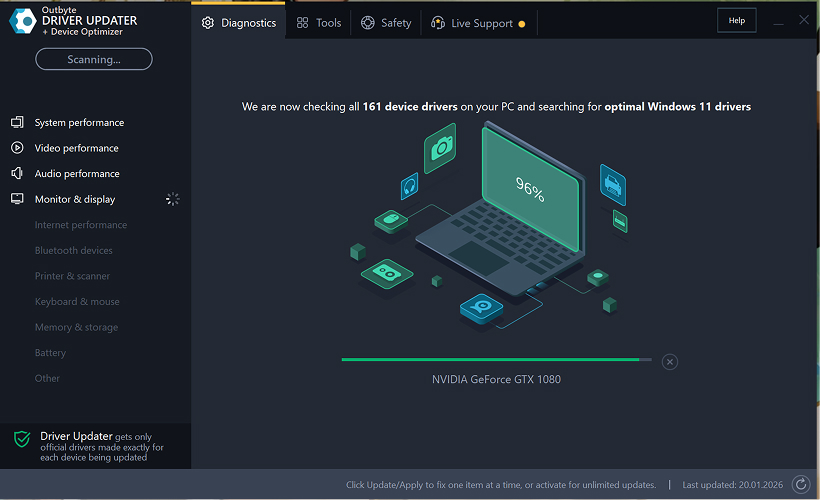
Trinn 2: Lukk aktiveringsvinduet
Etter skanningen kan et "Aktiver nå"-vindu vises.
For å fortsette gratis:
- klikk på lukk (X)-knappen i øvre høyre hjørne av vinduet.
Ingen informasjon behøver å oppgis
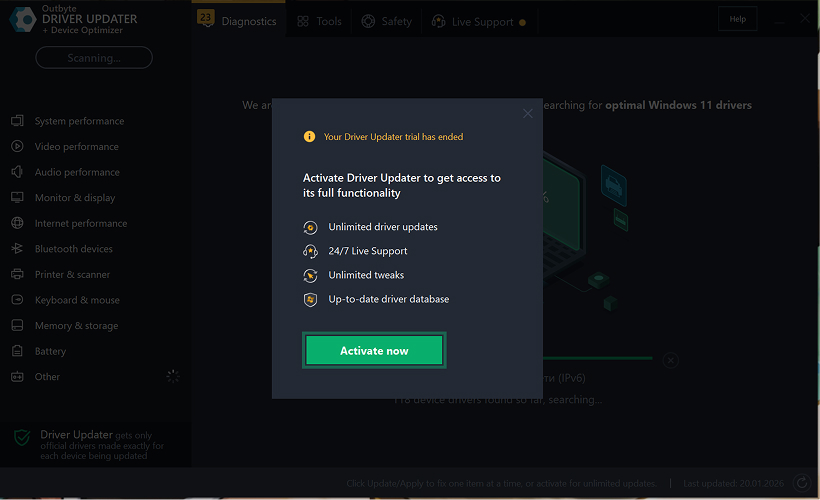
Trinn 3: Velg driverkategori
Fra menyen til venstre, velg enhetskategorien du vil oppdatere, for eksempel:
- lyddrivere;
- video- og grafikkdrivere;
- nettverk- og Wi-Fi-drivere;
- Bluetooth-drivere;
- skriver- og skannerdrivere.
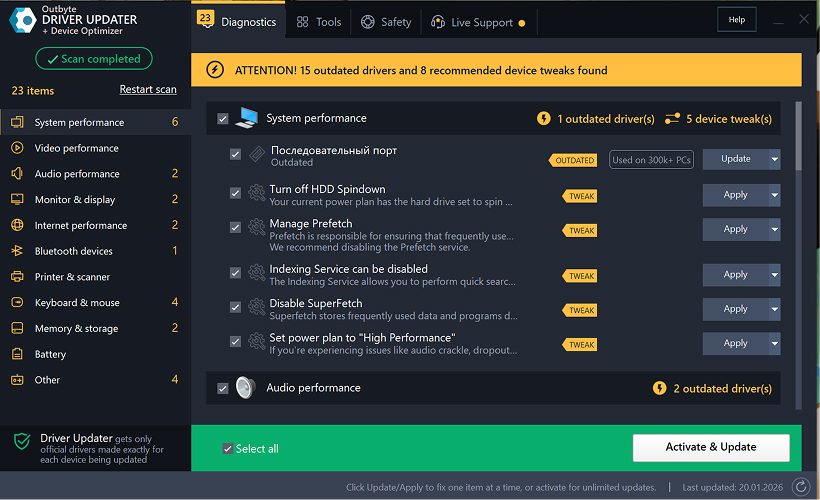
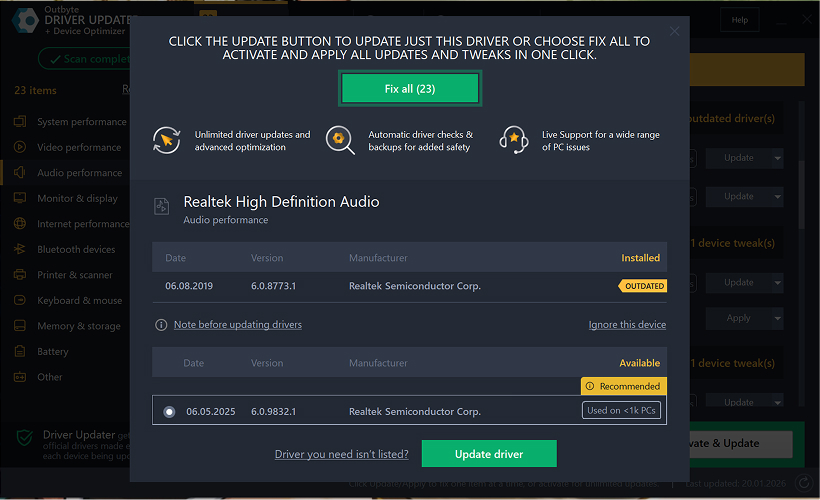
Trinn 4: Klikk "Oppdater" ved siden av den valgte driveren
I driverlisten, finn driveren du vil oppdatere og klikk på Oppdater-knappen ved siden av den.
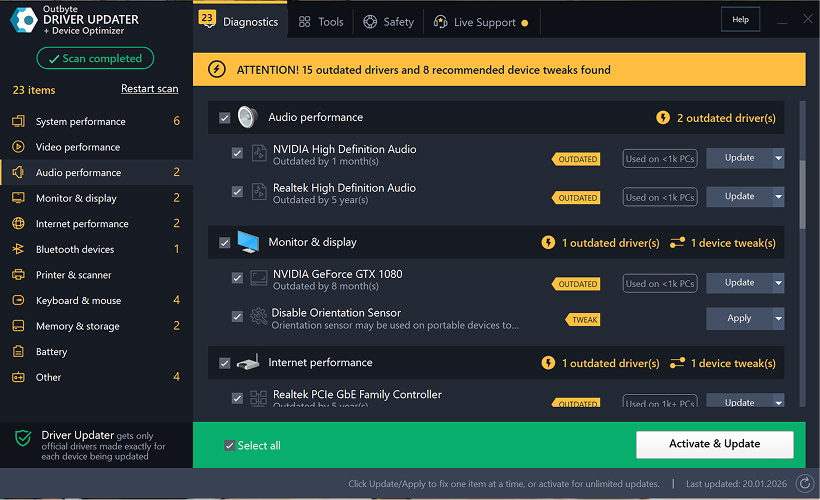
Trinn 5: Bekreft driveroppdateringen
I popup-vinduet, klikk Oppdater driver.
På dette stadiet kreves ingen personopplysninger eller betalingsdetaljer.
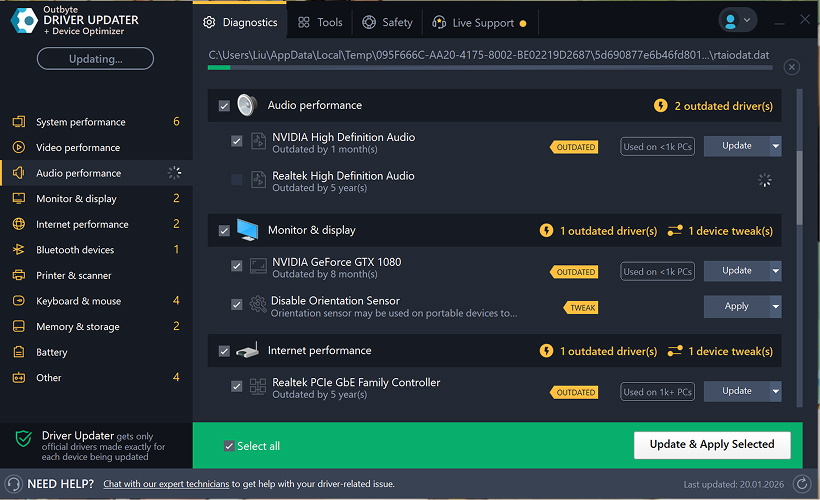
Trinn 6: Vent til oppdateringsprosessen er ferdig
Programmet vil begynne å laste ned og installere den valgte driveren.
Vennligst vent til prosessen er fullført.
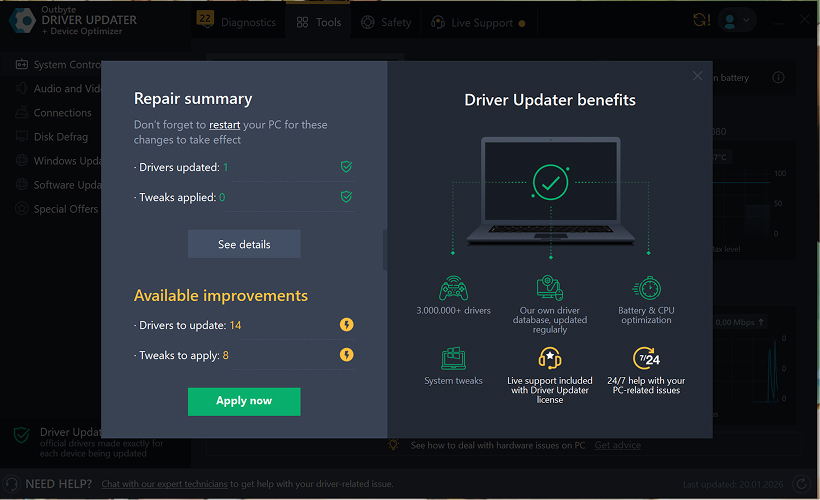
Trinn 7: Bruk endringer og start datamaskinen på nytt
Etter at installasjonen er ferdig, klikk Bruk nå for å aktivere endringene.
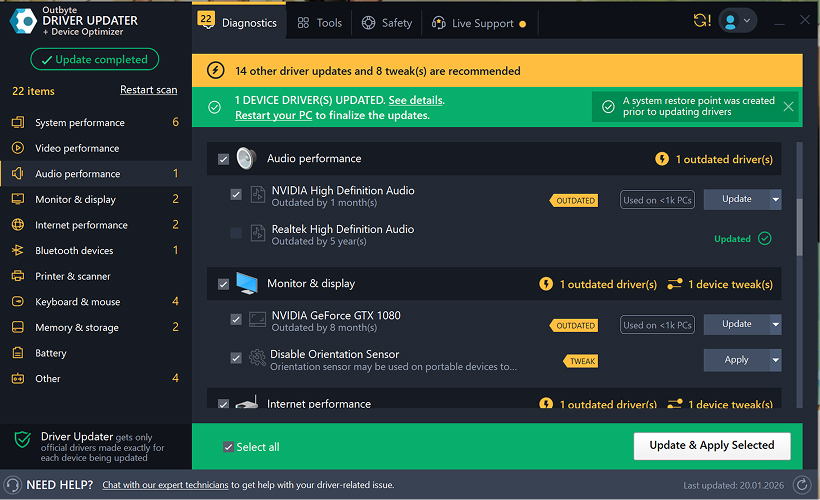
For å sikre at den oppdaterte driveren fungerer korrekt, start datamaskinen på nytt.
Viktige merknader
- Gratis oppdateringer er tilgjengelige én driver om gangen.
- Ingen registrering er påkrevd for den gratis oppdateringen.
- Ingen kredittkort- eller betalingsinformasjon blir forespurt.
- Alle handlinger utføres lokalt i programmet etter skanning av systemet.
- Tilgjengelighet for gratis oppdatering kan avhenge av drivertype og systemkonfigurasjon.
Learn to pair your wireless mouse with a different USB receiver in simple steps. Check compatibility (e.g., Logitech Unifying receivers), install required software/drivers, and use pairing modes to sync devices. Troubleshoot connection issues and optimize performance for seamless use.
Simplify your workspace with Logitech Unifying Software, enabling effortless connection of up to six compatible devices through a single receiver. Enjoy quick setup, clutter-free connectivity, and enhanced productivity as your keyboard, mouse, and other peripherals work in perfect harmony.
Learn how to set up your Epson L3250 printer with this step-by-step guide. Unbox, install ink, connect to power, and download drivers via Epson’s website or included CD. Configure Wi-Fi settings for wireless printing and run a test page to ensure proper installation. Simplify your setup process and start printing effortlessly.
Transform your smartphone into an HD webcam with DroidCam. Enjoy wireless connectivity and seamless video streaming for crystal-clear video calls, live streams, or online meetings. Works with PC/Mac.
Learn how to enable Bluetooth on your PC in a few simple steps. Check compatibility, activate Bluetooth via Windows Settings or the system tray, pair your device, and troubleshoot common issues. This guide ensures seamless wireless connections for headphones, speakers, or peripherals.
Learn how to set up your Epson L3250 printer quickly and efficiently. This guide covers unboxing, installing ink cartridges, connecting to power, and configuring Wi-Fi for seamless wireless printing. Follow step-by-step instructions to install drivers, align the printer head, and troubleshoot common issues. Perfect for home or office use, the Epson L3250 ensures hassle-free installation and high-quality printing, scanning, and copying.
Download the latest Epson L3250 printer drivers and software to ensure seamless connectivity and optimal performance. Compatible with Windows and macOS, these tools enable easy setup, wireless printing, and advanced features. Visit the official Epson support page for secure, up-to-date downloads tailored to your operating system. Simplify installation and maximize your printer’s capabilities with reliable drivers and utilities.
Discover innovative strategies to amplify your message and connect deeply with audiences – no microphone needed. Harness the power of body language, visual storytelling, and creative platforms to make your voice heard in any setting.
The Valeton GP 100 Wah is a professional-grade guitar pedal designed for musicians seeking dynamic sound control and expressive tonal shaping. Featuring a responsive wah circuit, it delivers smooth, vintage-inspired sweeps and modern versatility for rock, funk, blues, and beyond. Built with durable components and an intuitive design, the GP 100 ensures reliable performance on stage or in the studio. Adjustable parameters and a true bypass switch provide seamless integration into any pedalboard setup, while its compact size maximizes space efficiency. Elevate your playing with rich, articulate wah effects tailored to your musical style.
Virtual CloneDrive offers effortless disc image mounting and virtual drive cloning, enabling you to access ISO, BIN, IMG, and other formats without physical media. Streamline workflows, run software, or backup data with a lightweight, user-friendly tool that integrates seamlessly into your system. Simplify disc management and enhance productivity—no hardware required.