Zaufane Oprogramowanie

Outbyte Driver Updater
- Ponad 1 000 000 sterowników
- Pobrano: 1143473 razy
- Windows 11 / 10 / 8 / 7





 Pobierz
Alder Lake-S UHD Graphics
Pobierz
Alder Lake-S UHD Graphics
Pobierz
Alder Lake-S UHD Graphics

Informacje o Systemie
Twój komputer działa obecnie na:
Driver details
Driver Name:
Alder Lake-S UHD Graphics
Provider:
Intel Corporation
Version:
31.0.101.5590
Release Date:
6/10/2024
Architecture:
AMD64
File Size:
630.3 MB
Driver ID:
pci\ven_8086&dev_468a&subsys_332917aa
Supported OS:
Windows 10
WHQL:
Signed
Oferta specjalna
Pobierz
Wszystkie linki zostały przeskanowane przez program antywirusowy.
Manual download (.cab, 630.3 MB) from Microsoft servers
— install via Device Manager.
Compatible hardware
- Alder Lake-S [UHD Graphics] (Intel Corporation)
- Alder Lake-S GT1 [UHD Graphics 770] (Intel Corporation)
- Alder Lake-S GT1 [UHD Graphics 730] (Intel Corporation)
Supported Hardware IDs
pci\ven_8086&dev_468a&subsys_332917aa
pci\ven_8086&dev_468a&subsys_334917aa
pci\ven_8086&dev_468a&subsys_332a17aa
pci\ven_8086&dev_468a&subsys_332b17aa
pci\ven_8086&dev_468a&subsys_332c17aa
pci\ven_8086&dev_468a&subsys_332d17aa
pci\ven_8086&dev_468a&subsys_332e17aa
pci\ven_8086&dev_468a&subsys_376a17aa
pci\ven_8086&dev_468a&subsys_335017aa
pci\ven_8086&dev_468a&subsys_335117aa
Show all 300 hardware IDs
pci\ven_8086&dev_468a&subsys_334b17aa
pci\ven_8086&dev_468a&subsys_334d17aa
pci\ven_8086&dev_468a&subsys_334e17aa
pci\ven_8086&dev_468a&subsys_377e17aa
pci\ven_8086&dev_468a&subsys_335217aa
pci\ven_8086&dev_468a&subsys_334a17aa
pci\ven_8086&dev_468a&subsys_336417aa
pci\ven_8086&dev_468a&subsys_336617aa
pci\ven_8086&dev_468a&subsys_336717aa
pci\ven_8086&dev_468a&subsys_336817aa
pci\ven_8086&dev_468a&subsys_377f17aa
pci\ven_8086&dev_468a&subsys_335f17aa
pci\ven_8086&dev_468a&subsys_335517aa
pci\ven_8086&dev_468a&subsys_335617aa
pci\ven_8086&dev_468a&subsys_378417aa
pci\ven_8086&dev_468a&subsys_336117aa
pci\ven_8086&dev_468a&subsys_336217aa
pci\ven_8086&dev_468a&subsys_378517aa
pci\ven_8086&dev_468a&subsys_378617aa
pci\ven_8086&dev_468a&subsys_336a17aa
pci\ven_8086&dev_468a&subsys_336e17aa
pci\ven_8086&dev_468a&subsys_336f17aa
pci\ven_8086&dev_468a&subsys_337017aa
pci\ven_8086&dev_468a&subsys_339017aa
pci\ven_8086&dev_468a&subsys_337217aa
pci\ven_8086&dev_468a&subsys_337317aa
pci\ven_8086&dev_468a&subsys_337417aa
pci\ven_8086&dev_468a&subsys_337517aa
pci\ven_8086&dev_468a&subsys_337617aa
pci\ven_8086&dev_468a&subsys_337717aa
pci\ven_8086&dev_468a&subsys_378917aa
pci\ven_8086&dev_468a&subsys_338017aa
pci\ven_8086&dev_468a&subsys_338117aa
pci\ven_8086&dev_468a&subsys_338217aa
pci\ven_8086&dev_468b&subsys_105717aa
pci\ven_8086&dev_468b&subsys_374017aa
pci\ven_8086&dev_468b&subsys_376617aa
pci\ven_8086&dev_468b&subsys_32c817aa
pci\ven_8086&dev_468b&subsys_32ca17aa
pci\ven_8086&dev_468b&subsys_32cb17aa
pci\ven_8086&dev_468b&subsys_32cf17aa
pci\ven_8086&dev_468b&subsys_32d117aa
pci\ven_8086&dev_468b&subsys_32d217aa
pci\ven_8086&dev_468b&subsys_32d317aa
pci\ven_8086&dev_468b&subsys_32d417aa
pci\ven_8086&dev_468b&subsys_330817aa
pci\ven_8086&dev_468b&subsys_330917aa
pci\ven_8086&dev_468b&subsys_330a17aa
pci\ven_8086&dev_468b&subsys_330b17aa
pci\ven_8086&dev_468b&subsys_330c17aa
pci\ven_8086&dev_468b&subsys_330e17aa
pci\ven_8086&dev_468b&subsys_334617aa
pci\ven_8086&dev_468b&subsys_334817aa
pci\ven_8086&dev_468b&subsys_32f717aa
pci\ven_8086&dev_468b&subsys_373f17aa
pci\ven_8086&dev_468b&subsys_374117aa
pci\ven_8086&dev_468b&subsys_375e17aa
pci\ven_8086&dev_468b&subsys_106417aa
pci\ven_8086&dev_468b&subsys_332117aa
pci\ven_8086&dev_468b&subsys_332217aa
pci\ven_8086&dev_468b&subsys_332317aa
pci\ven_8086&dev_468b&subsys_332417aa
pci\ven_8086&dev_468b&subsys_332517aa
pci\ven_8086&dev_468b&subsys_332617aa
pci\ven_8086&dev_468b&subsys_332717aa
pci\ven_8086&dev_468b&subsys_333017aa
pci\ven_8086&dev_468b&subsys_333117aa
pci\ven_8086&dev_468b&subsys_333217aa
pci\ven_8086&dev_468b&subsys_333317aa
pci\ven_8086&dev_468b&subsys_333517aa
pci\ven_8086&dev_468b&subsys_333617aa
pci\ven_8086&dev_468b&subsys_331a17aa
pci\ven_8086&dev_468b&subsys_331b17aa
pci\ven_8086&dev_468b&subsys_331c17aa
pci\ven_8086&dev_468b&subsys_331d17aa
pci\ven_8086&dev_468b&subsys_332817aa
pci\ven_8086&dev_468b&subsys_332917aa
pci\ven_8086&dev_468b&subsys_334917aa
pci\ven_8086&dev_468b&subsys_332a17aa
pci\ven_8086&dev_468b&subsys_332b17aa
pci\ven_8086&dev_468b&subsys_332c17aa
pci\ven_8086&dev_468b&subsys_332d17aa
pci\ven_8086&dev_468b&subsys_332e17aa
pci\ven_8086&dev_468b&subsys_376a17aa
pci\ven_8086&dev_468b&subsys_335017aa
pci\ven_8086&dev_468b&subsys_335117aa
pci\ven_8086&dev_468b&subsys_334b17aa
pci\ven_8086&dev_468b&subsys_334d17aa
pci\ven_8086&dev_468b&subsys_334e17aa
pci\ven_8086&dev_468b&subsys_377e17aa
pci\ven_8086&dev_468b&subsys_335217aa
pci\ven_8086&dev_468b&subsys_334a17aa
pci\ven_8086&dev_468b&subsys_336417aa
pci\ven_8086&dev_468b&subsys_336617aa
pci\ven_8086&dev_468b&subsys_336717aa
pci\ven_8086&dev_468b&subsys_336817aa
pci\ven_8086&dev_468b&subsys_377f17aa
pci\ven_8086&dev_468b&subsys_335f17aa
pci\ven_8086&dev_468b&subsys_335517aa
pci\ven_8086&dev_468b&subsys_335617aa
pci\ven_8086&dev_468b&subsys_378417aa
pci\ven_8086&dev_468b&subsys_336117aa
pci\ven_8086&dev_468b&subsys_336217aa
pci\ven_8086&dev_468b&subsys_378517aa
pci\ven_8086&dev_468b&subsys_378617aa
pci\ven_8086&dev_468b&subsys_336a17aa
pci\ven_8086&dev_468b&subsys_336e17aa
pci\ven_8086&dev_468b&subsys_336f17aa
pci\ven_8086&dev_468b&subsys_337017aa
pci\ven_8086&dev_468b&subsys_339017aa
pci\ven_8086&dev_468b&subsys_337217aa
pci\ven_8086&dev_468b&subsys_337317aa
pci\ven_8086&dev_468b&subsys_337417aa
pci\ven_8086&dev_468b&subsys_337517aa
pci\ven_8086&dev_468b&subsys_337617aa
pci\ven_8086&dev_468b&subsys_337717aa
pci\ven_8086&dev_468b&subsys_378917aa
pci\ven_8086&dev_468b&subsys_338017aa
pci\ven_8086&dev_468b&subsys_338117aa
pci\ven_8086&dev_468b&subsys_338217aa
pci\ven_8086&dev_4690&subsys_105717aa
pci\ven_8086&dev_4690&subsys_374017aa
pci\ven_8086&dev_4690&subsys_376617aa
pci\ven_8086&dev_4690&subsys_32c817aa
pci\ven_8086&dev_4690&subsys_32ca17aa
pci\ven_8086&dev_4690&subsys_32cb17aa
pci\ven_8086&dev_4690&subsys_32cf17aa
pci\ven_8086&dev_4690&subsys_32d117aa
pci\ven_8086&dev_4690&subsys_32d217aa
pci\ven_8086&dev_4690&subsys_32d317aa
pci\ven_8086&dev_4690&subsys_32d417aa
pci\ven_8086&dev_4690&subsys_330817aa
pci\ven_8086&dev_4690&subsys_330917aa
pci\ven_8086&dev_4690&subsys_330a17aa
pci\ven_8086&dev_4690&subsys_330b17aa
pci\ven_8086&dev_4690&subsys_330c17aa
pci\ven_8086&dev_4690&subsys_330e17aa
pci\ven_8086&dev_4690&subsys_334617aa
pci\ven_8086&dev_4690&subsys_334817aa
pci\ven_8086&dev_4690&subsys_32f717aa
pci\ven_8086&dev_4690&subsys_373f17aa
pci\ven_8086&dev_4690&subsys_374117aa
pci\ven_8086&dev_4690&subsys_375e17aa
pci\ven_8086&dev_4690&subsys_106417aa
pci\ven_8086&dev_4690&subsys_332117aa
pci\ven_8086&dev_4690&subsys_332217aa
pci\ven_8086&dev_4690&subsys_332317aa
pci\ven_8086&dev_4690&subsys_332417aa
pci\ven_8086&dev_4690&subsys_332517aa
pci\ven_8086&dev_4690&subsys_332617aa
pci\ven_8086&dev_4690&subsys_332717aa
pci\ven_8086&dev_4690&subsys_333017aa
pci\ven_8086&dev_4690&subsys_333117aa
pci\ven_8086&dev_4690&subsys_333217aa
pci\ven_8086&dev_4690&subsys_333317aa
pci\ven_8086&dev_4690&subsys_333517aa
pci\ven_8086&dev_4690&subsys_333617aa
pci\ven_8086&dev_4690&subsys_331a17aa
pci\ven_8086&dev_4690&subsys_331b17aa
pci\ven_8086&dev_4690&subsys_331c17aa
pci\ven_8086&dev_4690&subsys_331d17aa
pci\ven_8086&dev_4690&subsys_332817aa
pci\ven_8086&dev_4690&subsys_332917aa
pci\ven_8086&dev_4690&subsys_334917aa
pci\ven_8086&dev_4690&subsys_332a17aa
pci\ven_8086&dev_4690&subsys_332b17aa
pci\ven_8086&dev_4690&subsys_332c17aa
pci\ven_8086&dev_4690&subsys_332d17aa
pci\ven_8086&dev_4690&subsys_332e17aa
pci\ven_8086&dev_4690&subsys_376a17aa
pci\ven_8086&dev_4690&subsys_335017aa
pci\ven_8086&dev_4690&subsys_335117aa
pci\ven_8086&dev_4690&subsys_334b17aa
pci\ven_8086&dev_4690&subsys_334d17aa
pci\ven_8086&dev_4690&subsys_334e17aa
pci\ven_8086&dev_4690&subsys_377e17aa
pci\ven_8086&dev_4690&subsys_335217aa
pci\ven_8086&dev_4690&subsys_334a17aa
pci\ven_8086&dev_4690&subsys_336417aa
pci\ven_8086&dev_4690&subsys_336617aa
pci\ven_8086&dev_4690&subsys_336717aa
pci\ven_8086&dev_4690&subsys_336817aa
pci\ven_8086&dev_4690&subsys_377f17aa
pci\ven_8086&dev_4690&subsys_335f17aa
pci\ven_8086&dev_4690&subsys_335517aa
pci\ven_8086&dev_4690&subsys_335617aa
pci\ven_8086&dev_4690&subsys_378417aa
pci\ven_8086&dev_4690&subsys_336117aa
pci\ven_8086&dev_4690&subsys_336217aa
pci\ven_8086&dev_4690&subsys_378517aa
pci\ven_8086&dev_4690&subsys_378617aa
pci\ven_8086&dev_4690&subsys_336a17aa
pci\ven_8086&dev_4690&subsys_336e17aa
pci\ven_8086&dev_4690&subsys_336f17aa
pci\ven_8086&dev_4690&subsys_337017aa
pci\ven_8086&dev_4690&subsys_339017aa
pci\ven_8086&dev_4690&subsys_337217aa
pci\ven_8086&dev_4690&subsys_337317aa
pci\ven_8086&dev_4690&subsys_337417aa
pci\ven_8086&dev_4690&subsys_337517aa
pci\ven_8086&dev_4690&subsys_337617aa
pci\ven_8086&dev_4690&subsys_337717aa
pci\ven_8086&dev_4690&subsys_378917aa
pci\ven_8086&dev_4690&subsys_338017aa
pci\ven_8086&dev_4690&subsys_338117aa
pci\ven_8086&dev_4690&subsys_338217aa
pci\ven_8086&dev_4692&subsys_105717aa
pci\ven_8086&dev_4692&subsys_374017aa
pci\ven_8086&dev_4692&subsys_376617aa
pci\ven_8086&dev_4692&subsys_32c817aa
pci\ven_8086&dev_4692&subsys_32ca17aa
pci\ven_8086&dev_4692&subsys_32cb17aa
pci\ven_8086&dev_4692&subsys_32cf17aa
pci\ven_8086&dev_4692&subsys_32d117aa
pci\ven_8086&dev_4692&subsys_32d217aa
pci\ven_8086&dev_4692&subsys_32d317aa
pci\ven_8086&dev_4692&subsys_32d417aa
pci\ven_8086&dev_4692&subsys_330817aa
pci\ven_8086&dev_4692&subsys_330917aa
pci\ven_8086&dev_4692&subsys_330a17aa
pci\ven_8086&dev_4692&subsys_330b17aa
pci\ven_8086&dev_4692&subsys_330c17aa
pci\ven_8086&dev_4692&subsys_330e17aa
pci\ven_8086&dev_4692&subsys_334617aa
pci\ven_8086&dev_4692&subsys_334817aa
pci\ven_8086&dev_4692&subsys_32f717aa
pci\ven_8086&dev_4692&subsys_373f17aa
pci\ven_8086&dev_4692&subsys_374117aa
pci\ven_8086&dev_4692&subsys_375e17aa
pci\ven_8086&dev_4692&subsys_106417aa
pci\ven_8086&dev_4692&subsys_332117aa
pci\ven_8086&dev_4692&subsys_332217aa
pci\ven_8086&dev_4692&subsys_332317aa
pci\ven_8086&dev_4692&subsys_332417aa
pci\ven_8086&dev_4692&subsys_332517aa
pci\ven_8086&dev_4692&subsys_332617aa
pci\ven_8086&dev_4692&subsys_332717aa
pci\ven_8086&dev_4692&subsys_333017aa
pci\ven_8086&dev_4692&subsys_333117aa
pci\ven_8086&dev_4692&subsys_333217aa
pci\ven_8086&dev_4692&subsys_333317aa
pci\ven_8086&dev_4692&subsys_333517aa
pci\ven_8086&dev_4692&subsys_333617aa
pci\ven_8086&dev_4692&subsys_331a17aa
pci\ven_8086&dev_4692&subsys_331b17aa
pci\ven_8086&dev_4692&subsys_331c17aa
pci\ven_8086&dev_4692&subsys_331d17aa
pci\ven_8086&dev_4692&subsys_332817aa
pci\ven_8086&dev_4692&subsys_332917aa
pci\ven_8086&dev_4692&subsys_334917aa
pci\ven_8086&dev_4692&subsys_332a17aa
pci\ven_8086&dev_4692&subsys_332b17aa
pci\ven_8086&dev_4692&subsys_332c17aa
pci\ven_8086&dev_4692&subsys_332d17aa
pci\ven_8086&dev_4692&subsys_332e17aa
pci\ven_8086&dev_4692&subsys_376a17aa
pci\ven_8086&dev_4692&subsys_335017aa
pci\ven_8086&dev_4692&subsys_335117aa
pci\ven_8086&dev_4692&subsys_334b17aa
pci\ven_8086&dev_4692&subsys_334d17aa
pci\ven_8086&dev_4692&subsys_334e17aa
pci\ven_8086&dev_4692&subsys_377e17aa
pci\ven_8086&dev_4692&subsys_335217aa
pci\ven_8086&dev_4692&subsys_334a17aa
pci\ven_8086&dev_4692&subsys_336417aa
pci\ven_8086&dev_4692&subsys_336617aa
pci\ven_8086&dev_4692&subsys_336717aa
pci\ven_8086&dev_4692&subsys_336817aa
pci\ven_8086&dev_4692&subsys_377f17aa
pci\ven_8086&dev_4692&subsys_335f17aa
pci\ven_8086&dev_4692&subsys_335517aa
pci\ven_8086&dev_4692&subsys_335617aa
pci\ven_8086&dev_4692&subsys_378417aa
pci\ven_8086&dev_4692&subsys_336117aa
pci\ven_8086&dev_4692&subsys_336217aa
pci\ven_8086&dev_4692&subsys_378517aa
pci\ven_8086&dev_4692&subsys_378617aa
pci\ven_8086&dev_4692&subsys_336a17aa
pci\ven_8086&dev_4692&subsys_336e17aa
pci\ven_8086&dev_4692&subsys_336f17aa
pci\ven_8086&dev_4692&subsys_337017aa
pci\ven_8086&dev_4692&subsys_339017aa
pci\ven_8086&dev_4692&subsys_337217aa
pci\ven_8086&dev_4692&subsys_337317aa
pci\ven_8086&dev_4692&subsys_337417aa
pci\ven_8086&dev_4692&subsys_337517aa
pci\ven_8086&dev_4692&subsys_337617aa
pci\ven_8086&dev_4692&subsys_337717aa
pci\ven_8086&dev_4692&subsys_378917aa
pci\ven_8086&dev_4692&subsys_338017aa
Match against Device Manager → Details → Hardware Ids to confirm this driver fits your device.
All versions of this driver
| Version | Release Date | Architecture | OS | |
|---|---|---|---|---|
| 32.0.101.7079 | 10/28/2025 | AMD64 | Windows 11 | 32.0.101.7079 |
| 32.0.101.7026 | 8/19/2025 | AMD64 | Windows 11, Windows 10 | 32.0.101.7026 |
| 32.0.101.6129 | 10/18/2024 | AMD64 | Windows 11 | 32.0.101.6129 |
| 32.0.101.6127 | 10/11/2024 | AMD64 | Windows 11 | 32.0.101.6127 |
| 31.0.101.5590 | 6/10/2024 | AMD64 | Windows 10 | (this page) |
| 32.0.101.5542 | 6/8/2024 | AMD64 | Windows 10 | 32.0.101.5542 |
| 31.0.101.5187 | 1/23/2024 | AMD64 | Windows 11 | 31.0.101.5187 |
Related drivers
- CometLake-U GT2 UHD Graphics (v31.0.101.2140)
- Alder Lake-S GT1 UHD Graphics 770 (v32.0.101.7080)
- Alder Lake-N UHD Graphics (v32.0.101.7077)
- TigerLake-LP GT2 Iris Xe Graphics (v32.0.101.7077)
- Alder Lake-S GT1 UHD Graphics 770 (v32.0.101.7077)
- Xeon E3-1200 v3 4th Gen Core Processor Integrated Graphics Controller (v20.19.15.4568)
- Alder Lake-S GT1 UHD Graphics 770 (v32.0.101.7077)
- TigerLake-LP GT2 Iris Xe Graphics (v32.0.101.7077)
- Alder Lake-S GT1 UHD Graphics 770 (v32.0.101.7026)
- Alder Lake-P GT1 UHD Graphics (v32.0.101.7077)
Sterowniki: Podstawa Stabilnej Pracy Urządzeń
Dlaczego Sterowniki są Tak Ważne?
Sterowniki odgrywają kluczową rolę w stabilności systemu. Przestarzałe lub uszkodzone sterowniki mogą powodować:
Zaleca się aktualizację sterowników co 3–6 miesięcy. Jest to szczególnie ważne przed instalacją nowego systemu operacyjnego, ponieważ zaktualizowane sterowniki mogą być niezbędne do zapewnienia kompatybilności.
Jak Utrzymać Sterowniki w Aktualności?
Automatyczna metoda aktualizacji i pobierania sterowników (Zalecane):
Jeśli nie chcesz ręcznie wyszukiwać odpowiedniego sterownika, dostępne są narzędzia, które automatycznie wykrywają model urządzenia i znajdują zgodny sterownik. Zmniejsza to ryzyko błędów i oszczędza czas.
Oferta specjalna
Pobierz

Limitations: trial version offers an unlimited number of scans, free driver backup and rollback. Registration for the full version starts from USD 29.95. See more information about Outbyte and uninstall instructions. Please review Outbyte EULA and Privacy Policy
Wszystkie linki zostały przeskanowane przez program antywirusowy.
Ręczna instalacja sterownika
Uwaga: Instalacja nieprawidłowej wersji sterownika może spowodować problemy z systemem. Jeśli nie jesteś pewien, który sterownik wybrać, zalecamy metodę automatyczną.
Pobierz sterownik za pomocą Menedżera urządzeń. Jak otworzyć Menedżera urządzeń:
Jak zainstalować sterowniki za pomocą Menedżera urządzeń:
How to Update a Driver for Free Using Outbyte Driver Updater
Utrzymywanie sterowników urządzeń na bieżąco pomaga zapewnić stabilną wydajność systemu Windows i prawidłowe działanie sprzętu. Poniżej znajduje się przewodnik krok po kroku wyjaśniający, jak bezpłatnie zaktualizować pojedynczy sterownik za pomocą Outbyte Driver Updater. Ten przewodnik opisuje metodę aktualizacji jednego wybranego sterownika bez aktywacji licencji i bez podawania jakichkolwiek danych osobowych lub informacji o płatności.
Czy możesz zaktualizować sterownik za darmo bez rejestracji?
Tak.
Outbyte Driver Updater pozwala na:
- bezpłatne skanowanie komputera w poszukiwaniu przestarzałych sterowników;
- przeglądanie listy wykrytych sterowników;
- bezpłatną aktualizację jednego wybranego sterownika;
- uniknięcie konieczności wprowadzania adresu e-mail, imienia, numeru karty kredytowej lub innych danych osobowych.
Proces bezpłatnej aktualizacji wymaga tylko zainstalowanego programu oraz standardowych kroków skanowania i aktualizacji.
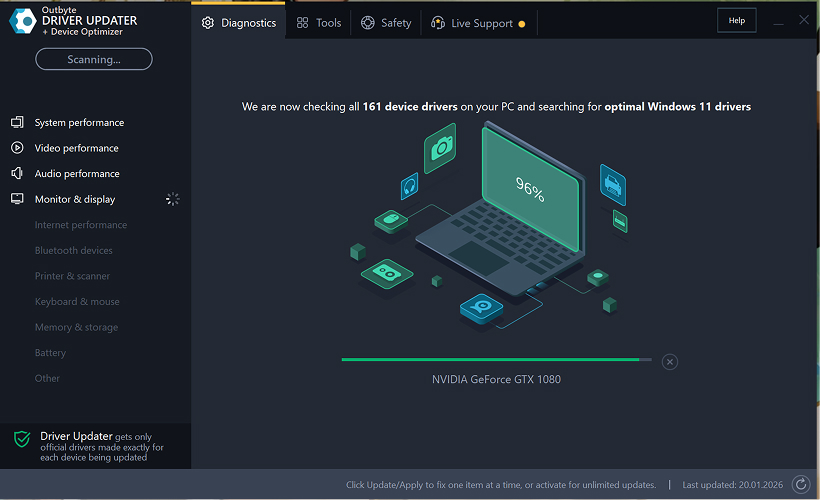
Krok 1: Uruchom program i przeskanuj komputer
Pobierz i zainstaluj Outbyte Driver Updater na swoim komputerze z systemem Windows.
Po uruchomieniu programu automatycznie rozpocznie się skanowanie systemu i sprawdzanie zainstalowanych sterowników.
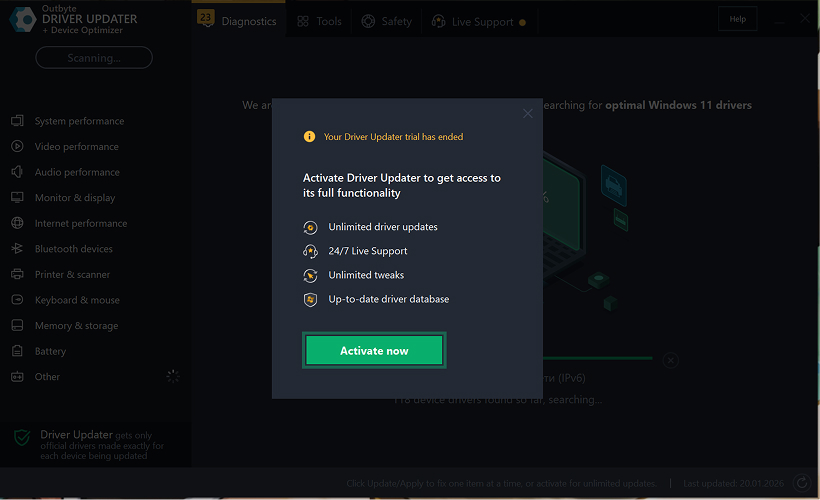
Krok 2: Zamknij okno aktywacji
Po zakończeniu skanowania może pojawić się okno "Aktywuj teraz".
Aby kontynuować bezpłatnie:
- kliknij przycisk zamykania (X) w prawym górnym rogu okna.
Nie trzeba wprowadzać żadnych informacji
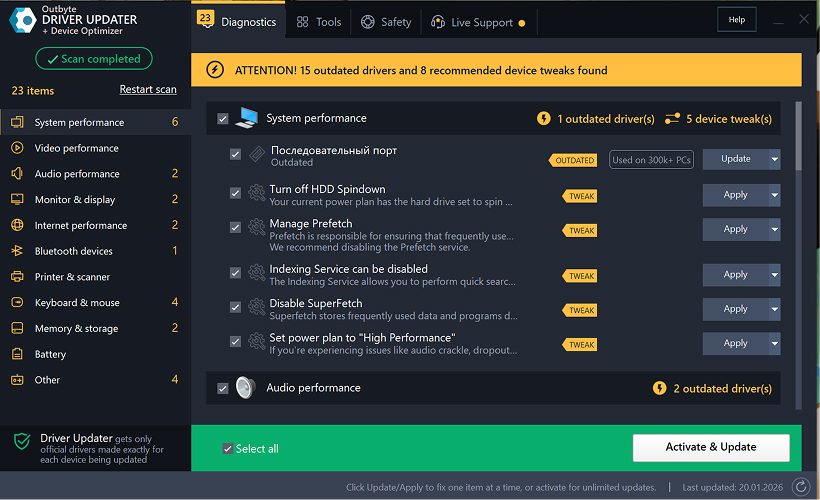
Krok 3: Wybierz kategorię sterownika
Z menu po lewej stronie wybierz kategorię urządzenia, które chcesz zaktualizować, na przykład:
- sterowniki audio;
- sterowniki wideo i grafiki;
- sterowniki sieciowe i Wi-Fi;
- sterowniki Bluetooth;
- sterowniki drukarek i skanerów.
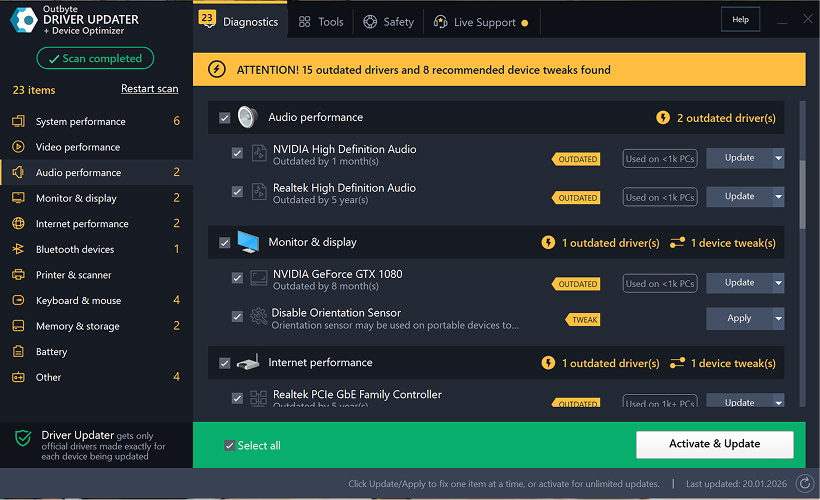
Krok 4: Kliknij "Aktualizuj" obok wybranego sterownika
Na liście sterowników znajdź sterownik, który chcesz zaktualizować i kliknij przycisk Aktualizuj obok niego.
Krok 5: Potwierdź aktualizację sterownika
W wyskakującym oknie kliknij Aktualizuj sterownik.
Na tym etapie nie są wymagane żadne dane osobowe ani informacje o płatności.
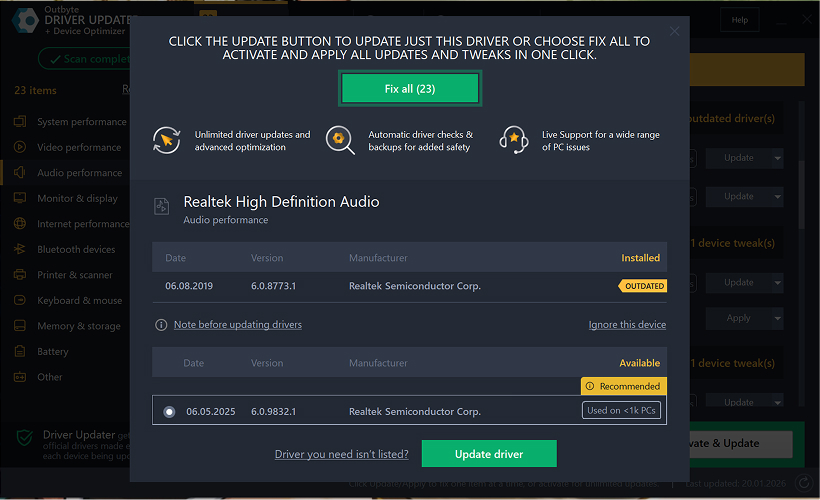
Krok 6: Poczekaj na zakończenie procesu aktualizacji
Program rozpocznie pobieranie i instalację wybranego sterownika.
Poczekaj, aż proces zostanie zakończony.
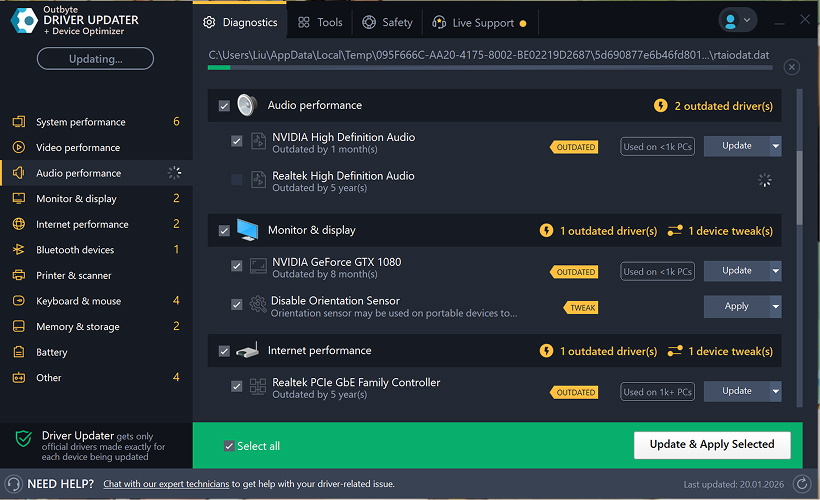
Krok 7: Zastosuj zmiany i uruchom ponownie komputer
Po zakończeniu instalacji kliknij Zastosuj teraz, aby zastosować zmiany.
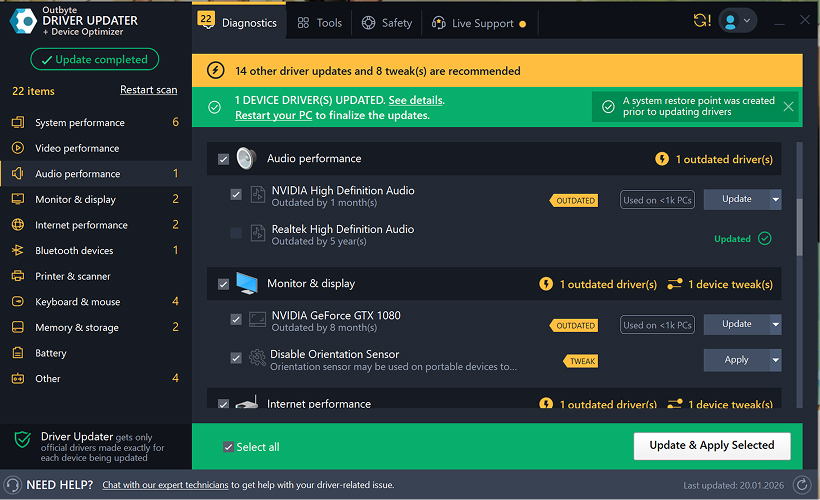
Aby upewnić się, że zaktualizowany sterownik działa poprawnie, uruchom ponownie komputer.
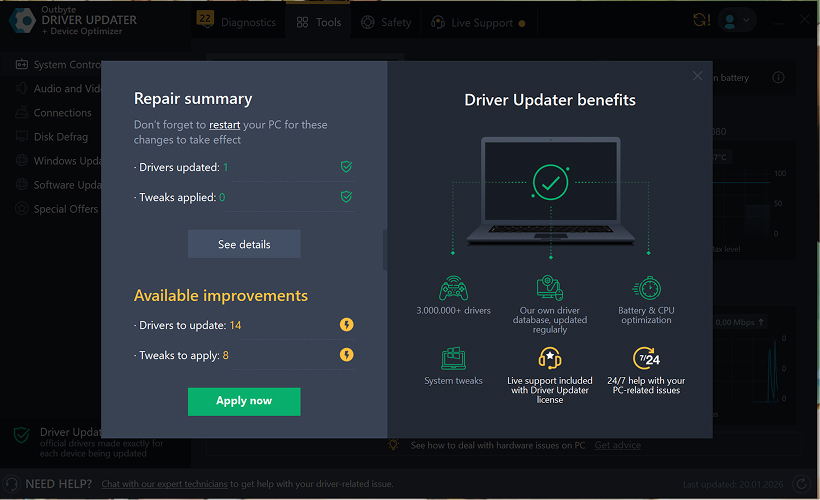
Ważne uwagi
- Bezpłatne aktualizacje są dostępne po jednym sterowniku na raz.
- Do bezpłatnej aktualizacji nie jest wymagana rejestracja.
- Nie są wymagane informacje o karcie kredytowej ani płatności.
- Wszystkie działania są wykonywane lokalnie w programie po przeskanowaniu systemu.
- Dostępność bezpłatnej aktualizacji może zależeć od typu sterownika i konfiguracji systemu.
Learn to pair your wireless mouse with a different USB receiver in simple steps. Check compatibility (e.g., Logitech Unifying receivers), install required software/drivers, and use pairing modes to sync devices. Troubleshoot connection issues and optimize performance for seamless use.
Simplify your workspace with Logitech Unifying Software, enabling effortless connection of up to six compatible devices through a single receiver. Enjoy quick setup, clutter-free connectivity, and enhanced productivity as your keyboard, mouse, and other peripherals work in perfect harmony.
Learn how to set up your Epson L3250 printer with this step-by-step guide. Unbox, install ink, connect to power, and download drivers via Epson’s website or included CD. Configure Wi-Fi settings for wireless printing and run a test page to ensure proper installation. Simplify your setup process and start printing effortlessly.
Transform your smartphone into an HD webcam with DroidCam. Enjoy wireless connectivity and seamless video streaming for crystal-clear video calls, live streams, or online meetings. Works with PC/Mac.
Learn how to enable Bluetooth on your PC in a few simple steps. Check compatibility, activate Bluetooth via Windows Settings or the system tray, pair your device, and troubleshoot common issues. This guide ensures seamless wireless connections for headphones, speakers, or peripherals.
Learn how to set up your Epson L3250 printer quickly and efficiently. This guide covers unboxing, installing ink cartridges, connecting to power, and configuring Wi-Fi for seamless wireless printing. Follow step-by-step instructions to install drivers, align the printer head, and troubleshoot common issues. Perfect for home or office use, the Epson L3250 ensures hassle-free installation and high-quality printing, scanning, and copying.
Download the latest Epson L3250 printer drivers and software to ensure seamless connectivity and optimal performance. Compatible with Windows and macOS, these tools enable easy setup, wireless printing, and advanced features. Visit the official Epson support page for secure, up-to-date downloads tailored to your operating system. Simplify installation and maximize your printer’s capabilities with reliable drivers and utilities.
Discover innovative strategies to amplify your message and connect deeply with audiences – no microphone needed. Harness the power of body language, visual storytelling, and creative platforms to make your voice heard in any setting.
The Valeton GP 100 Wah is a professional-grade guitar pedal designed for musicians seeking dynamic sound control and expressive tonal shaping. Featuring a responsive wah circuit, it delivers smooth, vintage-inspired sweeps and modern versatility for rock, funk, blues, and beyond. Built with durable components and an intuitive design, the GP 100 ensures reliable performance on stage or in the studio. Adjustable parameters and a true bypass switch provide seamless integration into any pedalboard setup, while its compact size maximizes space efficiency. Elevate your playing with rich, articulate wah effects tailored to your musical style.
Virtual CloneDrive offers effortless disc image mounting and virtual drive cloning, enabling you to access ISO, BIN, IMG, and other formats without physical media. Streamline workflows, run software, or backup data with a lightweight, user-friendly tool that integrates seamlessly into your system. Simplify disc management and enhance productivity—no hardware required.