Software Confiável

Outbyte Driver Updater
- 1.000.000+ drivers
- Baixar: 1,143,473 times
- Windows 11 / 10 / 8 / 7





 Baixar
Alder Lake-P GT1 UHD Graphics
Baixar
Alder Lake-P GT1 UHD Graphics
Baixar
Alder Lake-P GT1 UHD Graphics

Informações do Sistema
Seu PC está atualmente executando:
Driver details
Driver Name:
Alder Lake-P GT1 UHD Graphics
Provider:
Intel Corporation
Version:
32.0.101.5542
Release Date:
6/8/2024
Architecture:
AMD64
File Size:
579.7 MB
Driver ID:
pci\ven_8086&dev_46a3&subsys_00023100
Supported OS:
Windows 11
WHQL:
Signed
Oferta especial
Baixar
Todos os links foram analisados por um programa antivírus.
Manual download (.cab, 579.7 MB) from Microsoft servers
— install via Device Manager.
Compatible hardware
- Alder Lake-P GT1 [UHD Graphics] (Intel Corporation)
- Alder Lake-P GT2 [Iris Xe Graphics] (Intel Corporation)
- Alder Lake-UP3 GT2 [Iris Xe Graphics] (Intel Corporation)
- Alder Lake-UP3 GT1 [UHD Graphics] (Intel Corporation)
- Alder Lake-P Integrated Graphics Controller (Intel Corporation)
- Alder Lake-UP4 GT2 [Iris Xe Graphics] (Intel Corporation)
- Alder Lake-UP3 GT2 [UHD Graphics] (Intel Corporation)
- AlderLake-P [UHD Graphics] (Intel Corporation)
- Alder Lake-UP4 GT1 [UHD Graphics] (Intel Corporation)
- Raptor Lake-P [Iris Xe Graphics] (Intel Corporation)
- Raptor Lake-P [UHD Graphics] (Intel Corporation)
Supported Hardware IDs
pci\ven_8086&dev_4626
pci\ven_8086&dev_4626&subsys_00023100
pci\ven_8086&dev_4626&subsys_00033100
pci\ven_8086&dev_4626&subsys_00043100
pci\ven_8086&dev_4626&subsys_00093100
pci\ven_8086&dev_4626&subsys_000d3100
pci\ven_8086&dev_4628
pci\ven_8086&dev_4628&subsys_00023100
pci\ven_8086&dev_4628&subsys_00033100
pci\ven_8086&dev_4628&subsys_00043100
Show all 211 hardware IDs
pci\ven_8086&dev_4628&subsys_00093100
pci\ven_8086&dev_4628&subsys_000d3100
pci\ven_8086&dev_462a
pci\ven_8086&dev_462a&subsys_00023100
pci\ven_8086&dev_462a&subsys_00033100
pci\ven_8086&dev_462a&subsys_00043100
pci\ven_8086&dev_462a&subsys_00093100
pci\ven_8086&dev_462a&subsys_000d3100
pci\ven_8086&dev_4680
pci\ven_8086&dev_4682
pci\ven_8086&dev_4688
pci\ven_8086&dev_468a
pci\ven_8086&dev_468b
pci\ven_8086&dev_4690
pci\ven_8086&dev_4692
pci\ven_8086&dev_4693
pci\ven_8086&dev_46a3
pci\ven_8086&dev_46a3&subsys_00023100
pci\ven_8086&dev_46a3&subsys_00033100
pci\ven_8086&dev_46a3&subsys_00043100
pci\ven_8086&dev_46a3&subsys_00093100
pci\ven_8086&dev_46a3&subsys_000d3100
pci\ven_8086&dev_46a6
pci\ven_8086&dev_46a6&subsys_00023100
pci\ven_8086&dev_46a6&subsys_00033100
pci\ven_8086&dev_46a6&subsys_00043100
pci\ven_8086&dev_46a6&subsys_00093100
pci\ven_8086&dev_46a6&subsys_000d3100
pci\ven_8086&dev_46a8
pci\ven_8086&dev_46a8&subsys_00023100
pci\ven_8086&dev_46a8&subsys_00033100
pci\ven_8086&dev_46a8&subsys_00043100
pci\ven_8086&dev_46a8&subsys_00093100
pci\ven_8086&dev_46a8&subsys_000d3100
pci\ven_8086&dev_46aa
pci\ven_8086&dev_46aa&subsys_00023100
pci\ven_8086&dev_46aa&subsys_00033100
pci\ven_8086&dev_46aa&subsys_00043100
pci\ven_8086&dev_46aa&subsys_00093100
pci\ven_8086&dev_46aa&subsys_000d3100
pci\ven_8086&dev_46b3
pci\ven_8086&dev_46b3&subsys_00023100
pci\ven_8086&dev_46b3&subsys_00033100
pci\ven_8086&dev_46b3&subsys_00043100
pci\ven_8086&dev_46b3&subsys_00093100
pci\ven_8086&dev_46b3&subsys_000d3100
pci\ven_8086&dev_46c3
pci\ven_8086&dev_46c3&subsys_00023100
pci\ven_8086&dev_46c3&subsys_00033100
pci\ven_8086&dev_46c3&subsys_00043100
pci\ven_8086&dev_46c3&subsys_00093100
pci\ven_8086&dev_46c3&subsys_000d3100
pci\ven_8086&dev_46d0
pci\ven_8086&dev_46d1
pci\ven_8086&dev_46d2
pci\ven_8086&dev_46d3
pci\ven_8086&dev_46d4
pci\ven_8086&dev_4c8a
pci\ven_8086&dev_4c8b
pci\ven_8086&dev_4c90
pci\ven_8086&dev_7d40
pci\ven_8086&dev_7d40&subsys_00023100
pci\ven_8086&dev_7d40&subsys_00033100
pci\ven_8086&dev_7d40&subsys_00043100
pci\ven_8086&dev_7d40&subsys_00083100
pci\ven_8086&dev_7d40&subsys_000a3100
pci\ven_8086&dev_7d45
pci\ven_8086&dev_7d45&subsys_00023100
pci\ven_8086&dev_7d45&subsys_00033100
pci\ven_8086&dev_7d45&subsys_00043100
pci\ven_8086&dev_7d45&subsys_00083100
pci\ven_8086&dev_7d45&subsys_000a3100
pci\ven_8086&dev_7d55
pci\ven_8086&dev_7d55&subsys_00023100
pci\ven_8086&dev_7d55&subsys_00033100
pci\ven_8086&dev_7d55&subsys_00043100
pci\ven_8086&dev_7d55&subsys_00083100
pci\ven_8086&dev_7d55&subsys_000a3100
pci\ven_8086&dev_7dd5
pci\ven_8086&dev_7dd5&subsys_00023100
pci\ven_8086&dev_7dd5&subsys_00033100
pci\ven_8086&dev_7dd5&subsys_00043100
pci\ven_8086&dev_7dd5&subsys_00083100
pci\ven_8086&dev_7dd5&subsys_000a3100
pci\ven_8086&dev_9a40
pci\ven_8086&dev_9a40&subsys_00023100
pci\ven_8086&dev_9a40&subsys_00033100
pci\ven_8086&dev_9a40&subsys_00043100
pci\ven_8086&dev_9a40&subsys_00073100
pci\ven_8086&dev_9a40&subsys_00093100
pci\ven_8086&dev_9a40&subsys_000d3100
pci\ven_8086&dev_9a40&subsys_000f3100
pci\ven_8086&dev_9a40&subsys_001d3100
pci\ven_8086&dev_9a40&subsys_002d3100
pci\ven_8086&dev_9a49
pci\ven_8086&dev_9a49&subsys_00023100
pci\ven_8086&dev_9a49&subsys_00033100
pci\ven_8086&dev_9a49&subsys_00043100
pci\ven_8086&dev_9a49&subsys_00073100
pci\ven_8086&dev_9a49&subsys_00093100
pci\ven_8086&dev_9a49&subsys_000d3100
pci\ven_8086&dev_9a49&subsys_000f3100
pci\ven_8086&dev_9a49&subsys_001d3100
pci\ven_8086&dev_9a49&subsys_002d3100
pci\ven_8086&dev_9a60
pci\ven_8086&dev_9a60&subsys_00023100
pci\ven_8086&dev_9a60&subsys_00033100
pci\ven_8086&dev_9a60&subsys_00043100
pci\ven_8086&dev_9a60&subsys_00073100
pci\ven_8086&dev_9a60&subsys_00093100
pci\ven_8086&dev_9a60&subsys_000d3100
pci\ven_8086&dev_9a60&subsys_000f3100
pci\ven_8086&dev_9a60&subsys_001d3100
pci\ven_8086&dev_9a60&subsys_002d3100
pci\ven_8086&dev_9a68
pci\ven_8086&dev_9a70
pci\ven_8086&dev_9a78
pci\ven_8086&dev_9a78&subsys_00023100
pci\ven_8086&dev_9a78&subsys_00033100
pci\ven_8086&dev_9a78&subsys_00043100
pci\ven_8086&dev_9a78&subsys_00073100
pci\ven_8086&dev_9a78&subsys_00093100
pci\ven_8086&dev_9a78&subsys_000d3100
pci\ven_8086&dev_9a78&subsys_000f3100
pci\ven_8086&dev_9a78&subsys_001d3100
pci\ven_8086&dev_9a78&subsys_002d3100
pci\ven_8086&dev_a720
pci\ven_8086&dev_a720&subsys_00023100
pci\ven_8086&dev_a720&subsys_00033100
pci\ven_8086&dev_a720&subsys_00043100
pci\ven_8086&dev_a720&subsys_00083100
pci\ven_8086&dev_a720&subsys_00093100
pci\ven_8086&dev_a720&subsys_000a3100
pci\ven_8086&dev_a720&subsys_000c3100
pci\ven_8086&dev_a720&subsys_000d3100
pci\ven_8086&dev_a720&subsys_000e3100
pci\ven_8086&dev_a720&subsys_001e3100
pci\ven_8086&dev_a721
pci\ven_8086&dev_a721&subsys_00023100
pci\ven_8086&dev_a721&subsys_00033100
pci\ven_8086&dev_a721&subsys_00043100
pci\ven_8086&dev_a721&subsys_00083100
pci\ven_8086&dev_a721&subsys_00093100
pci\ven_8086&dev_a721&subsys_000a3100
pci\ven_8086&dev_a721&subsys_000c3100
pci\ven_8086&dev_a721&subsys_000d3100
pci\ven_8086&dev_a721&subsys_000e3100
pci\ven_8086&dev_a721&subsys_001e3100
pci\ven_8086&dev_a780
pci\ven_8086&dev_a782
pci\ven_8086&dev_a788
pci\ven_8086&dev_a78a
pci\ven_8086&dev_a78b
pci\ven_8086&dev_a7a0
pci\ven_8086&dev_a7a0&subsys_00023100
pci\ven_8086&dev_a7a0&subsys_00033100
pci\ven_8086&dev_a7a0&subsys_00043100
pci\ven_8086&dev_a7a0&subsys_00083100
pci\ven_8086&dev_a7a0&subsys_00093100
pci\ven_8086&dev_a7a0&subsys_000a3100
pci\ven_8086&dev_a7a0&subsys_000c3100
pci\ven_8086&dev_a7a0&subsys_000d3100
pci\ven_8086&dev_a7a0&subsys_000e3100
pci\ven_8086&dev_a7a0&subsys_001e3100
pci\ven_8086&dev_a7a1
pci\ven_8086&dev_a7a1&subsys_00023100
pci\ven_8086&dev_a7a1&subsys_00033100
pci\ven_8086&dev_a7a1&subsys_00043100
pci\ven_8086&dev_a7a1&subsys_00083100
pci\ven_8086&dev_a7a1&subsys_00093100
pci\ven_8086&dev_a7a1&subsys_000a3100
pci\ven_8086&dev_a7a1&subsys_000c3100
pci\ven_8086&dev_a7a1&subsys_000d3100
pci\ven_8086&dev_a7a1&subsys_000e3100
pci\ven_8086&dev_a7a1&subsys_001e3100
pci\ven_8086&dev_a7a8
pci\ven_8086&dev_a7a8&subsys_00023100
pci\ven_8086&dev_a7a8&subsys_00033100
pci\ven_8086&dev_a7a8&subsys_00043100
pci\ven_8086&dev_a7a8&subsys_00083100
pci\ven_8086&dev_a7a8&subsys_00093100
pci\ven_8086&dev_a7a8&subsys_000a3100
pci\ven_8086&dev_a7a8&subsys_000c3100
pci\ven_8086&dev_a7a8&subsys_000d3100
pci\ven_8086&dev_a7a8&subsys_000e3100
pci\ven_8086&dev_a7a8&subsys_001e3100
pci\ven_8086&dev_a7a9
pci\ven_8086&dev_a7a9&subsys_00023100
pci\ven_8086&dev_a7a9&subsys_00033100
pci\ven_8086&dev_a7a9&subsys_00043100
pci\ven_8086&dev_a7a9&subsys_00083100
pci\ven_8086&dev_a7a9&subsys_00093100
pci\ven_8086&dev_a7a9&subsys_000a3100
pci\ven_8086&dev_a7a9&subsys_000c3100
pci\ven_8086&dev_a7a9&subsys_000d3100
pci\ven_8086&dev_a7a9&subsys_000e3100
pci\ven_8086&dev_a7a9&subsys_001e3100
pci\ven_8086&dev_a7aa
pci\ven_8086&dev_a7ab
pci\ven_8086&dev_a7ac
pci\ven_8086&dev_a7ad
Match against Device Manager → Details → Hardware Ids to confirm this driver fits your device.
File details
File name:
ed92f778-f363-431b-9203-377737d6af91_802ff97db41fd6e2d7dcb54aefa70d0d8f43b74b.cab
File size:
607844954 bytes (579.6 MB)
Signed / DriverVer:
06/08/2024,32.0.101.5542
Provider (INF):
Intel Corporation
Catalog file:
igdlh.cat
SHA-256:
39c487e0348d047de8e9fabe651131d5f535b8755e8b0b06e5fd38383e2e7758
To verify: open PowerShell and run Get-FileHash <filename.cab>
What's inside the package (288 files)
ColorImageEnhancement.wmv 366.3 KB
ControlApiWrapper.dll 432.1 KB
ControlLib.dll 328.7 KB
ControlLib32.dll 272.4 KB
DnnlPlugin.dll 18.7 MB
FilmModeDetection.wmv 626.4 KB
GSCAuxDriver.inf 12.0 KB
GSCAuxDriverx64.sys 107.0 KB
GfxDownloadWrapper.exe 174.5 KB
HdBusExt.inf 10.4 KB
ImageStabilization.wmv 394.2 KB
IntelControlLib.dll 661.2 KB
IntelControlLib32.dll 581.7 KB
IntelCpHDCPSvc.exe 362.5 KB
IntelGFXFwUpdate.inf 26.9 KB
IntelGFXFwUpdateTool.exe 366.9 KB
IntelGpuCompiler32.dll 157.9 KB
IntelGpuCompiler64.dll 193.5 KB
Intel_OpenCL_ICD32.dll 381.0 KB
Intel_OpenCL_ICD64.dll 497.6 KB
LiteDB.dll 391.0 KB
MSHdaDac.inf 38.7 KB
NLog.dll 900.1 KB
Newtonsoft.Json.dll 727.4 KB
OSSCOPYRIGHT.txt 1.3 KB
OneApp.IGCC.CommunicationService.dll 103.0 KB
OneApp.IGCC.CoreLibrary.dll 790.0 KB
OneApp.IGCC.WinService.LACE.exe 11.9 MB
OneApp.IGCC.WinService.exe 58.9 KB
OneApp.IGCC.WinService.exe.config 1.9 KB
TEEDriverGscW8x64.sys 275.4 KB
UMED.dll 167.5 KB
UniversalAdapter32.dll 535.9 KB
UniversalAdapter64.dll 630.3 KB
VulkanRT-EULA.txt 3.9 KB
XeFX.dll 159.3 KB
acxdac.cat 71.7 KB
c_32.cpa 1.2 MB
c_64.cpa 1.3 MB
clangFEWrapper.dll 39.5 MB
clangFEWrapper32.dll 30.5 MB
cp_resources.bin 2.4 MB
cpa_32.vp 1.0 KB
cpa_64.vp 1.0 KB
cui_dch.inf 21.9 KB
dev_32.vp 55.8 KB
dev_64.vp 55.0 KB
enctools32.dll 7.5 MB
enctools64.dll 8.6 MB
gscauxdriver.cat 72.2 KB
gscheci.cat 72.2 KB
gscheci.inf 37.5 KB
h265e_32.vp 69.6 KB
h265e_64.vp 13.4 KB
hdbusext.cat 71.7 KB
he_32.vp 68.0 KB
he_64.vp 12.9 KB
iga32.dll 2.5 MB
iga64.dll 3.2 MB
igc1464.dll 72.7 MB
igc32.dll 63.5 MB
igc64.dll 170.1 KB
igc964.dll 55.6 MB
igcc_dch.inf 6.4 KB
igd10iumd32.dll 4.2 MB
igd10iumd64.dll 4.2 MB
igd10mg32.dll 2.2 MB
igd10mg64.dll 2.3 MB
igd10um32xe.dll 21.8 MB
igd10um64xe.dll 23.0 MB
igd10umt32xe.dll 20.1 MB
igd10umt64xe.dll 21.2 MB
igd11dxva32.dll 3.4 MB
igd11dxva64.dll 4.1 MB
igd12dks.dll 31.4 MB
igd12dxva32.dll 2.6 MB
igd12dxva64.dll 3.2 MB
igd12um32xeh.dll 38.7 MB
igd12um32xel.dll 17.2 MB
igd12um64xeh.dll 55.4 MB
igd12um64xel.dll 33.9 MB
igd12umd32.dll 146.4 KB
igd12umd64.dll 179.8 KB
igd9dxva32.dll 20.3 MB
igd9dxva64.dll 21.6 MB
igd9trinity32.dll 19.6 MB
igd9trinity64.dll 20.7 MB
igdail32.dll 270.1 KB
igdail64.dll 292.6 KB
igdde32.dll 352.2 KB
igdde64.dll 422.5 KB
igddxvacommon32.dll 18.8 MB
igddxvacommon64.dll 19.9 MB
igdext32.dll 159.8 KB
igdext64.dll 183.9 KB
igdfcl32.dll 1.0 MB
igdfcl64.dll 1.0 MB
igdgmm32.dll 3.3 MB
igdgmm64.dll 4.3 MB
igdinfo32.dll 160.1 KB
igdinfo64.dll 183.9 KB
igdkmdn64.sys 50.4 MB
igdkmdnd64.sys 50.4 MB
igdlh.cat 11.9 MB
igdmd32.dll 13.7 MB
igdmd64.dll 18.5 MB
igdml32.dll 1.0 MB
igdml64.dll 3.3 MB
igdrcl32.dll 12.2 MB
igdrcl64.dll 13.6 MB
igdumdim32.dll 2.6 MB
igdumdim64.dll 2.5 MB
igfx11cmrt32.dll 199.2 KB
igfx11cmrt64.dll 242.9 KB
igfxCUIServiceN.exe 387.0 KB
igfxCUIServicePSN.dll 429.6 KB
igfxDHN.dll 983.0 KB
igfxDIN.dll 401.6 KB
igfxEMN.exe 745.2 KB
igfxLHM.dll 2.1 MB
igfxSDK.exe 991.0 KB
igfxSDKLib.dll 125.2 KB
igfxcmrt32.dll 197.7 KB
igfxcmrt64.dll 239.8 KB
igfxexps.dll 78.4 KB
igfxexps32.dll 78.6 KB
igfxextN.exe 332.0 KB
iglhxa64.cpa 1.3 MB
iglhxa64.vp 1.0 KB
iglhxc64.vp 43.1 KB
iglhxc64_dev.vp 42.2 KB
iglhxg64.vp 42.7 KB
iglhxg64_dev.vp 42.7 KB
iglhxo64.vp 41.5 KB
iglhxo64_dev.vp 42.1 KB
iglhxsn64.vp2 11.6 KB
iglhxsnd64.vp2 11.6 KB
igmlsblob64xeh.dll 12.5 MB
igmlsblob64xel.dll 2.9 MB
igsc.dll 302.5 KB
igvk32.dll 18.1 MB
igvk32.json 141 B
igvk64.dll 18.9 MB
igvk64.json 141 B
igvkMedia32.dll 1.0 MB
igvkMedia64.dll 1.3 MB
igxehpgicd32.dll 16.4 MB
igxehpgicd64.dll 20.2 MB
igxelpgicd32.dll 16.4 MB
igxelpgicd64.dll 20.2 MB
igxelpicd32.dll 16.3 MB
igxelpicd64.dll 19.6 MB
igxelpplusicd32.dll 16.3 MB
igxelpplusicd64.dll 19.6 MB
igxess.dll 85.5 MB
iigd_dch.inf 382.7 KB
iigd_dch_d.inf 317.1 KB
intel_gfx_api-x64.dll 607.1 KB
intel_gfx_api-x86.dll 469.4 KB
intelgfxfwupdate.cat 103.7 KB
libLLVM-14.so 33.1 MB
libUniversalAdapter64.so 574.0 KB
libigc.so 56.9 MB
libigd12dxva64.so 24.8 MB
libigd12um64xeh.so 28.6 MB
libigd12um64xel.so 7.9 MB
libigd12umd64.so 46.2 KB
libigdfcl.so 1.0 MB
libigdgmm_w.so.12 2.2 MB
libmfx32-gen.dll 21.4 MB
libmfx64-gen.dll 23.0 MB
libmfxhw32.dll 26.3 MB
libmfxhw64.dll 27.8 MB
libopencl-clang.so.14 156.7 MB
libwsl_compute_helper.so 538.0 KB
media_bin_32.dll 24.6 MB
media_bin_64.dll 29.9 MB
memcntrl.inf 3.7 KB
mfx_loader_dll_hw32.dll 720.6 KB
mfx_loader_dll_hw64.dll 956.3 KB
mfx_mft_av1hve_32.dll 2.3 MB
mfx_mft_av1hve_32.vp 69.5 KB
mfx_mft_av1hve_64.dll 2.8 MB
mfx_mft_av1hve_64.vp 13.3 KB
mfx_mft_av1ve_32.dll 2.3 MB
mfx_mft_av1ve_32.vp 69.5 KB
mfx_mft_av1ve_64.dll 2.8 MB
mfx_mft_av1ve_64.vp 13.4 KB
mfx_mft_encrypt_32.dll 2.1 MB
mfx_mft_encrypt_64.dll 2.6 MB
mfx_mft_h264ve_32.dll 2.3 MB
mfx_mft_h264ve_64.dll 2.8 MB
mfx_mft_h265ve_32.dll 2.3 MB
mfx_mft_h265ve_64.dll 2.8 MB
mfx_mft_mjpgvd_32.dll 2.1 MB
mfx_mft_mjpgvd_64.dll 2.6 MB
mfx_mft_vp9ve_32.dll 2.3 MB
mfx_mft_vp9ve_64.dll 2.8 MB
mfxplugin32_av1e_gacc.dll 8.3 MB
mfxplugin32_hw.dll 19.7 MB
mfxplugin64_av1e_gacc.dll 12.0 MB
mfxplugin64_hw.dll 26.6 MB
mj_32.vp 63.9 KB
mj_64.vp 12.6 KB
msvcp140.dll 604.2 KB
opencl-clang32.dll 117.7 MB
opencl-clang64.dll 143.9 MB
vcruntime140.dll 134.3 KB
vcruntime140_1.dll 74.1 KB
vp9e_32.vp 69.3 KB
vp9e_64.vp 13.4 KB
vpl_dispatcher_32.dll 652.8 KB
vpl_dispatcher_64.dll 765.5 KB
vulkan-1-32.dll 1.2 MB
vulkan-1-64.dll 1.3 MB
vulkaninfo-32.exe 1.5 MB
vulkaninfo-64.exe 2.0 MB
ze_intel_gpu64.dll 18.9 MB
ze_intel_gpu_raytracing.dll 1.9 MB
ze_loader.dll 773.6 KB
ze_tracing_layer.dll 547.5 KB
ze_validation_layer.dll 341.6 KB
MiniCtaDriver.inf 4.3 KB
MiniCtaDriver.sys 54.5 KB
minictadriver.cat 72.2 KB
dg1_gfx_fwupdate.bin 2.0 MB
Comm.dll 2.8 MB
IspSetting.ini 599 B
LoadCScaler.dll 3.0 MB
WinOperateCScaler.dll 3.1 MB
Flash.dat 42.5 KB
WinIspPlugIn.dll 3.4 MB
Comm_Aux.dll 3.0 MB
dg2_pcon_fw.bin 384.0 KB
dg2_d_acer_predator-a380_oprom-data.rom 1.0 MB
dg2_d_acer_predator-bifrost-a770_oprom-data.rom 1.0 MB
dg2_d_asrock_challenger-a380_oprom-data.rom 1.0 MB
dg2_d_asrock_challenger-a750_oprom-data.rom 1.0 MB
dg2_d_asrock_phantom-gaming-a770_oprom-data.rom 1.0 MB
dg2_d_asus_dual-a380_oprom-data.rom 1.0 MB
dg2_d_gunnir_flux-a770_oprom-data.rom 1.0 MB
dg2_d_gunnir_photon-a380_oprom-data.rom 1.0 MB
dg2_d_intel_a750-cr2_oprom-data.rom 1.0 MB
dg2_d_intel_a750-gold_oprom-data.rom 1.0 MB
dg2_d_intel_a750_oprom-data.rom 1.0 MB
dg2_d_intel_a770_oprom-data.rom 1.0 MB
dg2_c_oprom.rom 1.0 MB
dg2_acer_predator-a380_config-data.bin 40.0 KB
dg2_acer_predator-bifrost-a770_config-data.bin 40.0 KB
dg2_asrock_challenger-a310_config-data.bin 40.0 KB
dg2_asrock_challenger-a380_config-data.bin 40.0 KB
dg2_asrock_challenger-a580_config-data.bin 40.0 KB
dg2_asrock_challenger-a750_config-data.bin 40.0 KB
dg2_asrock_phantom-gaming-a770_config-data.bin 40.0 KB
dg2_asus_dual-a380_config-data.bin 40.0 KB
dg2_dell_widowmaker-a770_config-data.bin 40.0 KB
dg2_gunnir_flux-a750_config-data.bin 40.0 KB
dg2_gunnir_flux-a770_config-data.bin 40.0 KB
dg2_gunnir_gu23a-a580_config-data.bin 40.0 KB
dg2_gunnir_index-a380_config-data.bin 40.0 KB
dg2_gunnir_photon-a380_config-data.bin 40.0 KB
dg2_gunnir_photon-a750_config-data.bin 40.0 KB
dg2_gunnir_photon-a770_config-data.bin 40.0 KB
dg2_intel_a750-cr2_config-data.bin 40.0 KB
dg2_intel_a750-gold_config-data.bin 40.0 KB
dg2_intel_a750_config-data.bin 40.0 KB
dg2_intel_a770_config-data.bin 40.0 KB
dg2_sparkle_6gb-genie-a380_config-data.bin 40.0 KB
dg2_sparkle_6gb-industrial-lp-a380_config-data.bin 40.0 KB
dg2_sparkle_6gb-ipc-omni-a380_config-data.bin 40.0 KB
dg2_sparkle_elf-a310_config-data.bin 40.0 KB
dg2_sparkle_lp-eco-a310_config-data.bin 40.0 KB
dg2_sparkle_lp-ipc-a310_config-data.bin 40.0 KB
dg2_sparkle_lp-ipc-omni-a310_config-data.bin 40.0 KB
dg2_sparkle_lp-ipc-pfu-a310_config-data.bin 40.0 KB
dg2_sparkle_lp-s-eco-a310_config-data.bin 40.0 KB
dg2_sparkle_orc-a580_config-data.bin 40.0 KB
dg2_sparkle_orc-a750_config-data.bin 40.0 KB
dg2_sparkle_titan-a750_config-data.bin 40.0 KB
dg2_gfx_fwupdate_SOC1.bin 2.0 MB
dg2_gfx_fwupdate_SOC2.bin 2.0 MB
dg2_gfx_fwupdate_SOC3.bin 2.0 MB
Intel_NF_I2C.sys 217.6 KB
Intel_NF_I2C_Child.inf 5.7 KB
intel_nf_i2c.cat 72.1 KB
CtaChildDriver.inf 5.2 KB
CtaChildDriver.sys 56.0 KB
ctachilddriver.cat 72.2 KB
All versions of this driver
| Version | Release Date | Architecture | OS | |
|---|---|---|---|---|
| 32.0.101.7077 | 9/16/2025 | AMD64 | Windows 11 | 32.0.101.7077 |
| 32.0.101.6881 | 6/4/2025 | AMD64 | Windows 11 | 32.0.101.6881 |
| 32.0.101.6881 | 6/4/2025 | AMD64 | Windows 10 | 32.0.101.6881 |
| 32.0.101.6078 | 9/13/2024 | AMD64 | Windows 11, Windows 10 | 32.0.101.6078 |
| 32.0.101.5763 | 7/8/2024 | AMD64 | Windows 11 | 32.0.101.5763 |
| 32.0.101.5542 | 6/8/2024 | AMD64 | Windows 11 | (this page) |
| 32.0.101.5542 | 6/8/2024 | AMD64 | Windows 11, Windows 10 | 32.0.101.5542 |
| 31.0.101.5522 | 5/12/2024 | AMD64 | Windows 11 | 31.0.101.5522 |
Related drivers
- CometLake-U GT2 UHD Graphics (v31.0.101.2140)
- Alder Lake-S GT1 UHD Graphics 770 (v32.0.101.7080)
- Alder Lake-N UHD Graphics (v32.0.101.7077)
- TigerLake-LP GT2 Iris Xe Graphics (v32.0.101.7077)
- Alder Lake-S GT1 UHD Graphics 770 (v32.0.101.7077)
- Xeon E3-1200 v3 4th Gen Core Processor Integrated Graphics Controller (v20.19.15.4568)
- Alder Lake-S GT1 UHD Graphics 770 (v32.0.101.7077)
- TigerLake-LP GT2 Iris Xe Graphics (v32.0.101.7077)
- Alder Lake-S GT1 UHD Graphics 770 (v32.0.101.7026)
- Alder Lake-P GT1 UHD Graphics (v32.0.101.7077)
Drivers: A Base do Desempenho Estável dos Dispositivos
Por que os Drivers são tão Importantes?
Os drivers desempenham um papel crucial na manutenção da estabilidade do sistema. Drivers desatualizados ou corrompidos podem levar a:
Recomenda-se atualizar os drivers a cada 3–6 meses. Isso é especialmente importante antes de instalar um novo sistema operacional, pois drivers atualizados podem ser necessários para garantir compatibilidade.
Como Manter seus Drivers Atualizados?
Método automático para atualizar e transferir drivers (Recomendado):
Se preferir não procurar manualmente o driver certo, existem ferramentas que detetam automaticamente o modelo do seu dispositivo e encontram um driver compatível. Isto reduz o risco de erros e poupa tempo.
Oferta especial
Baixar

Limitations: trial version offers an unlimited number of scans, free driver backup and rollback. Registration for the full version starts from USD 29.95. See more information about Outbyte and uninstall instructions. Please review Outbyte EULA and Privacy Policy
Todos os links foram analisados por um programa antivírus.
Instalação manual de drivers
Nota: Instalar uma versão incorreta do driver pode causar problemas no sistema. Se não tiver a certeza sobre qual driver escolher, recomendamos o método automático.
Baixe o driver via Gerenciador de Dispositivos. Como abrir o Gerenciador de Dispositivos:
Como instalar drivers usando o Gerenciador de Dispositivos:
Como Atualizar um Driver Gratuitamente Usando o Outbyte Driver Updater
Manter os drivers do seu dispositivo atualizados ajuda a garantir um desempenho estável do Windows e o funcionamento adequado do hardware. Abaixo está um guia passo a passo explicando como atualizar um único driver gratuitamente usando o Outbyte Driver Updater. Este guia descreve um método para atualizar um driver selecionado sem ativar uma licença e sem fornecer qualquer informação pessoal ou detalhes de pagamento.
Você Pode Atualizar um Driver Gratuitamente Sem Registro?
Sim.
O Outbyte Driver Updater permite que você:
- escaneie seu computador em busca de drivers desatualizados sem custo;
- visualize uma lista de drivers detectados;
- atualize um driver selecionado gratuitamente;
- evite inserir um endereço de e-mail, nome, número de cartão de crédito ou qualquer outro dado pessoal.
O processo de atualização gratuita requer apenas o programa instalado e as etapas padrão de verificação e atualização.
Passo 1: Inicie o Programa e Escaneie Seu Computador
Baixe e instale o Outbyte Driver Updater no seu PC Windows.
Após iniciar o programa, ele começará automaticamente a escanear seu sistema e verificar os drivers instalados.
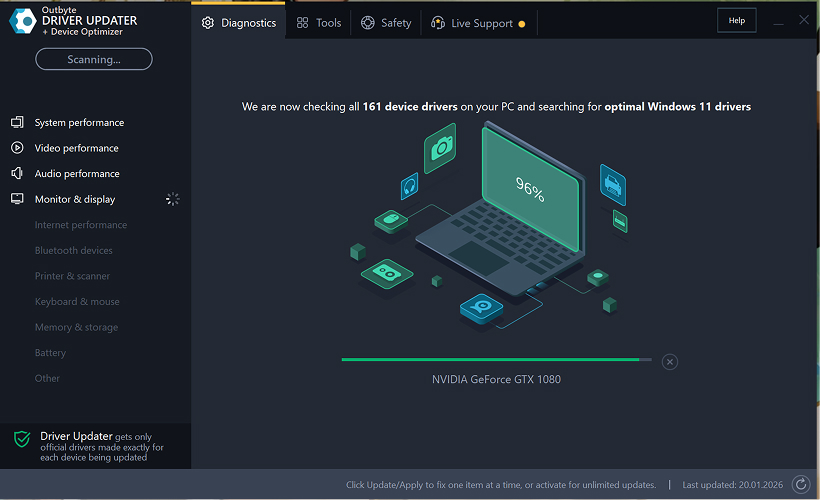
Passo 2: Feche a Janela de Ativação
Após a verificação, uma janela "Ativar agora" pode aparecer.
Para continuar gratuitamente:
- clique no botão fechar (X) no canto superior direito da janela.
Nenhuma informação precisa ser inserida
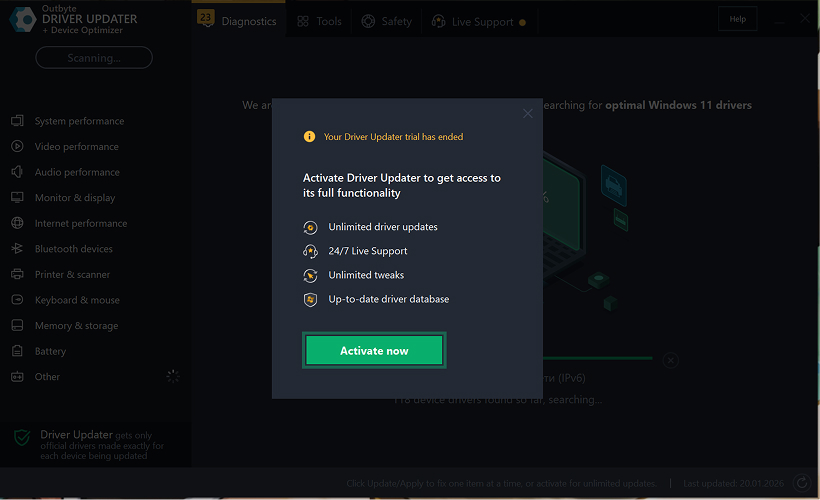
Passo 3: Selecione a Categoria do Driver
No menu à esquerda, escolha a categoria do dispositivo que deseja atualizar, como:
- drivers de áudio;
- drivers de vídeo e gráficos;
- drivers de rede e Wi-Fi;
- drivers Bluetooth;
- drivers de impressora e scanner.
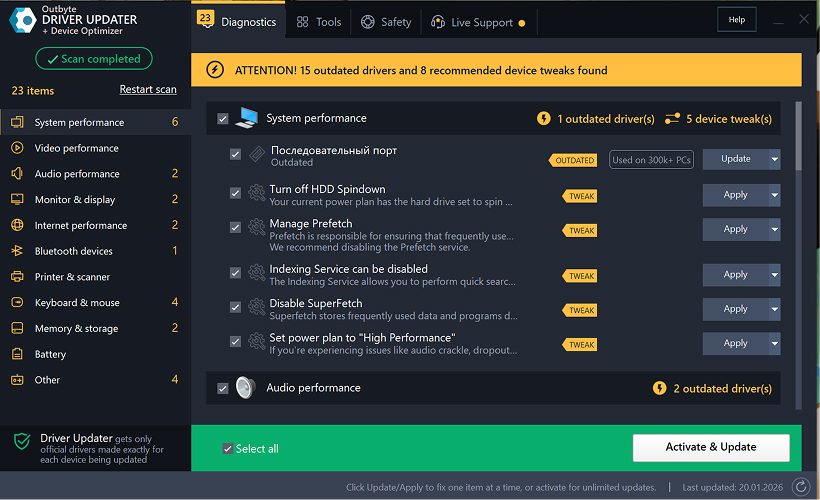
Passo 4: Clique em "Atualizar" Ao Lado do Driver Selecionado
Na lista de drivers, localize o driver que deseja atualizar e clique no botão Atualizar ao lado dele.
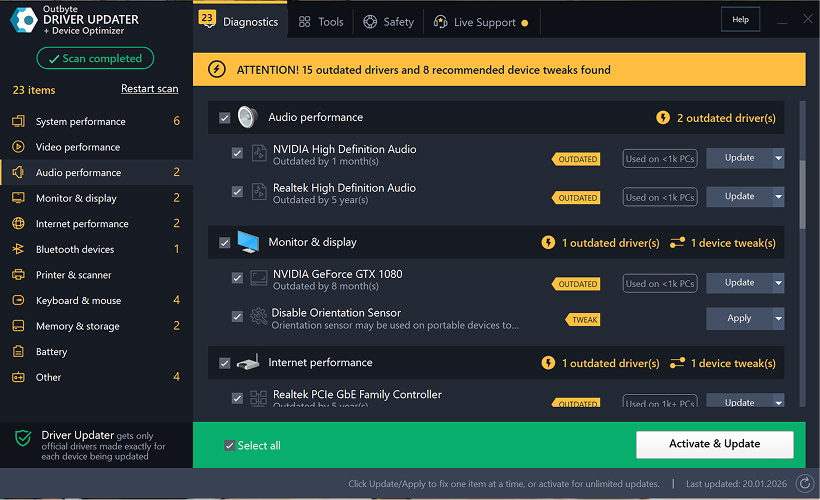
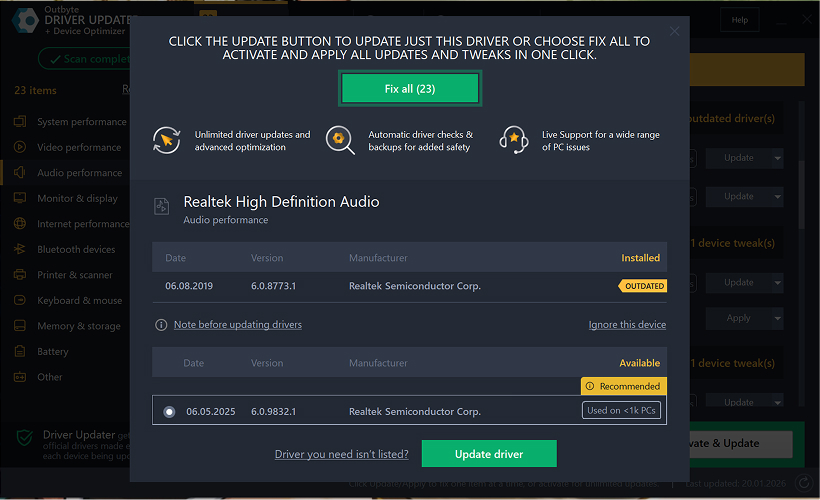
Passo 5: Confirme a Atualização do Driver
Na janela pop-up, clique em Atualizar driver.
Nesta etapa, nenhum dado pessoal ou detalhe de pagamento é necessário.
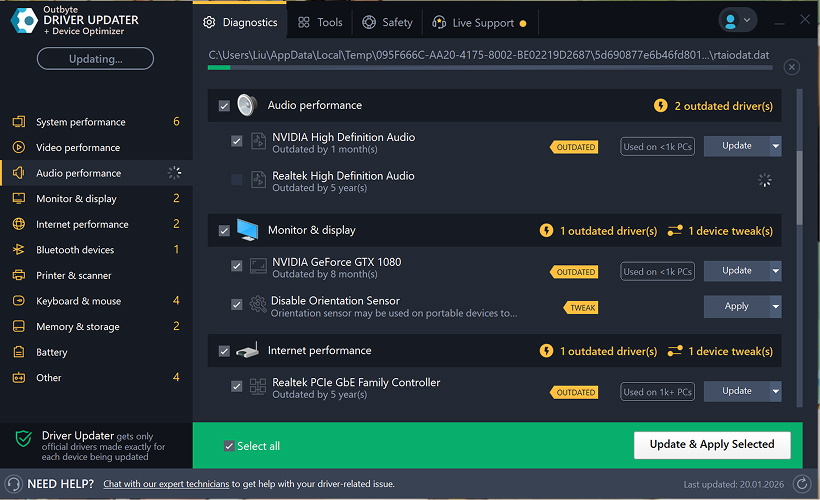
Passo 6: Aguarde o Término do Processo de Atualização
O programa começará a baixar e instalar o driver selecionado.
Por favor, aguarde até que o processo seja concluído.
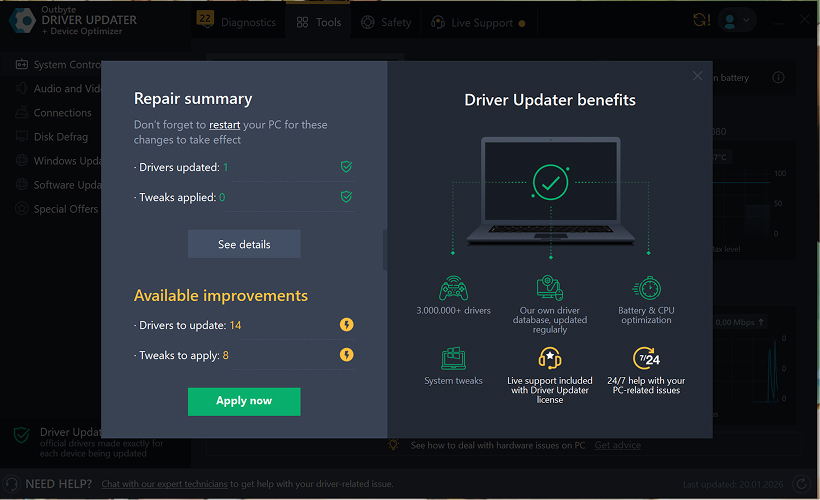
Passo 7: Aplique as Alterações e Reinicie Seu Computador
Após o término da instalação, clique em Aplicar agora para aplicar as alterações.
Para garantir que o driver atualizado funcione corretamente, reinicie seu computador.
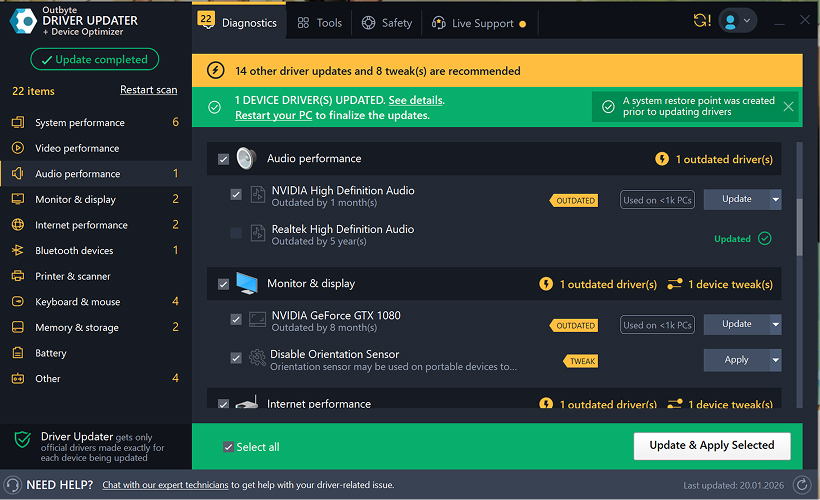
Notas Importantes
- Atualizações gratuitas estão disponíveis um driver por vez.
- Nenhum registro é necessário para a atualização gratuita.
- Nenhum cartão de crédito ou informação de pagamento é solicitado.
- Todas as ações são realizadas localmente dentro do programa após escanear seu sistema.
- A disponibilidade de atualização gratuita pode depender do tipo de driver e da configuração do sistema.
Learn to pair your wireless mouse with a different USB receiver in simple steps. Check compatibility (e.g., Logitech Unifying receivers), install required software/drivers, and use pairing modes to sync devices. Troubleshoot connection issues and optimize performance for seamless use.
Simplify your workspace with Logitech Unifying Software, enabling effortless connection of up to six compatible devices through a single receiver. Enjoy quick setup, clutter-free connectivity, and enhanced productivity as your keyboard, mouse, and other peripherals work in perfect harmony.
Learn how to set up your Epson L3250 printer with this step-by-step guide. Unbox, install ink, connect to power, and download drivers via Epson’s website or included CD. Configure Wi-Fi settings for wireless printing and run a test page to ensure proper installation. Simplify your setup process and start printing effortlessly.
Transform your smartphone into an HD webcam with DroidCam. Enjoy wireless connectivity and seamless video streaming for crystal-clear video calls, live streams, or online meetings. Works with PC/Mac.
Learn how to enable Bluetooth on your PC in a few simple steps. Check compatibility, activate Bluetooth via Windows Settings or the system tray, pair your device, and troubleshoot common issues. This guide ensures seamless wireless connections for headphones, speakers, or peripherals.
Learn how to set up your Epson L3250 printer quickly and efficiently. This guide covers unboxing, installing ink cartridges, connecting to power, and configuring Wi-Fi for seamless wireless printing. Follow step-by-step instructions to install drivers, align the printer head, and troubleshoot common issues. Perfect for home or office use, the Epson L3250 ensures hassle-free installation and high-quality printing, scanning, and copying.
Download the latest Epson L3250 printer drivers and software to ensure seamless connectivity and optimal performance. Compatible with Windows and macOS, these tools enable easy setup, wireless printing, and advanced features. Visit the official Epson support page for secure, up-to-date downloads tailored to your operating system. Simplify installation and maximize your printer’s capabilities with reliable drivers and utilities.
Discover innovative strategies to amplify your message and connect deeply with audiences – no microphone needed. Harness the power of body language, visual storytelling, and creative platforms to make your voice heard in any setting.
The Valeton GP 100 Wah is a professional-grade guitar pedal designed for musicians seeking dynamic sound control and expressive tonal shaping. Featuring a responsive wah circuit, it delivers smooth, vintage-inspired sweeps and modern versatility for rock, funk, blues, and beyond. Built with durable components and an intuitive design, the GP 100 ensures reliable performance on stage or in the studio. Adjustable parameters and a true bypass switch provide seamless integration into any pedalboard setup, while its compact size maximizes space efficiency. Elevate your playing with rich, articulate wah effects tailored to your musical style.
Virtual CloneDrive offers effortless disc image mounting and virtual drive cloning, enabling you to access ISO, BIN, IMG, and other formats without physical media. Streamline workflows, run software, or backup data with a lightweight, user-friendly tool that integrates seamlessly into your system. Simplify disc management and enhance productivity—no hardware required.