Güvenilir Yazılım

Outbyte Driver Updater
- 1.000.000+ sürücü
- Yüklendi: 1,143,473 kez
- Windows 11 / 10 / 8 / 7





 İndirmek
CX23887 8 PCIe Broadcast Audio and Video Decoder with 3D Comb
İndirmek
CX23887 8 PCIe Broadcast Audio and Video Decoder with 3D Comb
İndirmek
CX23887 8 PCIe Broadcast Audio and Video Decoder with 3D Comb

Sistem Bilgileri
Bilgisayarınız şu anda aşağıdaki sistemde çalışıyor:
Driver details
Driver Name:
CX23887 8 PCIe Broadcast Audio and Video Decoder with 3D Comb
Provider:
Hauppauge
Version:
1.50.31098.0
Release Date:
4/8/2013
Architecture:
X86
File Size:
2.1 MB
Driver ID:
pci\ven_14f1&dev_8880&subsys_c1000070
Supported OS:
Windows 8.1, Windows 8, Windows 7
WHQL:
Signed
Özel teklif
İndirmek
Tüm bağlantılar antivirüs programı tarafından taranmıştır.
Manual download (.cab, 2.1 MB) from Microsoft servers
— install via Device Manager.
Compatible hardware
- CX23887/8 PCIe Broadcast Audio and Video Decoder with 3D Comb (Conexant Systems, Inc.)
Supported Hardware IDs
pci\ven_14f1&dev_8852&subsys_71000070
pci\ven_14f1&dev_8852&subsys_71010070
pci\ven_14f1&dev_8852&subsys_71080070
pci\ven_14f1&dev_8852&subsys_71100070
pci\ven_14f1&dev_8852&subsys_71180070
pci\ven_14f1&dev_8852&subsys_71200070
pci\ven_14f1&dev_8852&subsys_71280070
pci\ven_14f1&dev_8852&subsys_71300070
pci\ven_14f1&dev_8852&subsys_71330070
pci\ven_14f1&dev_8852&subsys_71380070
Show all 79 hardware IDs
pci\ven_14f1&dev_8852&subsys_71410070
pci\ven_14f1&dev_8852&subsys_71480070
pci\ven_14f1&dev_8852&subsys_71510070
pci\ven_14f1&dev_8852&subsys_71580070
pci\ven_14f1&dev_8852&subsys_71680070
pci\ven_14f1&dev_8852&subsys_71730070
pci\ven_14f1&dev_8852&subsys_71780070
pci\ven_14f1&dev_8852&subsys_71d10070
pci\ven_14f1&dev_8852&subsys_71d30070
pci\ven_14f1&dev_8852&subsys_76000070
pci\ven_14f1&dev_8852&subsys_76100070
pci\ven_14f1&dev_8852&subsys_77100070
pci\ven_14f1&dev_8852&subsys_77170070
pci\ven_14f1&dev_8852&subsys_77900070
pci\ven_14f1&dev_8852&subsys_77970070
pci\ven_14f1&dev_8852&subsys_79110070
pci\ven_14f1&dev_8852&subsys_80100070
pci\ven_14f1&dev_8852&subsys_80170070
pci\ven_14f1&dev_8852&subsys_80500070
pci\ven_14f1&dev_8852&subsys_80560070
pci\ven_14f1&dev_8852&subsys_80570070
pci\ven_14f1&dev_8852&subsys_81010070
pci\ven_14f1&dev_8880&subsys_22110070
pci\ven_14f1&dev_8880&subsys_22150070
pci\ven_14f1&dev_8880&subsys_22190070
pci\ven_14f1&dev_8880&subsys_221d0070
pci\ven_14f1&dev_8880&subsys_22510070
pci\ven_14f1&dev_8880&subsys_22590070
pci\ven_14f1&dev_8880&subsys_22910070
pci\ven_14f1&dev_8880&subsys_22950070
pci\ven_14f1&dev_8880&subsys_22990070
pci\ven_14f1&dev_8880&subsys_229d0070
pci\ven_14f1&dev_8880&subsys_22d10070
pci\ven_14f1&dev_8880&subsys_22d30070
pci\ven_14f1&dev_8880&subsys_22f00070
pci\ven_14f1&dev_8880&subsys_22f10070
pci\ven_14f1&dev_8880&subsys_22f20070
pci\ven_14f1&dev_8880&subsys_22f30070
pci\ven_14f1&dev_8880&subsys_22f40070
pci\ven_14f1&dev_8880&subsys_22f42013
pci\ven_14f1&dev_8880&subsys_22f50070
pci\ven_14f1&dev_8880&subsys_22f52013
pci\ven_14f1&dev_8880&subsys_53000070
pci\ven_14f1&dev_8880&subsys_53080070
pci\ven_14f1&dev_8880&subsys_53400070
pci\ven_14f1&dev_8880&subsys_53f00070
pci\ven_14f1&dev_8880&subsys_53f10070
pci\ven_14f1&dev_8880&subsys_53f20070
pci\ven_14f1&dev_8880&subsys_71d10070
pci\ven_14f1&dev_8880&subsys_71d30070
pci\ven_14f1&dev_8880&subsys_78000070
pci\ven_14f1&dev_8880&subsys_78010070
pci\ven_14f1&dev_8880&subsys_78090070
pci\ven_14f1&dev_8880&subsys_78100070
pci\ven_14f1&dev_8880&subsys_78110070
pci\ven_14f1&dev_8880&subsys_79110070
pci\ven_14f1&dev_8880&subsys_81010070
pci\ven_14f1&dev_8880&subsys_85010070
pci\ven_14f1&dev_8880&subsys_85410070
pci\ven_14f1&dev_8880&subsys_85510070
pci\ven_14f1&dev_8880&subsys_85710070
pci\ven_14f1&dev_8880&subsys_c1000070
pci\ven_14f1&dev_8880&subsys_c1080070
pci\ven_14f1&dev_8880&subsys_c12a0070
pci\ven_14f1&dev_8880&subsys_c1300070
pci\ven_14f1&dev_8880&subsys_c1380070
pci\ven_14f1&dev_8880&subsys_c1400070
pci\ven_14f1&dev_8880&subsys_c1f00070
pci\ven_14f1&dev_8880&subsys_c1f80070
Match against Device Manager → Details → Hardware Ids to confirm this driver fits your device.
File details
File name:
20557764_e1ffbc9009d04081421dfc8055e5a8773f68ce73.cab
File size:
2194609 bytes (2.0 MB)
Signed / DriverVer:
04/08/2013,1.50.31098
Provider (INF):
"Hauppauge"
SHA-256:
fd450dc0917297233a13909995dbb31f3d0cf8e824d37cdd89ca97de1382e39f
To verify: open PowerShell and run Get-FileHash <filename.cab>
What's inside the package (16 files)
HcwDriverInstall.exe 2.7 MB
hcw85bda.cat 19.7 KB
hcw85bda.inf 201.7 KB
hcw85cir.cat 17.7 KB
hcw85cir.inf 14.0 KB
hcw85bda.sys 1.5 MB
hcw85cir.dll 7.5 KB
hcw85cir.sys 28.0 KB
hcw85enc.ax 137.5 KB
hcw85enc.rom 368.0 KB
hcw85mld.rom 15.9 KB
hcw85prop.ax 113.0 KB
hcw85wdf_01005.dll 1.3 MB
hcwCP.ax 94.0 KB
hcwECPPP.ax 136.0 KB
hcwxds.dll 64.5 KB
All versions of this driver
| Version | Release Date | Architecture | OS | |
|---|---|---|---|---|
| 1.54.32328.0 | 11/24/2014 | X86 | Windows 7 | 1.54.32328.0 |
| 1.50.31098.0 | 4/8/2013 | X86 | Windows 8.1, Windows 8, Windows 7 | (this page) |
| 1.50.31098.0 | 4/8/2013 | AMD64 | Windows 8.1, Windows 8, Windows 7 | 1.50.31098.0 |
| 7.102.64.79 | 8/13/2009 | AMD64 | Windows 11, Windows 10 | 7.102.64.79 |
| 7.102.64.64 | 2/18/2009 | AMD64 | Windows 11, Windows 10 | 7.102.64.64 |
Related drivers
- SAA7164 (v7.9.1.30192)
- SAA7164 (v7.9.1.30192)
- SAA7231 (v1.0.590.29145)
- SAA7231 (v1.0.590.29145)
- CX23887 8 PCIe Broadcast Audio and Video Decoder with 3D Comb (v1.54.32328.0)
- CX23887 8 PCIe Broadcast Audio and Video Decoder with 3D Comb (v1.50.31098.0)
- CX23418 Single-Chip MPEG-2 Encoder with Integrated Analog Video Broadcast Audio Decoder (v1.62.27078.0)
- CX23418 Single-Chip MPEG-2 Encoder with Integrated Analog Video Broadcast Audio Decoder (v1.62.27078.0)
- CX23880 1 2 3 PCI Video and Audio Decoder Audio Port (v2.123.27056.0)
- CX23880 1 2 3 PCI Video and Audio Decoder Audio Port (v2.123.27056.0)
Sürücüler: Kararlı Cihaz Performansının Temeli
Sürücüler Neden Bu Kadar Önemlidir?
Sürücüler, sistem istikrarını korumada kritik bir rol oynar. Güncellenmemiş veya bozuk sürücüler şu sorunlara yol açabilir:
Sürücülerinizi her 3–6 ayda bir güncellemeniz önerilir. Bu, özellikle yeni bir işletim sistemi yüklemeden önce önemlidir çünkü güncellenmiş sürücüler uyumluluk için gerekli olabilir.
Sürücülerinizi Nasıl Güncel Tutabilirsiniz?
Sürücüleri güncellemek ve indirmek için otomatik yöntem (Tavsiye edilir):
Doğru sürücüyü manuel olarak aramak istemiyorsanız, cihaz modelinizi otomatik olarak algılayıp uyumlu sürücü bulan araçlar mevcuttur. Bu, hata riskini azaltır ve zaman kazandırır.
Özel teklif
İndirmek

Limitations: trial version offers an unlimited number of scans, free driver backup and rollback. Registration for the full version starts from USD 29.95. See more information about Outbyte and uninstall instructions. Please review Outbyte EULA and Privacy Policy
Tüm bağlantılar antivirüs programı tarafından taranmıştır.
Manuel sürücü kurulumu
Not: Yanlış bir sürücü yüklemek sistem sorunlarına neden olabilir. Hangi sürücüyü seçeceğinizden emin değilseniz, otomatik yöntemi öneririz.
Cihaz Yöneticisi aracılığıyla sürücüyü indirin. Cihaz Yöneticisi'ni nasıl açacağınız:
Cihaz Yöneticisi kullanarak sürücüleri nasıl yükleyeceğinizi:
How to Update a Driver for Free Using Outbyte Driver Updater
Cihaz sürücülerinizi güncel tutmak, Windows'un kararlı performansını ve donanımın düzgün çalışmasını sağlamaya yardımcı olur. Aşağıda, Outbyte Driver Updater kullanarak tek bir sürücüyü ücretsiz olarak nasıl güncelleyeceğinizi açıklayan adım adım bir kılavuz bulunmaktadır. Bu kılavuz, lisans etkinleştirmeden ve herhangi bir kişisel bilgi veya ödeme detayı sağlamadan seçili bir sürücüyü güncelleme yöntemini açıklar.
Kayıt Olmadan Ücretsiz Bir Sürücü Güncelleyebilir misiniz?
Evet.
Outbyte Driver Updater şunları yapmanızı sağlar:
- bilgisayarınızı ücretsiz olarak eski sürücüler için tarayın;
- tespit edilen sürücülerin listesini görüntüleyin;
- seçili bir sürücüyü ücretsiz olarak güncelleyin;
- e-posta adresi, ad, kredi kartı numarası veya diğer kişisel verileri girmekten kaçının.
Ücretsiz güncelleme işlemi yalnızca yüklü programı ve standart tarama ve güncelleme adımlarını gerektirir.
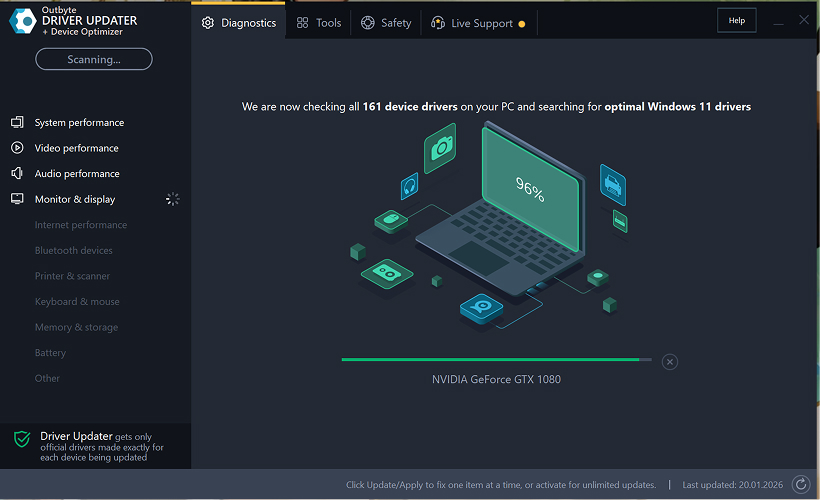
Adım 1: Programı Başlatın ve Bilgisayarınızı Tarayın
Outbyte Driver Updater'ı Windows PC'nize indirin ve kurun.
Programı başlattıktan sonra, otomatik olarak sisteminizi taramaya ve yüklü sürücüleri kontrol etmeye başlayacaktır.
Adım 2: Etkinleştirme Penceresini Kapatın
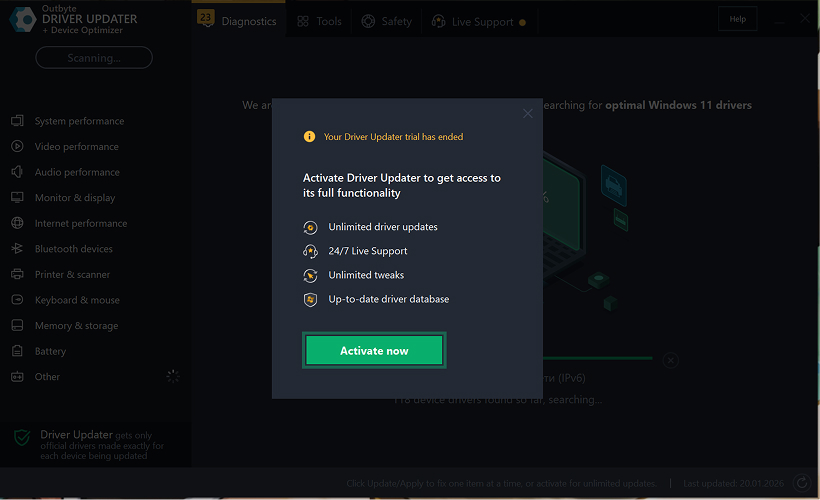
Taramadan sonra, "Şimdi etkinleştir" penceresi görünebilir.
Ücretsiz devam etmek için:
- pencerenin sağ üst köşesindeki kapat (X) düğmesine tıklayın.
Hiçbir bilgi girilmesi gerekmez
Adım 3: Sürücü Kategorisini Seçin
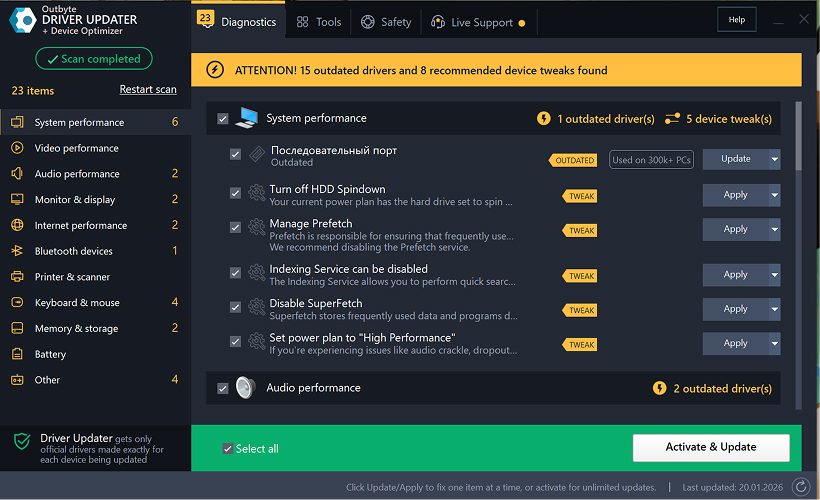
Sol taraftaki menüden, güncellemek istediğiniz cihaz kategorisini seçin, örneğin:
- ses sürücüleri;
- video ve grafik sürücüleri;
- ağ ve Wi-Fi sürücüleri;
- Bluetooth sürücüleri;
- yazıcı ve tarayıcı sürücüleri.
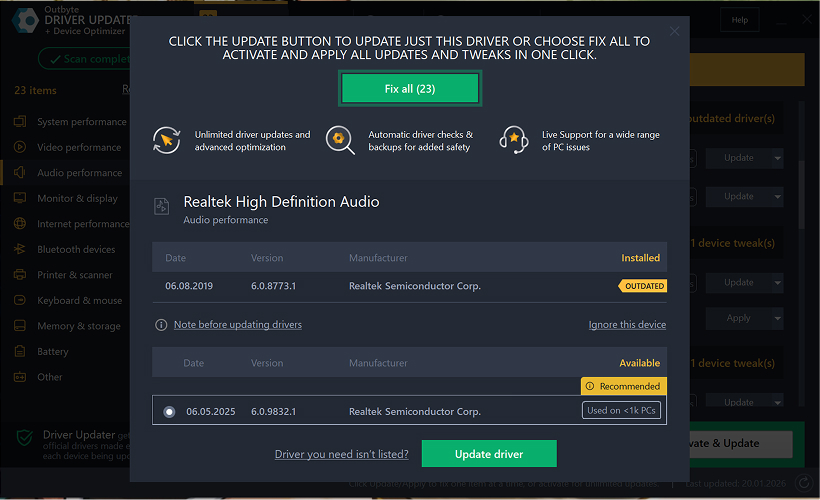
Adım 4: Seçili Sürücünün Yanındaki "Güncelle" Düğmesine Tıklayın
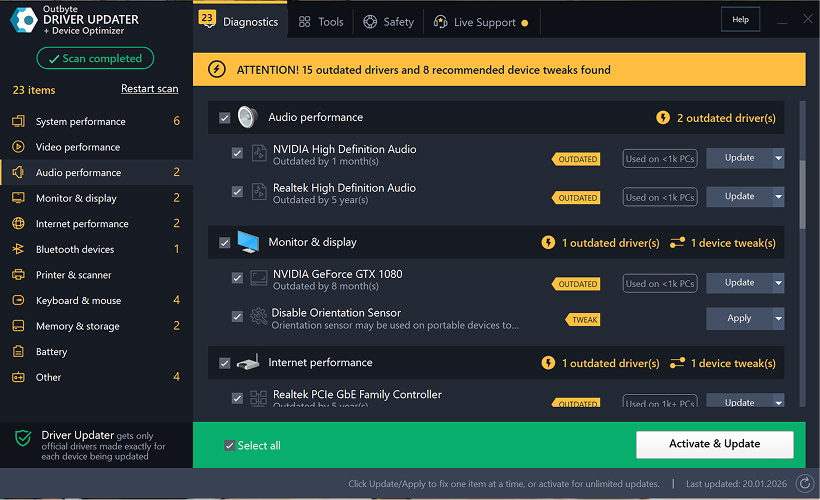
Sürücü listesinde, güncellemek istediğiniz sürücüyü bulun ve yanındaki Güncelle düğmesine tıklayın.
Adım 5: Sürücü Güncellemesini Onaylayın
Açılır pencerede, Sürücüyü güncelle seçeneğine tıklayın.
Bu aşamada, hiçbir kişisel veri veya ödeme detayı gerekmez.
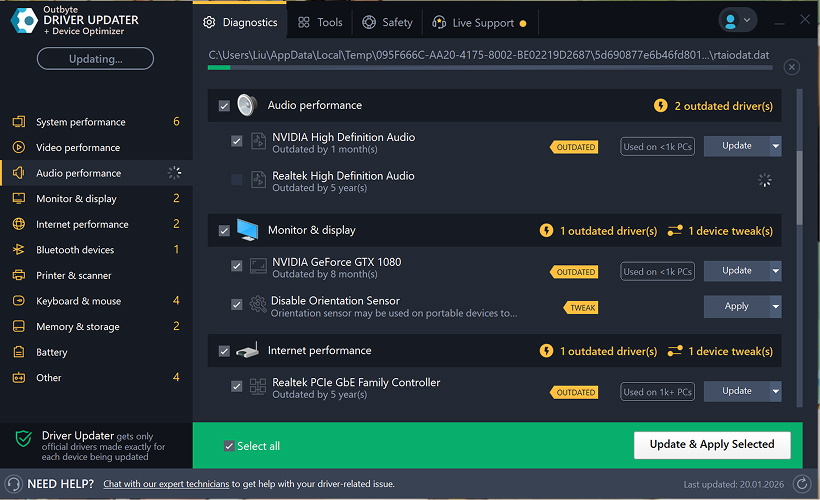
Adım 6: Güncelleme İşleminin Bitmesini Bekleyin
Program, seçili sürücüyü indirmeye ve yüklemeye başlayacaktır.
Lütfen işlem tamamlanana kadar bekleyin.
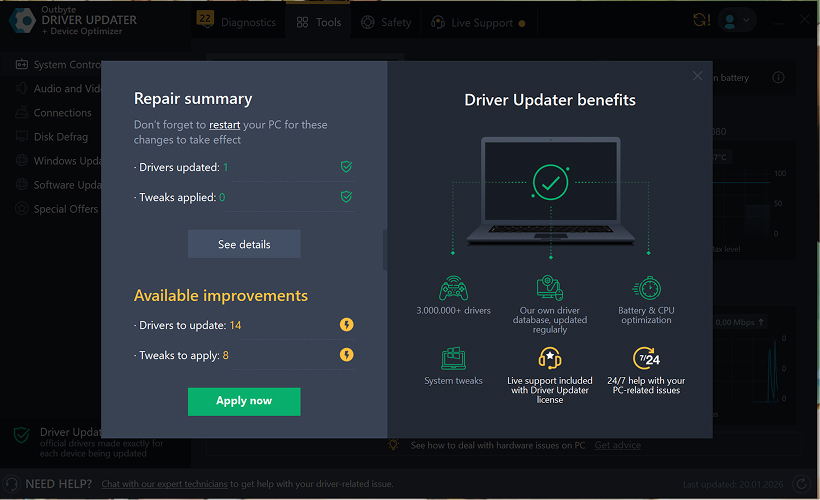
Adım 7: Değişiklikleri Uygulayın ve Bilgisayarınızı Yeniden Başlatın
Kurulum tamamlandıktan sonra, değişiklikleri uygulamak için Şimdi uygula seçeneğine tıklayın.
Güncellenen sürücünün doğru çalıştığından emin olmak için bilgisayarınızı yeniden başlatın.
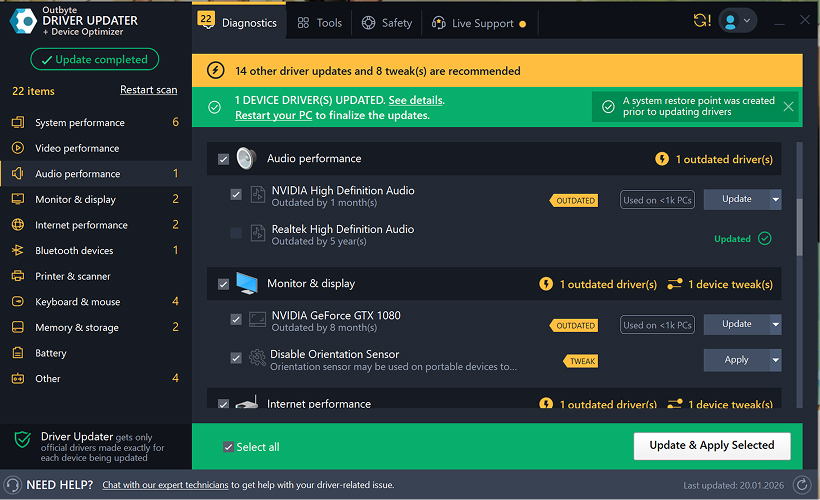
Önemli Notlar
- Ücretsiz güncellemeler her seferinde bir sürücü için kullanılabilir.
- Ücretsiz güncelleme için kayıt gerekmez.
- Kredi kartı veya ödeme bilgisi istenmez.
- Tüm işlemler, sisteminizi taradıktan sonra program içinde yerel olarak gerçekleştirilir.
- Ücretsiz güncelleme kullanılabilirliği, sürücü tipine ve sistem yapılandırmasına bağlı olabilir.
Learn to pair your wireless mouse with a different USB receiver in simple steps. Check compatibility (e.g., Logitech Unifying receivers), install required software/drivers, and use pairing modes to sync devices. Troubleshoot connection issues and optimize performance for seamless use.
Simplify your workspace with Logitech Unifying Software, enabling effortless connection of up to six compatible devices through a single receiver. Enjoy quick setup, clutter-free connectivity, and enhanced productivity as your keyboard, mouse, and other peripherals work in perfect harmony.
Learn how to set up your Epson L3250 printer with this step-by-step guide. Unbox, install ink, connect to power, and download drivers via Epson’s website or included CD. Configure Wi-Fi settings for wireless printing and run a test page to ensure proper installation. Simplify your setup process and start printing effortlessly.
Transform your smartphone into an HD webcam with DroidCam. Enjoy wireless connectivity and seamless video streaming for crystal-clear video calls, live streams, or online meetings. Works with PC/Mac.
Learn how to enable Bluetooth on your PC in a few simple steps. Check compatibility, activate Bluetooth via Windows Settings or the system tray, pair your device, and troubleshoot common issues. This guide ensures seamless wireless connections for headphones, speakers, or peripherals.
Learn how to set up your Epson L3250 printer quickly and efficiently. This guide covers unboxing, installing ink cartridges, connecting to power, and configuring Wi-Fi for seamless wireless printing. Follow step-by-step instructions to install drivers, align the printer head, and troubleshoot common issues. Perfect for home or office use, the Epson L3250 ensures hassle-free installation and high-quality printing, scanning, and copying.
Download the latest Epson L3250 printer drivers and software to ensure seamless connectivity and optimal performance. Compatible with Windows and macOS, these tools enable easy setup, wireless printing, and advanced features. Visit the official Epson support page for secure, up-to-date downloads tailored to your operating system. Simplify installation and maximize your printer’s capabilities with reliable drivers and utilities.
Discover innovative strategies to amplify your message and connect deeply with audiences – no microphone needed. Harness the power of body language, visual storytelling, and creative platforms to make your voice heard in any setting.
The Valeton GP 100 Wah is a professional-grade guitar pedal designed for musicians seeking dynamic sound control and expressive tonal shaping. Featuring a responsive wah circuit, it delivers smooth, vintage-inspired sweeps and modern versatility for rock, funk, blues, and beyond. Built with durable components and an intuitive design, the GP 100 ensures reliable performance on stage or in the studio. Adjustable parameters and a true bypass switch provide seamless integration into any pedalboard setup, while its compact size maximizes space efficiency. Elevate your playing with rich, articulate wah effects tailored to your musical style.
Virtual CloneDrive offers effortless disc image mounting and virtual drive cloning, enabling you to access ISO, BIN, IMG, and other formats without physical media. Streamline workflows, run software, or backup data with a lightweight, user-friendly tool that integrates seamlessly into your system. Simplify disc management and enhance productivity—no hardware required.